


How do we make left column show everything below last Account name?

Preamble:
- There are 34 email Accounts listed in left column.
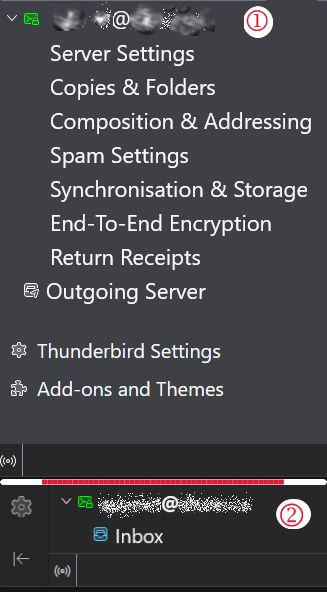
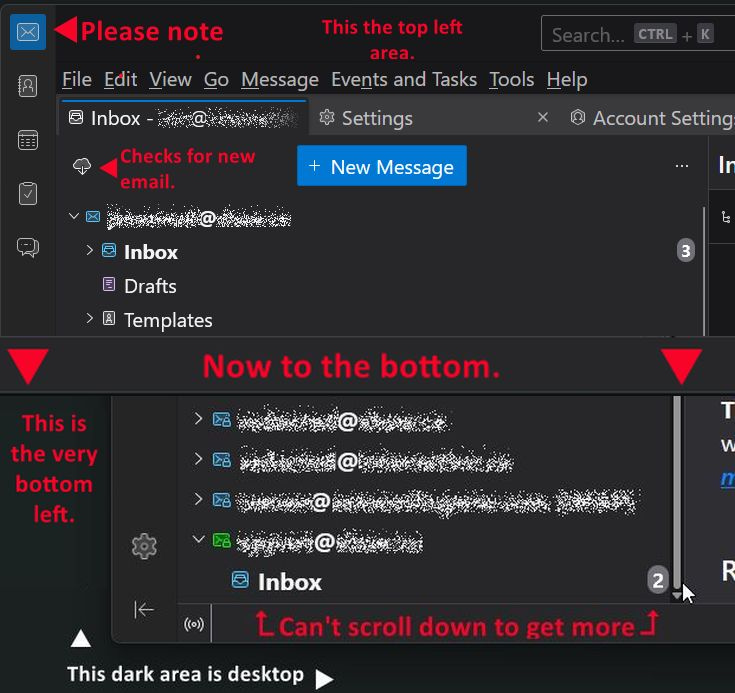
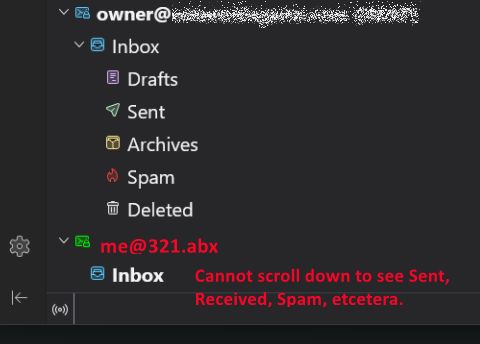
- (Image 1) When in "Mail" column I can see down to only the Account Name (address). There is only the Account Name and Inbox.. nothing else below that can be seen - no Drafts, Sent, Archives, Spam, or Deleted. Anything below is missing too.
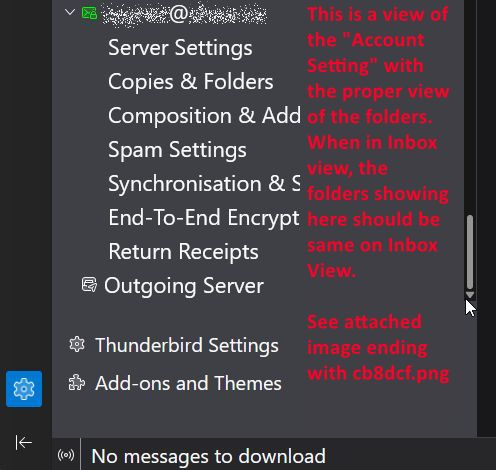
- When choosing "Account Setting", everything for last account shows up, plus Outgoing, Add-ons (Image 2). Too, we can see the Offline/Online Icon.
QUESTION: How may I fix it so that the last account shows all sub-sections of the account - i.e., Server Settings, Copies & Folders etcetera right on down to Online/Offline or at best, down to "Return Receipts" for the last account?
Thanks for volunteering, ~r
Modified by redacted
Chosen Solution
What happens if in Account Settings you manually move the very last account (the problematic one) just above the account before the last? Now in folder pane your problematic account should be displayed in the before last position: can you see the other folders of this account now?
All Replies (25)
I am confused. that is not the pane that shows folders. That pane is for the account information, such as server settings and passwords, not message folders. Am I misunderstanding? If so, please clarify. thanks.
Quote David: "I am confused. that is not the pane that shows folders. "
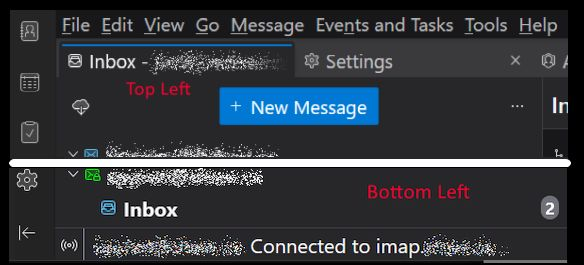
Sorry. Hope this new image is a better one. You can see that the bottom of the screen has Account name and only Inbox shows, not the other items such as sent, deleted, spam, etcetera.
The last email account name, assume its redacted@whatever.ccc don't show on the Email page with the blue box with "+ New Message" near the top. Where as the last Inbox account at the bottom new image marked in red with Bottom Left. It does however show up in Account Settings.
It would be great if on the page with all the various email boxes to show the sent,. spam etcetera boxes. Sorry for the error in using the Accounts page with the Email page in first image. This time U used the Page with the email boxes. The email at the bottom left needs more room.
I checked all my screen/Tbird settings - are OK. ~r
Can't you scroll further down in the folder pane using the scroll button of your mouse or the mouse pointer to move the scrollbar on the right of the folder pane? Thunderbird has no known limit of the number of accounts. You say you have 34 accounts listed in the folder pane, so inevitably there must be a scrollbar but maybe it is hidden by default. Does the same issu happen if you run Thunderbird in 'troubleshoot mode'? https://support.mozilla.org/en-US/kb/troubleshoot-mode-thunderbird
Modified by Mapenzi
Mapenzi said: "Can't you scroll further down in the folder pane..."
No. The revised image is attached to this post. It includes cursor position and bottom left of Thunderbird GUI w/ Scroll Bar at it's very bottom. I hope this helps. ~r
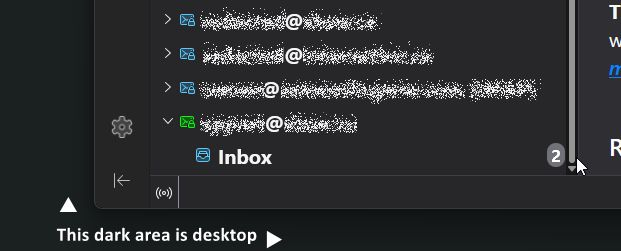
Very convincing new screen shot. But still rather odd, I've never seen that in my life. And in 'troubleshoot mode' no luck neither?
It shows properly if I switch to the Account Settings - see attached image.
I think I'll try setting a new account and hopefully, it will be last on the list and I can leave it blank. That would force the existing last account up to where it's other folders are visible.
Maybe I should let you know what my rig is: Alienware Aurora ACT1250 Gaming Desktop CPU intel I-9 Ultra GPU Nvidia RTX 5080 Monitor: Samsung Odyssey OLED G9 49" QHD 240Hz 0.03ms GTG Curved OLED G-Sync FreeSync Smart Monitor
I doubt hardware has anything to do with it, on the remote possibility... it could be. ~r
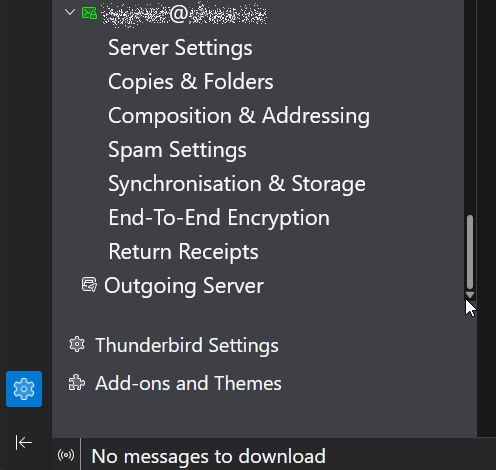
I am thinking there is no problem, but a misunderstanding of the folder pane and the account settings pane. I say that because you switch from one to the other. The account settings pane will never show message folders. If the folder pane is just showing inbox for an account, that is a different issue. Your latest screenshot shows that the last account shows all settings, so I see no problem with the account settings pane. What is it that you want to see but are not seeing?
@Mapenzi said "And in 'troubleshoot mode' no luck neither?
Sort of worked, but since I don't have a clue what Troubleshoot is supposed to-do, but ins scrolling up and down for a hint, I see that it lists all my email accounts surrounded by stuff for those that have enough knowledge to understand the results and how to use them.
I did see an oddity that might help getting some email through Rogers as well as this topic. It lists all my accounts by "account 23. account 25" and so on, but missed 'account 24. In it's place instead is:
account23 (pop3) mail.domainname.com:110 STARTTLS Normal imap.shaw.ca:587 SSL/TLS Normal password false account25 (pop3) shawmail.ok.shawcable.net:110 None Normal
Unfortunately, I don't see a way in this Chat GUI to use anything to provide width with scrollbar - sorry it is line wrapped. ~r
Modified by redacted
@David said: "I am thinking there is no problem, but a misunderstanding of the folder pane and the account settings pane." I disagree - there, IMO is something wrong if every account shows the Inbox, Drafts, Templates, Sent, Archives, Deleted, and Spam, folders under each Email accounts user ID (me@a-loss.xyz and the last email address at the bottom fails to show it.
The screen cap, which I have added back here, shows what bottom SHOULD look like in "folders view" (the one with all inboxes) Yes, Account Settings shows all folders. But the main tab (Inboxes?) fails to show the entire Drafts, Templates etcetera for blast bottom entry. when in the, umm, Inbox window(?) The last entry with folders can't be seen here is seen when using Account Settings tab (pic is above but added here for consistency).
If this doesn't work, I will do a better pic idea I just had with images. Let me know. ~r
Modified by redacted
Your insistence on showing the account settings folder is just causing confusion; your issue seems to be why that particular account is only showing the inbox. Is that the real issue? Please confirm or explain. One reason for only seeing an inbox can be for an account that has no sent messages.
When you run Thunderbird in 'troubleshoot mode' and the scrollbar in your folder pane works correctly (= you can see ALL folders at the bottom of the folder pane), that means that something is disturbing Thunderbird to display the correct view in 'normal' mode.
Troubleshoot mode (aka safe mode) temporarily affects the following (https://kb.mozillazine.org/Safe_Mode or https://support.mozilla.org/en-US/kb/troubleshoot-mode-thunderbird):
   All extensions are disabled.
   The default theme is used, without a persona.
   The Just-in-time (JIT) JavaScript compiler is disabled.
   The userChrome.css and userContent.css files are ignored.
   The default toolbar layout is used.
   Hardware acceleration is disabled.
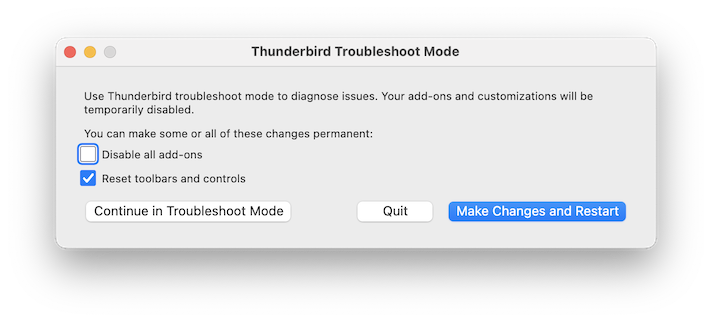
My usual suspect is an extension or a third party theme. Use the default theme, disable all extensions if you have installed any, and verify your folder pane. If the issue persists go again to Help > Troubleshoot mode > and when the "Thunderbird Troubleshoot Mode" dialogue box appears (see image) set a check-mark before "Reset toolbars and controls" and click on "Make Changes and Restart"
Modified by Mapenzi
@David. I don't know why you insist on say I am insistent because I only did as you asked. Why you insist that the end user is the problem. I went through the process of showing anyone who reads it, the two parts; one with all folders showing (Account Settings) and the one without folder (for last email address (Inbox? - noname brand)
This was a fresh install, on a brand new system, with no Tbird extensions - just the factory install.
I went through the troubleshooter that gave me all kinds of information. Nothing about why Tbird can't/won't show the details of the last (latest) entry. One entry was as I said, #24 is missing and it appears to me that the dbase holding the list burped and I have a glitch in 1st install.
Let's see... OK, I just tried to add a new account, but only option is to join "Mozilla Thunderbird Account Hub" I need to review the policies before I join any email "hub"; and as to what it means to be part of a Hub.
Really busy contacting friends and family, and sometime a business partner to let them know I still don't have email.
Thanks David for your valued input, ~r
Modified by redacted
@Mapenzi I know how Troubleshoot can help. I did as you suggested. This Tbird was straight up clean install. No themes, or Add-ons employed.
Settings are what ever Tbird wanted.
What should be showing and isn't in the Inbox area, is same as in the Account Settings window.
Once I can start a new email address and use it as a barrier and see what it shows. I'll bet your next week wages that it will show as empty too, but the real last email account will show what is presently missing.
I'll keep you and David updated. Thanks Mapenzi for your iuput,
It's great having people like you and David - where else would we go but where the pro's are.
~r

Hi Redacted,
Trying to clarify David's point: you seem to be expecting the folder list to show account settings, and you have identified a problem because the folder list of one account does not show account settings. But account settings do not belong in a a folder list. Some things are indeed missing from that one account's folder list: other folders, e.g., sent, trash, spam, and drafts. It is not account settings that are missing. You shouldn't compare a folder list with account settings. You should compare one account's folders with another account's folders. Sometimes, you refer correctly to missing folders; other times, you refer to account settings. Our focus is on missing folders.
To help identify what is causing some folders not to appear in that account's folder list, Mapenzi suggested that you run your regular Thunderbird instance in troubleshooting mode. It's not clear to me from your response that you have done that. I cannot tell if you created a new installation of Thunderbird. And I cannot tell if you only accessed troubleshooing information instead of running Thunderbird in troubleshooting mode. Have you actually run Thunderbird in troubleshooting mode? Access it from the Help menu. Then please report if you see more folders in that troublesome account.
The account hub is not something that a person joins. It's just a way to create new accounts. You already have your accounts. There's no need to create more.
If you right click on the name of that troublesome account in the folder pane (not in account settings), and select "Subscribe" from the drop-down menu, do you see the names of folders other than the inbox?
Why do you say that you still do not have e-mail? That account seems to be receiving mail. What happens when you try to send a message from it?
I'm curious: if you go into account settings, click and drag that account higher in the list of accounts, then look at the folder pane again, do more folders appear?
Rick makes a good point; you're focusing on WHERE the account appears. Instead, focus on the account. Do you receive mail to that account? Have you sent messages from that account? Have you created a draft from that account? Please do so and then show us what is there for that account.
@Rick said "Trying to clarify David's point: you seem to be expecting the folder list to show account settings, and you have identified a problem because the folder list of one account does not show account settings. "
Sorry, I do not expect that at all.
Perhaps you or anyone can explain to me why all the email accounts (not Account Settings) --- I mean very very left column ( I have roughly 40 email addresses) (not Settings", not Account Settings) the very left unidentified column what ever name it has.
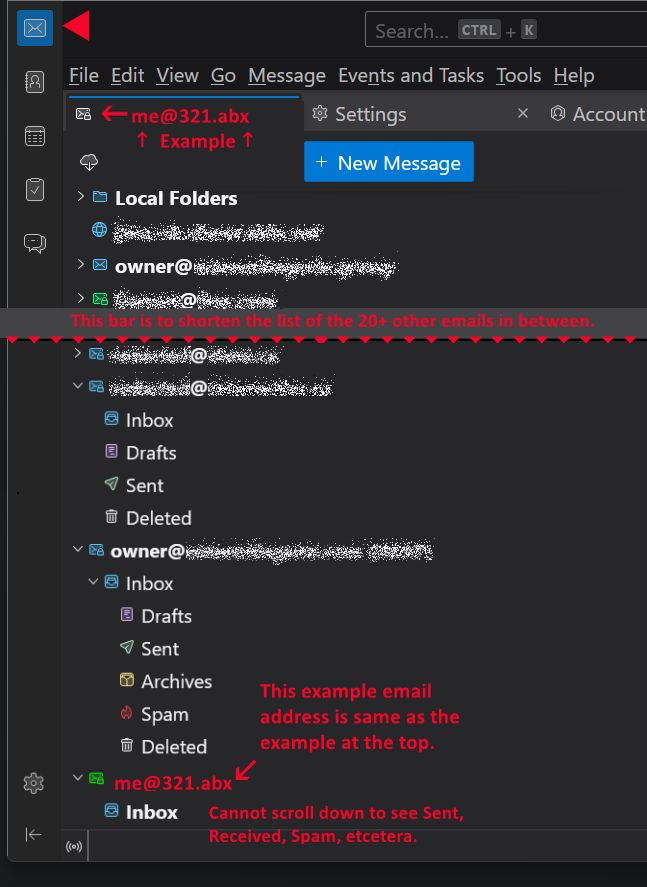
Today I redid a image to address only the no-name column with all the email accounts addresses that each email address has sub folders (Sent, Spam, Archives, Drafts. Deleted ad nauseum).
Of all the email addresses in my version of TB, only the last one on the list is the one I can't scroll down enough to read all of the sub folders (I used me@321.abx as example, instead of real address for obvious reasons.
NOTE: In the image, you'll see the example at the top left, and bottom right. Not something I coded in. Obviously, the one email address is faked for privacy reasons.
Please forget the past images, and focus instead on the problem of the missing folders for last email address showing at bottom of long email addresses lists.
I hope the new image sheds light on the ware I have been talking about those areas that only suggested how something might look - i.e., if it can list in Account Settings, why not like all the other email addresses?
~r
Modified by redacted
@David:
Rick makes a good point; you're focusing on WHERE the account appears. Instead, focus on the account.
It matters where it appears.
Do you receive mail to that account?
Yes.
Have you sent messages from that account?
Yes.
Have you created a draft from that account?
Yes.
Please do so and then show us what is there for that account.
Attached ~r
Yes, understood, the issue is the absence of several standard folders under the last account in the folder pane. That was clear before.
I gave a few suggestions and posed a few questions to help us figure that out. Here are more:
- How do you know that you created a draft if there is no drafts folder?
- Do you know for certain that you can send messages from this account even though there is no sent folder? Do recipients receive your messages?
- Would you please post a screen image of the copies and folders section of this account's account settings?
I'm eager to hear your answers to the questions in my earlier message and to these questions.
I find it interesting that terminology is so problematic here, yet no one has attempted to clarify it.
Your column is not a column, is is a pane and it is the folder pane. See https://support.mozilla.org/en-US/kb/how-change-thunderbird-layout It is not dependent on other window components for it's content. as the mail list/cards pane or the mail reading pane are.
Now that we can all use the correct term there is a number of issues within issues with the folder pane. The first of those is that pane has multiple options for displaying folders and they are not exclusive.
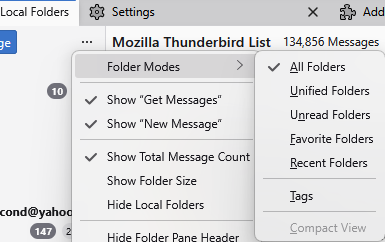
Not all modes will show all folders, the unread will only show folders that have unread mail in them for instance. So what options have you chosen to use? As you can see from my image I use only the all folder mode. That is cluttered enough. Normally the folder pane defaults to the unified view where multiple account are registered. But what are you using?
There is always the possibility that the folder cache is corrupt. This is especially so for those that choose to pay for third part antivirus programs which routinely corrupt Thunderbird files, or just block mail entirely.
Use the troubleshooting information in the help menu to open the profile folder. Then close Thunderbird. Rename the file foldertree.json and restart Thunderbird. That will force a rebuild from the source files and folders in the profile so will fix simple corruption. It will not help if the corruption was your antivirus locking the file to scan it. It will probably do it again when is is recreated. For this reason I recommend only using Defender while diagnosing issues.
@ Rick @Matt @Rick
Sorry for delay. I have been sick and read too much news. :)
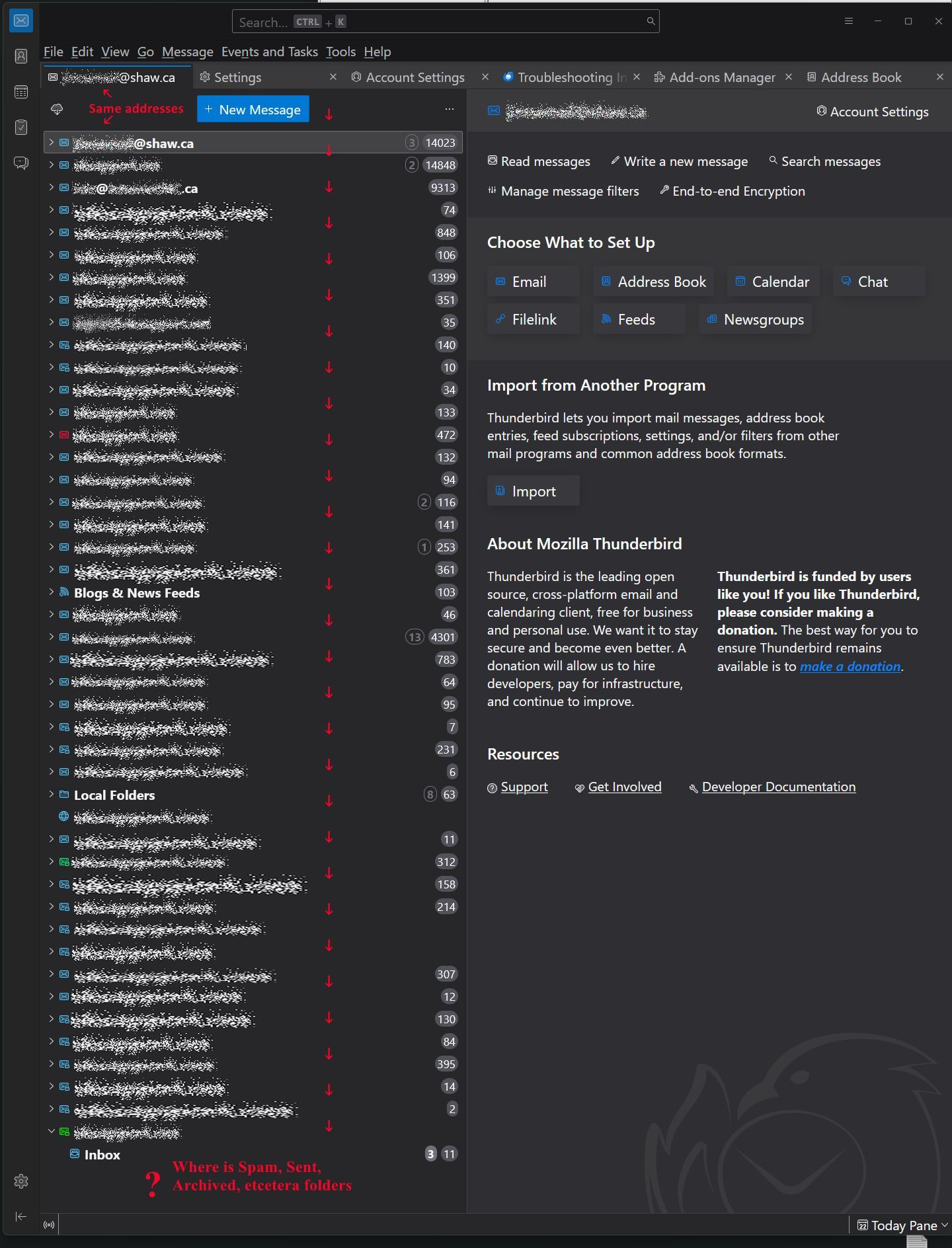
Please look at the attached new image. This was very hard to create even on a 49" with monitor. I rotated my screen to vertical (screen - not entire monitor to include the entire left column. Look at the top to confirm the view of the contents. Then look at the bottom of the column.
At the very bottom of the list, where "Inbox" is visible, there is a black on black mini line.
Below the last "Inbox" at the bottom, should also show Draft, Sent, and Deleted. No Spasm yet. Just like all the rest above it.
If I were to guess, I'd say the code behind that 'column' does now allow any more lines, such as Draft, etcetera.
Please, study the image. I think it easily explains the problem.
Thanks everyone for your help and patience with me, ~r
Modified by redacted