


Why are popups now required to see images in my emails???

Something horrible and time-consuming has changed within this past week to Thunderbird. My version is 140.7 1esr 64bit. Over the past 4 days or so, I've found I cannot scroll down and see the full emails--until I have to use this new pop-up system.
This is definitely not an improvement in my estimation. Is there any way to undo this?
All Replies (17)

Please post a screenshot of said popup, or at least where it is and what it says if anything.
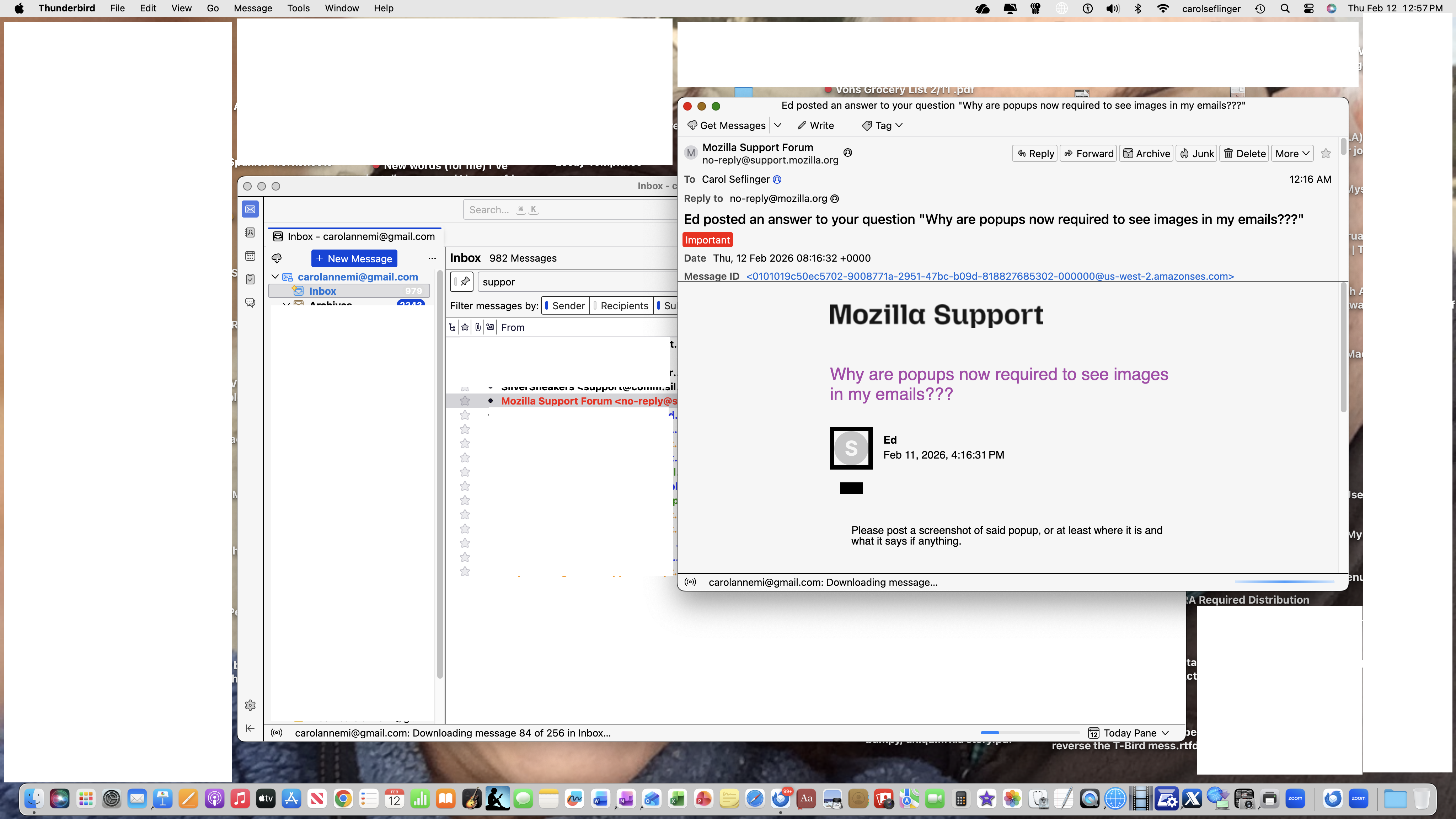
Hi, Ed, I hope this shows up. This was my clicking on your response and then what I call the pop up appears for every single message I try to open. So, no browsing of my email messages' images is possible without double clicking each message. Each 'pop-up' just offers the image that I can't see without it. There is no warnings or anything like that--just the 'reveal' of the email which does not occur without double-clicking.
Any advice?
Thank you.
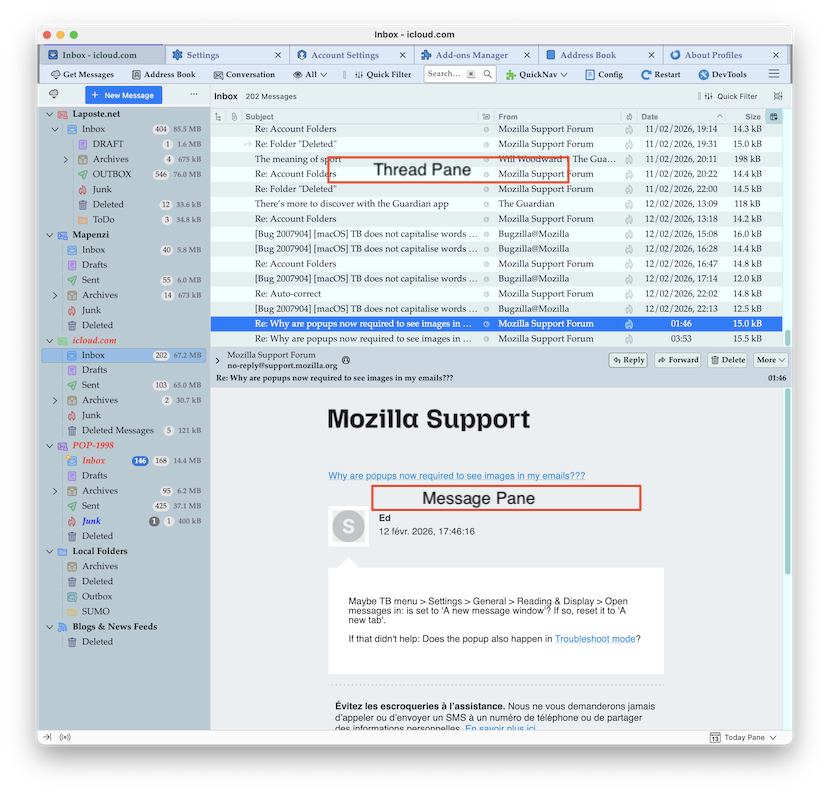
Your screen shots are a bit confusing for me although I am a Mac user. If I'm reading your images correctly the message pane is disabled in your TB main window. But far more interesting is the fact that you have activated the Quick Filter toolbar which hinders you to see all messages of the selected folder. Just disable it by clicking on the "Quick Filter" button... To display/enable (or hide) the message pane press the F8 button or go to View > Layout ✔︎ Message Pane.
Modified by Mapenzi
Maybe TB menu > Settings > General > Reading & Display > Open messages in: is set to 'A new message window'? If so, reset it to 'A new tab'.
If that didn't help: Does the popup also happen in Troubleshoot mode?
Hi again, and thanks for the recommendations, but nothing I tried via troubleshooting worked. And yes, the pop-ups still kept happening in Troubleshooting mode. Also, I was on the tab: 'an existing window' but I tried to use your other suggestion: 'a new tab' and that didn't help either. I think some kind of glitch happened that changed something when the latest update occurred. As I mentioned earlier, this change only happened--for the first time ever, this past week.
If you have any other ideas, I'd be happy to try those as well.
Thanks again!
Carol Anne, your description of your problem is difficult to understand and I think that the title is most misleading. You don't need "pop-ups to see images in your emails"... My understanding is that you want to tell us "why do my emails are displayed in a new window when I double-click them in order to open and read them"... and what you call pop-ups in reality are secondary Thunderbird windows.
Let's go back to your screen shot: what I see is a Thunderbird main window in the background and an email opened in a second window in the foreground. The Thunderbird main window has the "Classic View" layout (see my image), but it has no message pane. By some unfortunate operation the message pane must have been hidden. When the message pane is hidden the thread pane takes all the place on the right and you have to double-click on a message in the thread pane to open it either in a new tab or a new window. I can also see that you activated the Quick Filter toolbar and that you made a search for "suppor" but I don't think that the Quick Filter toolbar is your first concern.
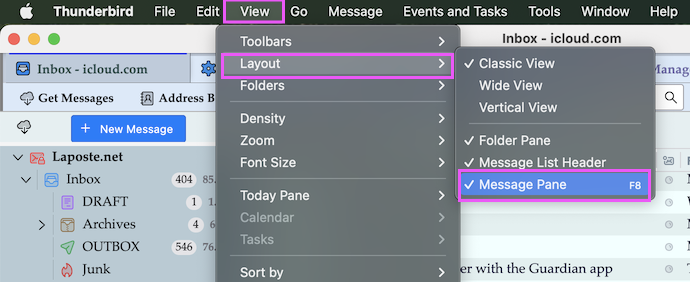
I still think that before this issue occurred you used to open your emails by a simple left click and you read them in the message pane, which is no longer visible as the lower right pane in the main window in your screen shot. So I can only repeat my advise from yesterday: Verify that the Thunderbird main window is in the foreground (or in focus) and hit the F8 key or go to menu View > Layout and select Message Pane (image)
Or is it possible that I followed a bad trail from the beginning and that you really only want to to view images you received in emails?
Modified by Mapenzi
Hi, Mapenzi, and thank you for the follow-up to your last advice. All I can say is that everything on Thunderbird had been perfect--regardless of whether I used the quick filter or not, and I never, ever, had to double click anything to read my messages and the images that came with my emails were always there.
Also the F8 key you suggested I use to bring the Thunderbird main window in the foreground kept bringing me to the Apple Music app! ' So maybe my keyboard setup is different than yours is.
All I can add is that I continue to have this new and aggravating situation that I have never had for at least some 15 or more years now! I never changed anything, so that is why I feel the newest update, which I've been allowing automatically, has done some real damage to my Tbird email server.
And yes, the main thing I wish to see is the images in my emails and that the email opens without requiring that second window. When, via wishful thinking, I try to see if my emails will now open w/o the need of the second window, it never works. Also, now when I choose to create a pdf from an email I received, the created pdf includes all these nonsensical technical details at the top of the page (not there in the original email) and shrinks down all the images to fit that nonsense.
Thank you for taking the time to add some more info, and if you can come up with any other ideas for me to try, I'll try again. If not, well, I'm sort of at wit's end to not give up and just switch to my iMac's Mail, which I never preferred when compared with Thunderbird.
Hi Anne, I am convinced that your view or display issue is due to a very very simple erroneous click you made somewhere in the graphic user interface. I am trying to help you at my best but you constantly misunderstand or don't follow my explanations. No, I did NOT tell you to hit the F8 key to bring the Thunderbird window in the foreground. I wrote "Verify that the Thunderbird main window is in the foreground (or in focus) and hit the F8 key or go to menu View > Layout and select Message Pane (image)"
Did you have a look at my screen shot with the "View" menu and did you try do go from "View" to "Layout" and then check "Message Pane"? How can you verify that the Thunderbird main window is in the foreground? Thunderbird is in the foreground when the Thunderbird menu bar (Thunderbird - File - Edit - View - Go - Message - Events and Tasks - Tools ... etc ) is displayed at the top of your screen, as you can easily see in my second screen shot. But these are basics and I do not know how to express my instructions in a more convenient language. And if the Thunderbird window is not in the foreground, how can you bring it in the foreground (into focus)? Just left-click somewhere in the main window, but not on a specific button...
I see you earlier posted https://support.mozilla.org/en-US/questions/1540445 which seems was never finished.
Hi, again, Mapenzi,
I tried to make sense of your images, but it is hard to follow your instructions when it also appears you may have not fully read my messages. I did finally find the other F8, but most of your explanations don't lead me anywhere new. All my settings had remained the same for many years, as I had mentioned before.
I already had everything set to work perfectly, and the change did not occur at all due to my messing around with my Thunderbird settings, which I never did. I hadn't changed ANYTHING (I would have just put that in bold but it doesn't seem to work on my end that way). I never needed to try to find a new way to get back to what had been working perfectly--since it was always very user friendly for me until just this past week. And please note, I'm the only one using my iMac and T-bird.
So, while your instructions may have seemed vague to me, along with what your screen shots showed, I obviously can tell you know more about the technical aspects of T-Bird than I do. Still, no amount of my attempts to revert my server from whatever seemed to mess things up in the first place has helped.
If you have any other ideas on how to bring this back around to how it was behaving so well for me before, I'm open to any new suggestions.
Thank you, Carol Anne
Modified by Wayne Mery
Hi, again, Mapenzi, I tried to make sense of your images, but it is hard to follow your instructions when it also appears you may have not fully read my messages. I did finally find the other F8, but most of your explanations didn’t help me try anything new. All my settings had remained the same for many years, as I had mentioned before. I already had everything set to work perfectly, and the change did not occur at all due to my messing around with my Thunderbird settings, which I never did. I hadn't changed ANYTHING (I would have just put that in bold but it doesn't seem to work on my end that way). I never needed to try to find a new way to get back to what had been working perfectly--since it was always very user friendly for me until just this past week. And please note, I'm the only one using my iMac and T-bird.
So, while your instructions may have seemed vague to me, along with what your screen shots showed, I obviously can tell you know more about the technical aspects of T-Bird than I do. Still, no amount of my attempts to revert my server from whatever seemed to mess things up in the first place has helped.
If you have any other ideas on how to bring this back around to how it was behaving so well for me before, I'm open to any new suggestions. Thank you, Carol Anne p.s. part of my message was cut off above for some reason, so I'm pasting this again.
It seems to me there are multiple misunderstanding here.
1. The window in the foreground of your screen shot is not what we would call a pop up. It is a standalone message window - displaying the message you double clicked on (or single clicked on). 2. I don't believe troubleshoot mode will help here.
So: 1. Don't double click messages. 2. To navigate the message list, and see the messages as you click through the message list, the preview pane must be shown. Which is what mapenzi is attempting to communicate.
Your screen should look like this ...
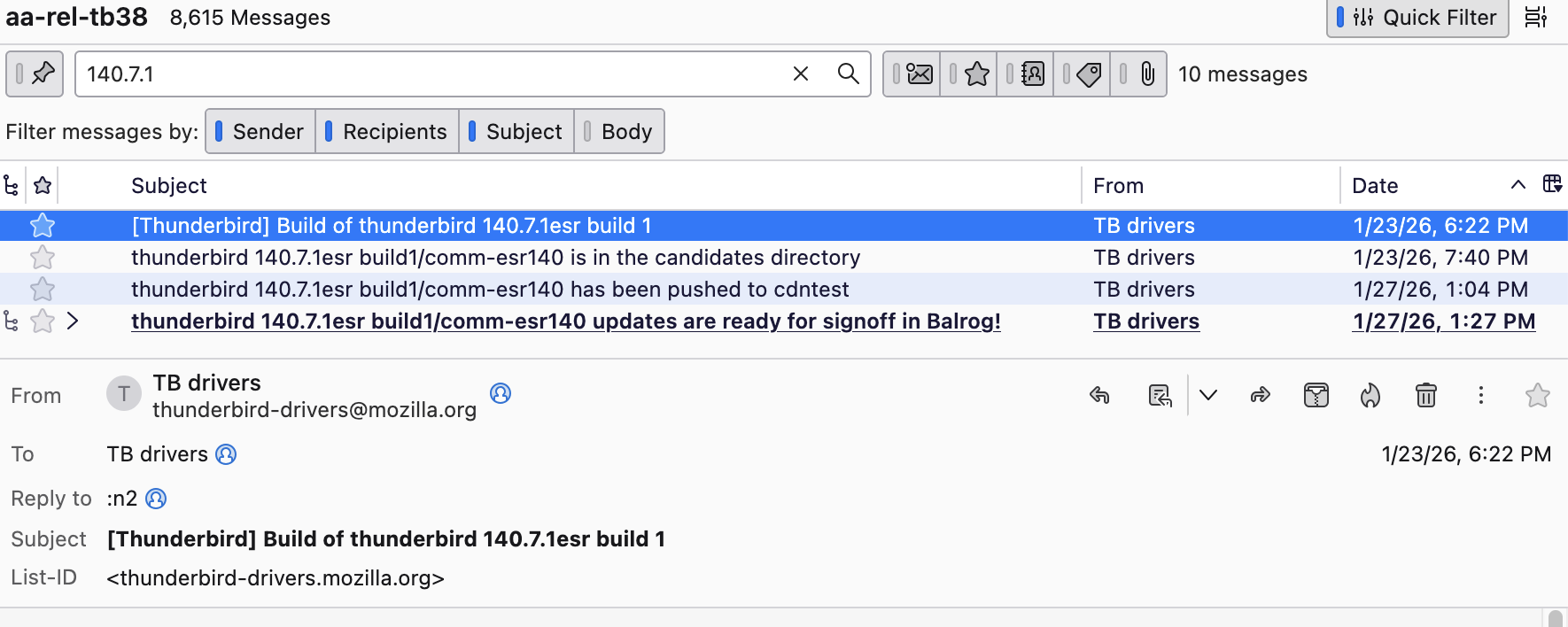
To make your screen look like that, with the message list in the foreground view, do F8.
If you don't know how to do F8, it is View > Layout > Message Pane, in that order.
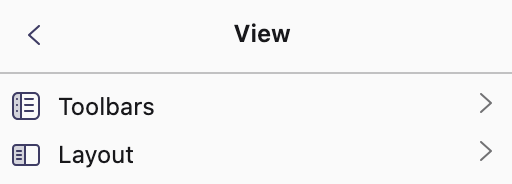
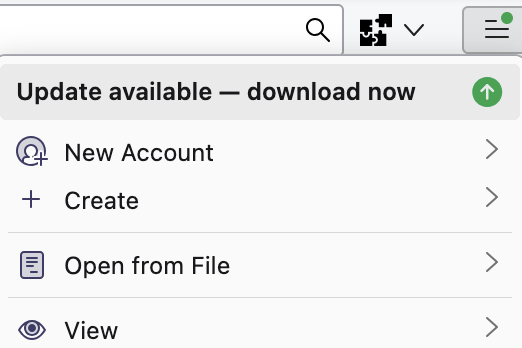
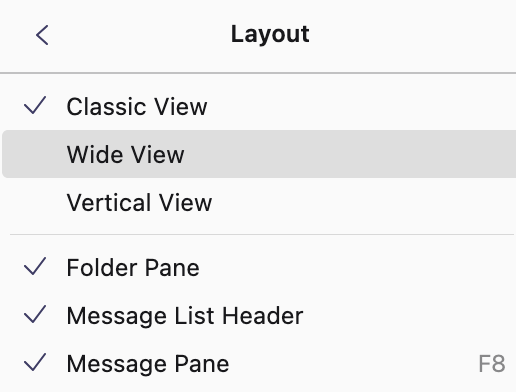
https://support.mozilla.org/en-US/kb/getting-started-thunderbird-main-window-supernova documents the screen layout
Is there a checkbox on the line "Message Pane F8" as shown in my screen shots and mapenzi's?
If not, then the message isn't going to show where you want it to.
Carol Anne said
If you have any other ideas on how to bring this back around to how it was behaving so well for me before, I'm open to any new suggestions.
No, I don't have any other ideas because they wouldn't help you since you could misinterpret them like "the F8 key to bring the Thunderbird window to the foreground"', and I don't want to argue with you any longer. Wayne has made the same diagnostic and gives the same instructions although in a shorter form and using a different way to open the View menu in his screen shots. Your message pane is hidden and that's why you open messages in new windows (NO POP-UPS)