


Thunderbird updates when it shouldn't

Many months ago I reported this error/bug but it remains unresolved, even though it was supposedly progressed to Mozilla.
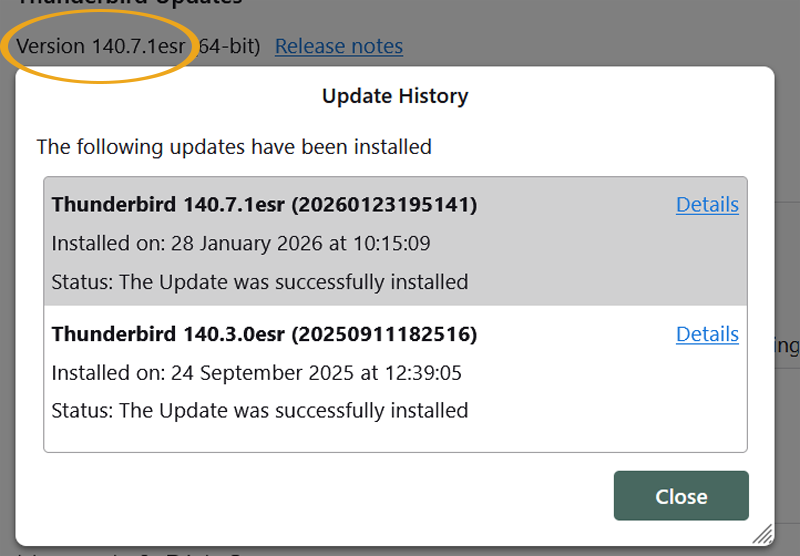
I have a desktop PC & a laptop. The problem only occurs on the laptop. I am running T/bird on ESR channel on both machines.
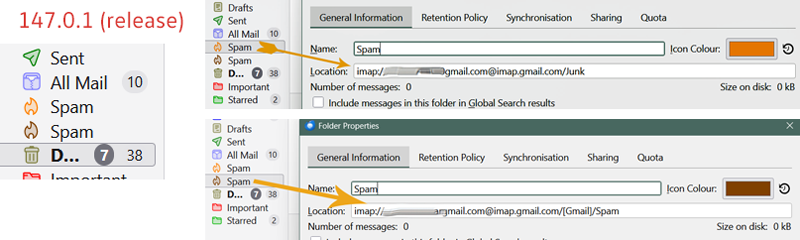
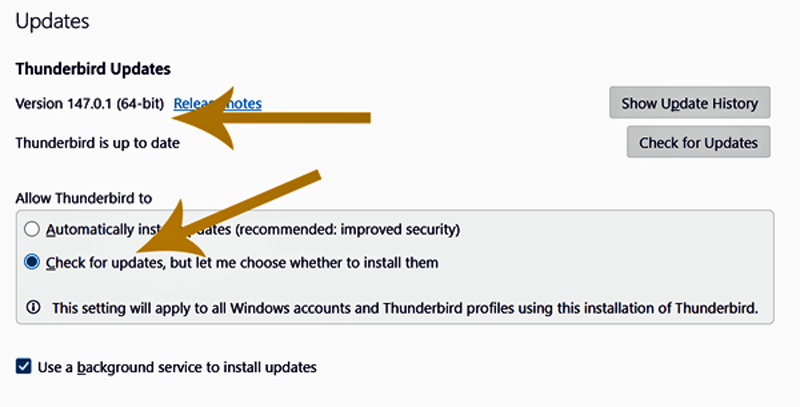
On the laptop, even though the settings are not to update automatically it does, reverting to the release channel. This displays the following bug!
Instead of a "Junk" and a "Spam" fold I get 2 "Spam" folders, but a closer look shows the paths as being correct, what you would expect. The folder will not rename.
Reinstalling the ESR version restores the correct folder names - UNTIL THE NEXT TIME THE PROGRAM AUTO-UPDATES when it shouldn't!
All Replies (5)
Hello
For information purposes, DisableAppUpdate. https://support.mozilla.org/en-US/questions/1548713#answer-1779983
If you're getting unwanted updates, it could be due to a software updater module that's part of some security apps like Norton or Avast.
There have been some recent updates that unfortunately rename server-defined folder names to TB-specific names, e.g. Junk/Bulk folders are now Spam and Sent Mail becomes Sent.
When this happened previously the auto update in Norton was on, so that could have been the cause. At that time I turned off this feature, and it has remained off ever since.
This reverting/update thing seems to happen with no specific pattern.
I'm continuing to monitor the situation.

TC, You should probably uncheck the option for "use a background service to install updates."
Speaking of 'should probably,' Mozilla should probably provide documentation for what this option does, or, provide documentation for any of the program for that matter...
Hello
According to the screenshot provided by TC. Without requiring you to click Yes in the Windows User Account Control (UAC) dialog.
Mozilla Maintenance Service. https://support.mozilla.org/en-US/kb/what-mozilla-maintenance-service