A new message on a singel line
Before a new message was shown on a single line. Today it is shown on two lines. How do change back to one line?
Before a new message was shown on a single line. Today it is shown on two lines. How do change back to one line?
Chosen solution
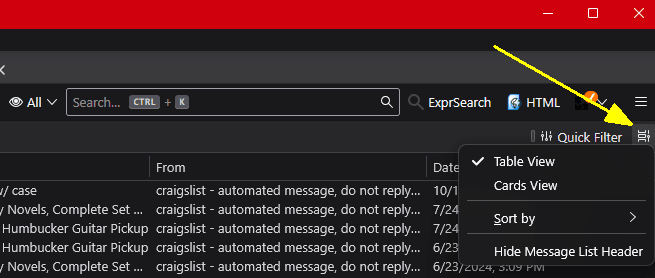
If I understand your question, you are now viewing your messages list in Cards View but you prefer to see it in Table View. You can switch between views at will by clicking on the little icon to the right of the top of the Messages list and choosing Table View. See the attached image.
Read this answer in context 👍 1All Replies (2)

Chosen Solution
If I understand your question, you are now viewing your messages list in Cards View but you prefer to see it in Table View. You can switch between views at will by clicking on the little icon to the right of the top of the Messages list and choosing Table View. See the attached image.