


Message filter to copy sent item to local folder

I have a message filter that copies every sent item to a local folder when I send it. I want this in addition to the normal sent item placed in the IMAP folder.
This works fine, except that when I reply to an email and the subject is prepended with "Re: ", the copy made in the local folder is not prepended with "Re: ".
Why is this, and how can I make sure the copy in local folders is prepended with "Re: " as it is in the IMAP sent folder?
All Replies (10)
The 're' is prepended at the time of sending. It is not a part of the actual subject, but an email signal to recipient.
david said
The 're' is prepended at the time of sending. It is not a part of the actual subject, but an email signal to recipient.
If "Re: " is not part of the actual subject then why is it present in the Subject field of the message composition window when I am typing a reply?
Please read my response. It is prepended. Debating it doesn't change it. I am not defending it, only advising on what is happening.
david said
I am not defending it, only advising on what is happening.
So if I start a new email from scratch, instead of replying, and I manually type "Re: " at the start of the subject, would you expect the copy in the IMAP folder to differ from the one the filter copies to Local Folders?

Hi triatica,
I understand that you are talking about “Re:” being removed from a subject header when you reply to a message that already has it.
This is a mystery to me. Would you please share a screen image of the filter rules?
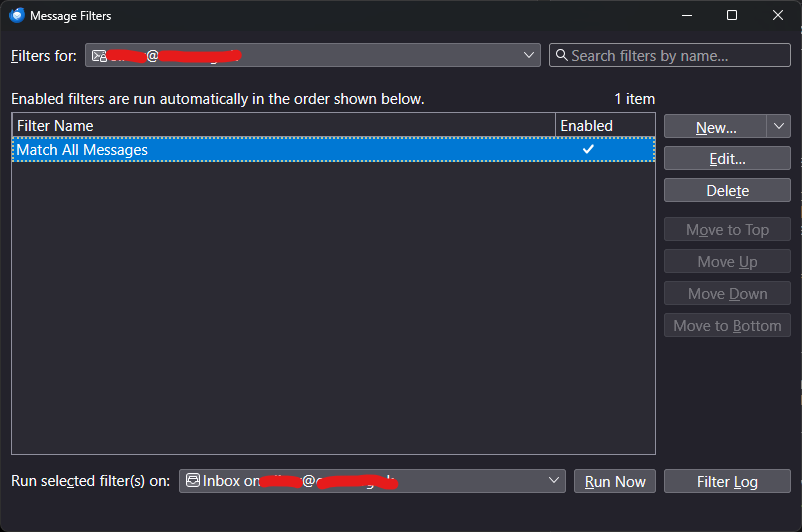
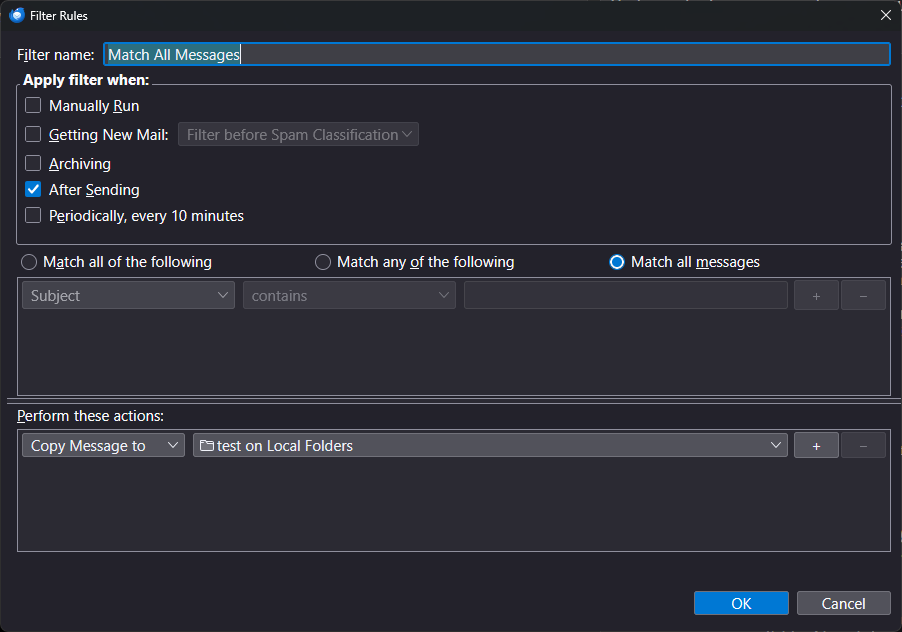
Nothing stands out to me. My only idea is a general troubleshooting step. Start Thunderbird in troubleshooting mode and see if the problem persists.
≡button > Help > Troubleshooting mode
I did initially check but "Filter after sending not working any more" didn't seem to fit my issue, as it does work for me apart from the "Re: ". It was only when I opened my own bug report that someone said it was a duplicate. Anyway, the main thing is that it's being fixed!