


Lost emails after transfer

I've (finally!) managed to set up a new account on my new PC (having found the required password, a long string of letters - where did that come from? - I would certainly never have chosen that and I was never informed of it). I also successfully managed to transfer my Profile from the old PC to the new one (thanks to your helpful article. However, While I have thousands of 'sent' messages I only have a few in my inbox and sub-folders (i.e. today's). (I originally used the recommended server settings (?IMAP) I was offered but then changed to SMTP/POP which is what I always used before without problems.) So - I go to 'Import from a Thunderbird profile' and it shows me the Profile Name and Directory details, but then says 'Nothing can be imported from the selected source' - but doesn't tell me why not, nor what I should do about it! Given the Profile has transferred successfully, why can't it be accessed? Any ideas appreciated. Thanks, David Collins.
Chosen solution
Thank you, Toad-Hall, for your time and help.
It seems to have worked this time! - I say 'this time' because the procedure was very similar to previous attempts which were unsuccessful, but the important thing is that everything appears as it should on the new PC.
Thanks again for your helpfulness - it's a weight off my mind and now I can really begin to enjoy my new PC! (and try re-installing the printer, transferring Photoshop 2.0 [optimistic, I know] and all the other things which OneDrive never managed to achieve).
David.
Read this answer in context 👍 0All Replies (7)
Your switch from IMAP to POP may be preventing you from accessing some content. Please post a screenshot of the profile you are attempting to import from and someone here may be able to offer suggestions. Are you missing messages fro inbox, sent folder, Local Folders, or elsewhere?
I think I have both IMAP and POP accounts now...! (Thunderbird seems to offer me IMAP as default).
Previously (on my old PC) I had a POP account and all my emails - sent and received - were available on my PC. Now I only have sent ones (about 7k), apart from the few which have arrived since I set up the account(s) on my new PC earlier today.
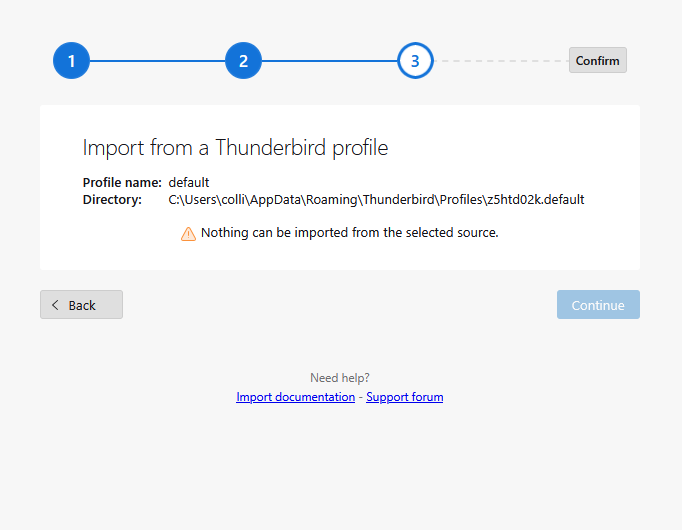
The screenshot shows where the Profile transfer gets stuck, but doesn't explain why. For some reason, I can't navigate to the Profile files. I can get to C: > Users > colli> but then there's no AppData, Roaming or Thunderbird which is the address of the Profiles. Mysterious.
Your help is much appreciated.
David. P.S. I can't send emails either now - it says the SMTP server times out... Any ideas why?!
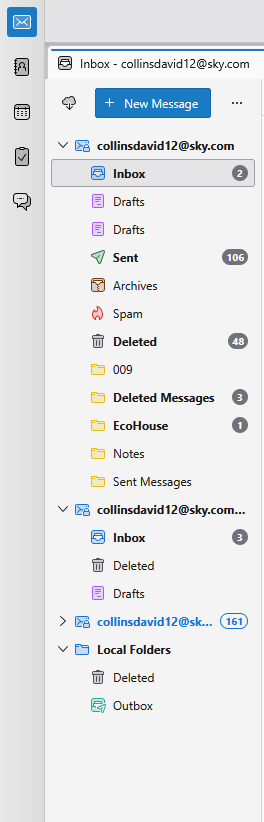
PPS If it's any help, this is what my Thunderbird homepage looks like now -
The appdata is hidden. Please explain what you want to achieve, not how to do it. You have an IMAP account and a POP account. what is missing? I believe you can get to profile with these steps: - click help>troubleshootinginformation - scroll to 'profile folder' and then click 'open folder' - you are now in the profile. but what are you wanting to do there?
I believe you can see all profiles by these steps: - enter %appdata% in search box on task bar and press enter - that should display the appdata\roaming folder - the thunderbird folder should be there - click the thunderbird folder and then the profiles folder and you will be looking at all profiles
If you want to activate an old profile, try this: - click help>troubleshootinginformation - scroll to 'profiles' and click 'about:profiles' - locate your old profile and click the launch button
Hi again, David -
Thank you for your time. What do I want to achieve? Quite simply, for all the 7k messages in my various inboxes to appear in Thunderbird, sorted to where they belong (all the sent messages are there, but not sorted into the appropriate subfolders. And to be able to send emails again!
I can find my (?'old' - the ones transferred from my old PC) Profiles on the new PC okay, but can't see any launch button to launch them (and double cicking just reveals umpteen separate subfiles). Presumably launching the files would achieve the desired result?
It would also be good to be able to send emails again, and to know why 'Nothing can be imported from the selected source' as shown in my first screenshot, ad how to resolve that.
Thanks again for your help (and patience).
David.
Let's start again. If you are copying an old working profile to a new computer then there is no need to create a new mail account if it already exists on old computer.
I'm assuming you have got the download from the official Thunderbird website: https://www.thunderbird.net/en-US/thunderbird/all/ So all profiles will be in the default location.
On Old computer Do you have everything ? Do you want to see exactly the same on new computer ? If yes: Then do this:
On Old computer:
- Exit Thunderbird - this is important.
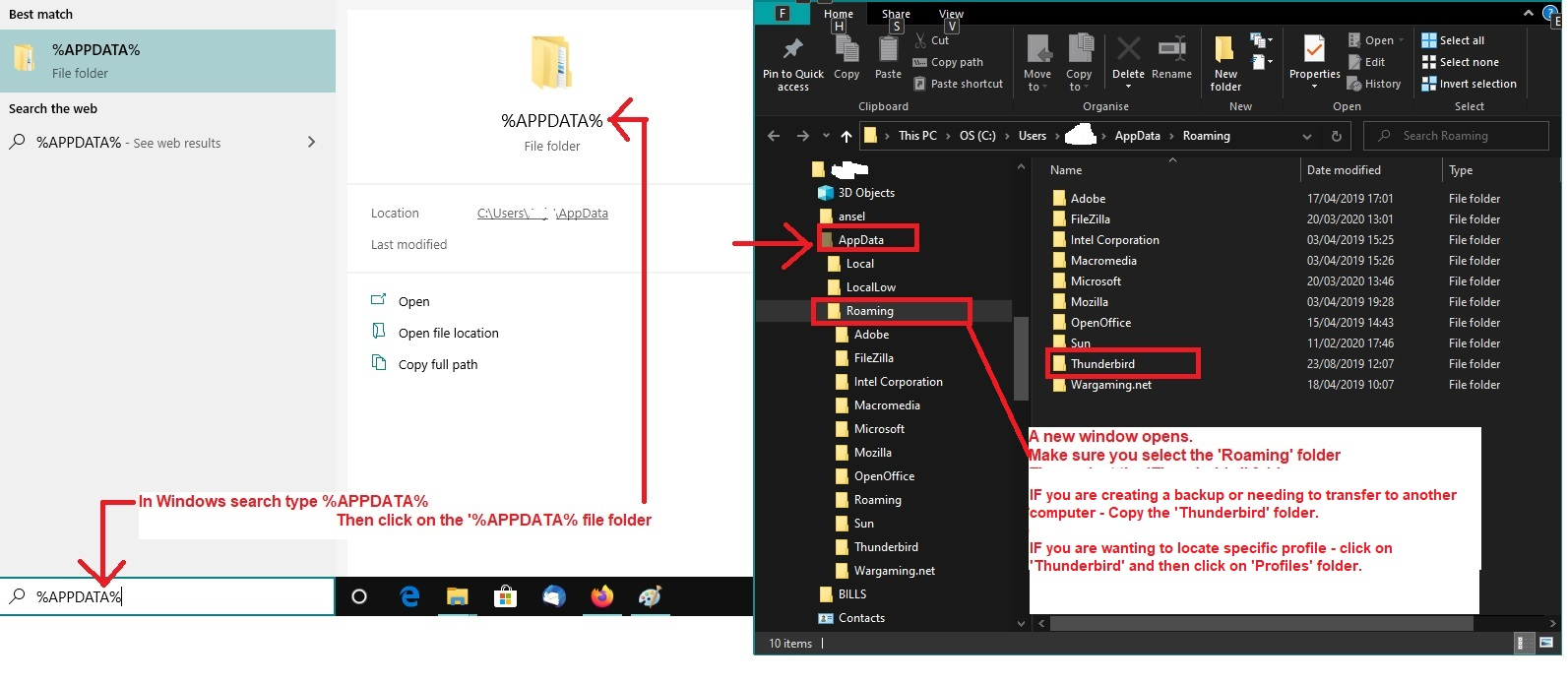
- Access profile by doing the following: - see image below as a guide - note it it's too small then in this forum question click on the thumbnail image to see it much larger.
- In windows search type: %Appdata%
- Select %Appdata% file folder
- Select 'Roaming'
- Copy the 'Thunderbird' folder to external drive.
On New computer:
- Exit Thunderbird - this is important.
Firewall
- Access the Firewall which might be the default supplied with OS or controlled by an Anti-Virus you installed.
- Make sure the Thunderbird program is set up as allowed.
Now to get Thunderbird profile info copied over.
- Access profile by doing the following: - see image below as a guide - note if image is too small then in this forum question click on the thumbnail image to see it much larger.
- In windows search type: %Appdata%
- Select %Appdata% file folder
- Select 'Roaming'
- Delete the 'Thunderbird' folder
- Paste the copied 'Thunderbird' folder from the external drive into the 'Roaming' folder
Thus replacing the 'Thunderbird folder with a copy of what exists on old computer.
Start Thunderbird
Modified by Toad-Hall
Chosen Solution
Thank you, Toad-Hall, for your time and help.
It seems to have worked this time! - I say 'this time' because the procedure was very similar to previous attempts which were unsuccessful, but the important thing is that everything appears as it should on the new PC.
Thanks again for your helpfulness - it's a weight off my mind and now I can really begin to enjoy my new PC! (and try re-installing the printer, transferring Photoshop 2.0 [optimistic, I know] and all the other things which OneDrive never managed to achieve).
David.