


thunderbird oauth2 login defect

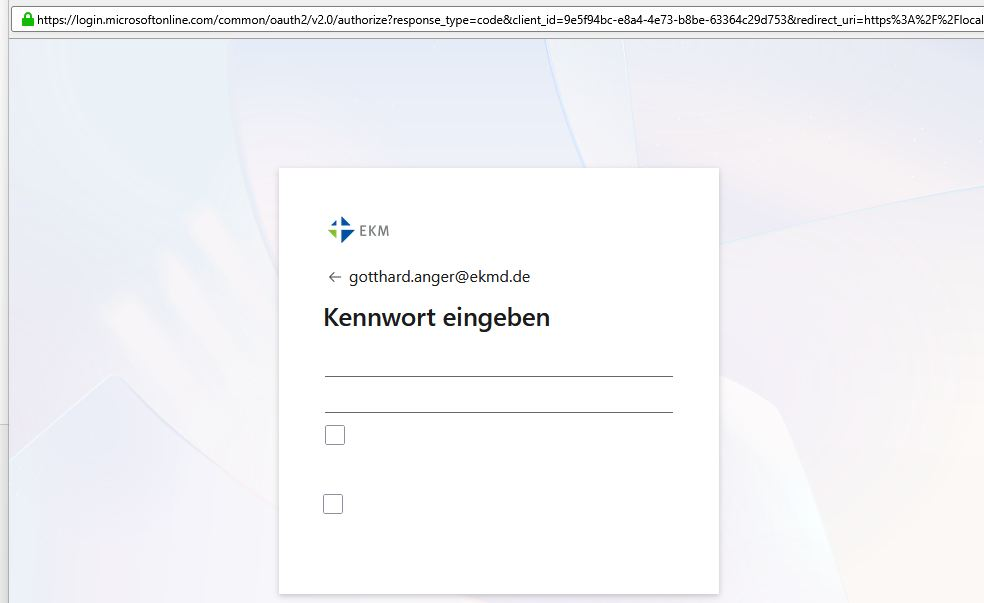
I´m well trained employee in user support and server administration for more than 30 years now. So long for my skills... I´m the administrator of a Microsoft 365 tenant. A user asked some days age, as he can´t login into his M365E3 account using Thunderbird. I tried this scenario in my private Thunderbird profile and indeed I get an weird dialog box. I can insert my password above the first line, input above the second line is readable in clear text, the checkboxes are selectable, but no button for continue. I have examined https://support.mozilla.org/de/kb/microsoft-oauth-authentifizierung-th..., but have no success. Whats going wrong here and how can I help for debugging? Environment: TB 147.0, disabled extensions, Windows 11 pro german 01-2026 patch M365 account with MFA, (Microsoft authenticator app as primary option)
All Replies (1)
Addition: I found this issue at reddit: this
I examined my system, but there is any port 80 open. I can confirm, as the copied link in any browser works as expected: asking for password, providing MFA and redirect to https://localhost/?code=1.ATEA... Netstat shows me, there is no port 443 open on my system.