


Thunderbird not storing IMAP message bodies on local computer

Thunderbird is not saving IMAP message bodies to my home computer.
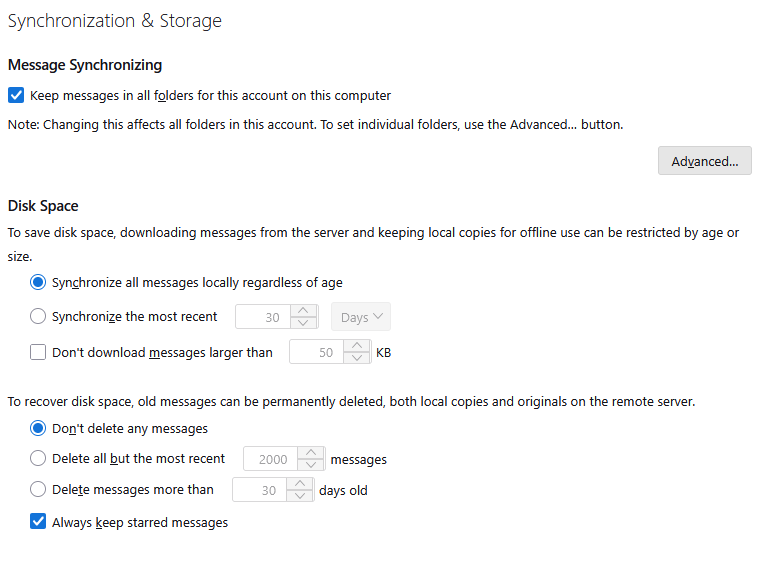
My settings: - Keep messages in all folders on this computer is checked. Under "Advanced" all the folders are checked for download. - Synchronize all messages locally regardless of age is on.
If a message has some significant graphics there is a fairly long delay before the body is shown. I know that this is a characteristic of IMAP. But if I close Thuderbird and return to it later, the same message will again have the download delay. Clearly it is not being stored on my computer.
Any help will be appreciated.
Thank you, Paul
All Replies (5)
I am not sure of the setting to keep all messages in all folders. A screen shot may help. A suggestion: click file>offline and then shut down and restart. Then, see if the message is there. That may allow visual confirmation of whether thunderbird keeps messages.
I did your suggestion of going off-line, shutting down, and then going back in. When I then selected a message that I new had some significant graphics in it, there was a very long delay before the body showed up, and The off-line option had turned off.
Per your suggestion I have attached a screen shot of my settings page.
Paul
where did you download Thunderbird from... Sort of sounds like the data is going away between sessions which may well be possible with MSIX versions. I really do not know how they work with their sandbox and using the local storage space.
I downloaded the latest version from the Mozella site. But I will add that all of my configuration settings were copied over from an old Windows 11 computer a couple of weeks ago. This is a brand new Windows 11 machine.
Paul
I recommend downloading from https://www.thunderbird.net/en-US/thunderbird/all/ the Microsoft version is lacking support features and persons providing assistance will normally assume you are using the primary version