


Message Filter Actions Not Shown in Japanese UI

I am reporting an issue with message filters in Thunderbird.
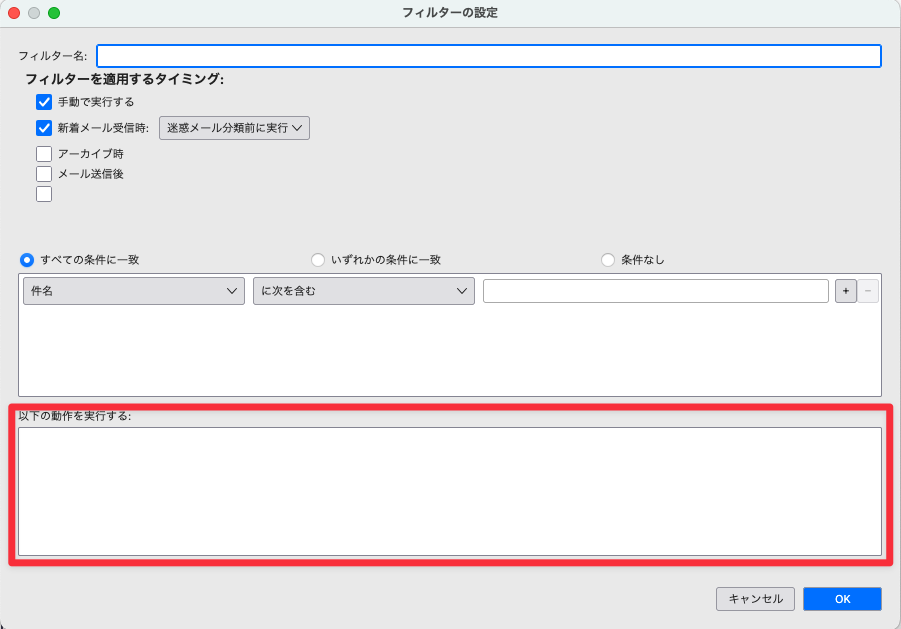
When the UI language is set to Japanese (ja-JP), the “Perform these actions” section in Tools → Message Filters is not displayed, making it impossible to configure filters.
Environment OS: macOS Sequoia 15.6.1 UI language: Japanese (ja-JP)
After switching the UI language to English (US) and restarting Thunderbird, the actions list appears and filters work normally. Switching back to Japanese reproduces the issue.
This seems to be a Japanese localization-related bug.
Thank you.
I am reporting an issue with message filters in Thunderbird.
When the UI language is set to Japanese (ja-JP), the “Perform these actions” section in
Tools → Message Filters is not displayed, making it impossible to configure filters.
'''Environment'''
OS: macOS Sequoia 15.6.1
UI language: Japanese (ja-JP)
After switching the UI language to English (US) and restarting Thunderbird, the actions list appears and filters work normally. Switching back to Japanese reproduces the issue.
This seems to be a Japanese localization-related bug.
Thank you.
Chosen solution
I'll wait for the update. Thank you.
Read this answer in context 👍 1All Replies (2)
There is a bug in this area that is being worked on. You should see a fix coming in January.