


File (saving/moving) to a folder - Recent function (bug2000453)
The File (saving to a folder) Recent function used to have the folders alphabetically. Some genius thought to reorganize the Recent folders to be in chronological order. Is there a setting to have the Recent folders be in alphabetical order again? I could not find anything. Thanks in advance.
Modified by Wayne Mery
All Replies (20)
Just a possibility if this is ver 146 you're using: - try highlighting the account - rightclick and select 'reset folder order.'
Thanks David. I am using Ver 146. But I'm not sure what "account" I need to highlight.
I am assuming the account with the folders not alphabetical. Or Local Folders.

Paul said
The File (saving to a folder) Recent function used to have the folders alphabetically. Some genius thought to reorganize the Recent folders to be in chronological order. Is there a setting to have the Recent folders be in alphabetical order again? I could not find anything. Thanks in advance.
Paul, where is this function in Thunderbird? Are you using an add-on? Or is this a function in a file dialogue window from the operating system?
Sorry, been away for a while. When you open an email you receive, it's the File in the second row with the down arrow; when clicked, there is Recent and Local Folders. See image. When you click in the >, that opens up the folders.
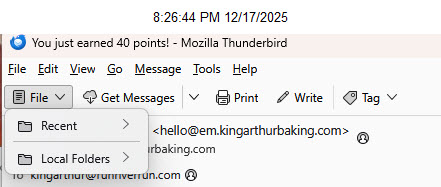
Thanks. I don't use that view and I would not see "File" there if I did because I removed it from that toolbar. So I did not know what you were referring to.
On the unified toolbar, the same button is called "Move to". Consistency might be helpful.
I cannot reproduce the problem. What version of Thunderbird are your using?
A general troubleshooting step may be helpful. Could you start Windows in safe mode with networking, then open Thunderbird in troubleshooting mode (Help menu), and see if the problem persists?
Hi Rick, you replied right after I shut down my computer for the night. I'm using the most recent version - 146.0.1. I pretty sure this issue started with the most recent version update just a few days ago. Having used Thunderbird for decades, this feature was always alphabetical. My sense is some programmer overthought the issue and decided to change it. Normally this is due to the programmer not really using the feature but think they are being clever/helpful when they aren't.
I'll try to start in Safe mode now and let you know. Thanks again for your time helping on this.
Started in Safe mode with Networking and the issue with the order did not change.
There was a conscious decision to make changes to folder names in 146. Apparently not well thought out. Several users have reported displeasure with results. There are bugs in progress, as I understand, so I anticipate some upcoming changes. On that, as a volunteer, I speak only as an outsider; we're not part of the 'in crowd.'
I hope they monitor these forums. I have not found anyway to send bugs/requests. They broke the Save address button next to the sender's email address a while ago which eventually was fixed, but the Edit Details is still broken. I assume they know but there is no way for sure.
Thanks again for your suggestions and time. Take care.
The place to file bug reports is https://bugzilla.mozilla.org/home The place to make recommendations is connect.mozilla.org under the IDEAS page. Those are read (or so I'm told).

Hi. I am on 146.0.1 and have the same problem. It is really annoying since it takes me many seconds to find my Move To folder in the long Recent Folders list. Please fix asap. Thanks.
cewoodhse said
Hi. I am on 146.0.1 and have the same problem. It is really annoying since it takes me many seconds to find my Move To folder in the long Recent Folders list. Please fix asap. Thanks.
This is a forum where users support each other. We cannot fix anything. You can report bugs here: https://bugzilla.mozilla.org/home

Hi, I'm also using 146.0.1 and have the same problem. It is extremely annoying, since it takes me several seconds sometimes to find the right folder under the Move To, Recent Folders list, especially since it shows 30 recent folders.
I've been a very long time supporter/user of Thunderbird (since it was first released 20+ years ago). This might be the bug/change that breaks me, and I look for a new mail app. Especially, after I read the bug report and discussion. See bug report #2000453 https://bugzilla.mozilla.org/show_bug.cgi?id=2000453 .
he upside of using the monthly release is you get the latest changes. But sometimes the changes are still maturing. If stability is your priority, I encourage switching to the ESR release, as it does receive major changes only yearly, and that is after the enhancements have stabilized in the monthly. That's just my personal opinion, but the official view is similar: for stability and no new features, use the ESR.
The 146.0 ESR version is not backward compatible with 146.0.1; it asked me to create a new profile, so not an option for me. Thanks though.
Comments: - I believe you can delete the recent moves list by renaming foldercache.json file. - the 'bug' is actually an attempt to have the most recent folders at the top. In reading the bug document, various options are being floated, so this should work itself out eventually. I respect the possible change this may entail, but staying the course is usually safer than reverting to a prior version. - reverting to ver 140 is possible, but might require reentering passwords. The 146 upgrade changed some password management items, or so I'm told.

Is someone from the tech side assigned to follow the discussion here? I would feel out of my league posting to the discussion among the designers and coders.
Having read the discussion at the bugzilla site, I have some comments based on my extreme dislike of the chronological listing under Move To > Recent Destinations.
1) From an accessibility point of view, with my vision problems, reading down a list (whether 10 items or 25) in alphabetical order makes scanning much easier because I don't need to read each entry to find the folder name I need. I can skip to the bottom to start reading more carefully for a folder name that starts with V or W. There is no mention of accessibility issues in the bugzilla discussion. Surely that should be a priority?
2) The suggestion that the resistance from users can be waited out while we become accustomed to the new chronological listing suggests that the problem is with the users, not the design. Dare I say that this sounds a bit presumptuous? Surely users and their needs are the raison d’être for Tbird. For those who see usefulness in the chronological list, perhaps there could be an option for users to choose?
3) The suggestion that what other apps or OSs do is a consideration or that standardization to their model is desirable is questionable IMO. Comparing Windows or Libre Office (as the bugzilla poster did) ignores context and function. What I am trying to do with Move To > Recent Destinations is to quickly file emails I have been reading into their designated folders, singly or in groups. I.e., to put them away.
First and easiest option is to Move To <foldername> Again, assuming that's the last folder I used. Second option is Move To > Recent Destinations, easy enough with an alphabetical list. Third option, Move To > Favourites, has an alphabetical listing (with some overlap with Recent Destinations). In the context, I think it makes sense to have both lists be alphabetical. Last option, when all else fails, is to work through the alphabetical folder trees under Local Folders. Again, internal consistency would seem to argue for an alphabetical listing in all three instances since they are variations on the same action.
I don't know Libre Office, but what Windows File Explorer is doing in listing recent items I have used is to let me return to that single item. I.e., retrieve it. So as far as I can see, not a good comparison to the moving of emails to my Recent Destinations folders. A comparison to Outlook or Gmail might be more apt, but the reason I use Thunderbird is that it's not Outlook or Gmail. So, I can't make that comparison. Maybe someone else can.
The people on this forum are volunteers, peer-to-peer. We make no decisions and have no more input than you. Decisions appear to be coming from a small core group. They have good intentions, but their implementations sometimes need adjustments. I am not defending them; that's just what happens. Notes in Bugzilla indicate that serious discussions and options are being considered. If a major concern is a desire for stability and consistency, I recommend using the ESR release.