


Windows 10 reached EOS (end of support) on October 14, 2025. For more information, see this article.

Search Support

Avoid support scams. We will never ask you to call or text a phone number or share personal information. Please report suspicious activity using the “Report Abuse” option.

Learn More

How do I disable the "Suggest Firefox Relay email mask" option

  • 1 reply
  • 0 have this problem
  • 92 views
  • Last reply by Denys

more options

With reference to this question: https://support.mozilla.org/en-US/questions/1439281 from 2024

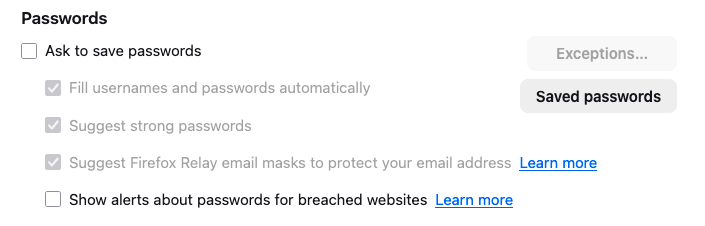
The answer was this: Disable "Suggest Firefox Relay email masks to protect your email address" in "Settings -> Privacy & Security -> Passwords".

But I already have this setting disabled. The popup still comes up. (BTW it's in "Preferences -> Privacy & Secutiry ->Passwords". The popup still comes up.

NO ONE IS WATCHING ME! I'm at home! (Except for that guy who sees what I do in bed /s)

Moderator note: This question has been edited to correct the link.
With reference to this question: https://support.mozilla.org/en-US/questions/1439281 from 2024 The answer was this: Disable "Suggest Firefox Relay email masks to protect your email address" in "Settings -> Privacy & Security -> Passwords". But I already have this setting disabled. The popup still comes up. (BTW it's in "'''''Preferences''''' -> Privacy & Secutiry ->Passwords". The popup still comes up. NO ONE IS WATCHING ME! I'm at home! (Except for that guy who sees what I do in bed /s) ''Moderator note: This question has been edited to correct the link.''
Attached screenshots

Modified by Denys

All Replies (1)

more options

Hi,

Not sure what may be the reason, but could you please check "Ask to save passwords", uncheck the Relay option (as it should become available) and then uncheck "Ask to save passwords" again? Does it help?

Ask a question

You must log in to your account to reply to posts. Please start a new question, if you do not have an account yet.