


Migrate from one mac to another, and thunderbird is broken

I migrated one mac, which was intel based, to another, which is M4. It all went fine. I have the same versions of OS and Thunderbird on each, before the migration. The new machine is a 2025 Mac Studio. The old machine is a 2018 Mac Mini, 6 core Intel Core.15
On the old machine in Thunderbird, under my user, all my files are listed. On the new machine, files are not listed.
I saw a lot of information/suggestions to replace the Profile folder under: USER/Library/Thunderbird/Profiles And I copied it straight over from the old machine, with negative results.
I did notice that under profiles, it continues: m8mojurw.default-esr/Mail/Local Folders/ where there are some other goodies, some of which are "documents".
however, on the new machine, those same files are there, except they are "unix executable files"
I have migrated many times over the years and this hasn't happened.
I have done all of the suggestions I found so far, such as the Profile copy/past, reinstalled Thunderbird from scratch, looked thru comparisons of the Account Settings....
Oh, a couple more things:
If I look under my user and go to "Account settings" then "copies & folders" to looks different on the 2 machines. The old machine has: a check next to "Place a copy in" and under that a dot for "Sent folder on:" and my user name. On the new machine there is: "Place a copy in" and I cannot write into the "sent folder on" space, I can only select Choose and Account -> Local files as if the user doesn't exist (?) Thanks
Modified by minusetopii
Chosen solution
Well, I'm not certain what happened, nor when, nor why, but it is working.
To answer previous questions:
--I did copy the entire TB file, which was suggested, to which I replied no, that didn't work.
--What was wrong was in TB, in the far left window, there is >USER and >Local files etc. If I select the >USER ( which is my email, which I am hiding) there were none of the files I expect to see, that is, everything from the last 20 years. The path is denoted under >User -> Account Settings -> Server settings ->Local Directory, which is a path to everything I want.
(I did state this in my original post)
That is what suddenly is working. That path is being seen, so the files are now being seen.
I think (??????) the one that did it was under the path given in Local Directory as shown above, I erased that line, and chose the Browse button to the right, and input it again in that way.
Could that have fixed it all? Is it possible that /Users/.... has a path to the old disk which we don't see? How could using "browse" impact that?
Altho it is true that I made a lot of changes to the Profile section, none made a difference, including keeping/nuking old builds of profiles.
Anyway, thanks to everyone who were helping. Sorry for belaboring this reply, but it may happen to someone else, so I wanted to add to the knowledge base.
Thanks again.
Read this answer in context 👍 0All Replies (13)

minusetopii said
I saw a lot of information/suggestions to replace the Profile folder under: USER/Library/Thunderbird/Profiles And I copied it straight over from the old machine, with negative results.
What exactly did you copy/paste from your old Mac to the new Mac? The profile folder m8mojurw.default-esr? The folder "Profiles"? Or the entire folder "Thunderbird" Copy the entire folder Thunderbird from the old Mac and paste it in the user-library on the new Mac would have been the easiest way to migrate with very little risk to commit an error.
Please show screen shots with the contents of • the folder "Profiles" • the file "profiles.ini" (open the latter with TextEdit)
Thanks, but no. that does not work either. The comments regarding the "unix executable" description still applies, and then have been changed doing this also.
Here are the two screen shot requested.
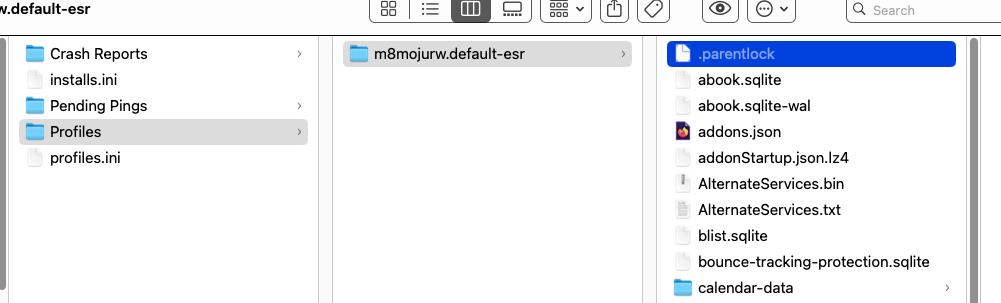
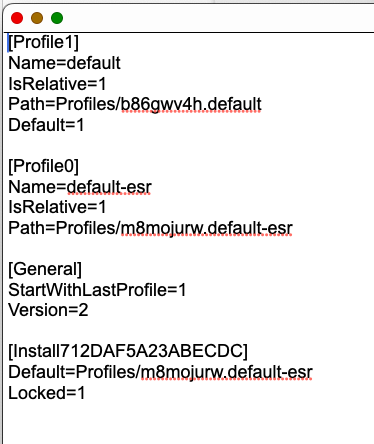
Modified by minusetopii
minusetopii said
Thanks, but no. that does not work either.
However, Mapenzi's response is marked as the solution. Is this problem solved?
Sorry, I must have poked that by accident. I have unpoked it.
So it has not been solved, and it is not working for me. Thanks.
Modified by minusetopii
Re: however, on the new machine, those same files are there, except they are "unix executable files"
I am still running macOS 12.7.6 and cannot confirm those unix executable files (see image) Maybe this is how mbox files such as Inbox, Sent, Drafts, Trash are called in recent macOS versions. It shouldn't intervene in Thunderbird profile migration from an old to a new Mac. Your screenshots are OK and Thunderbird on a new Mac should appear as on the old Mac.
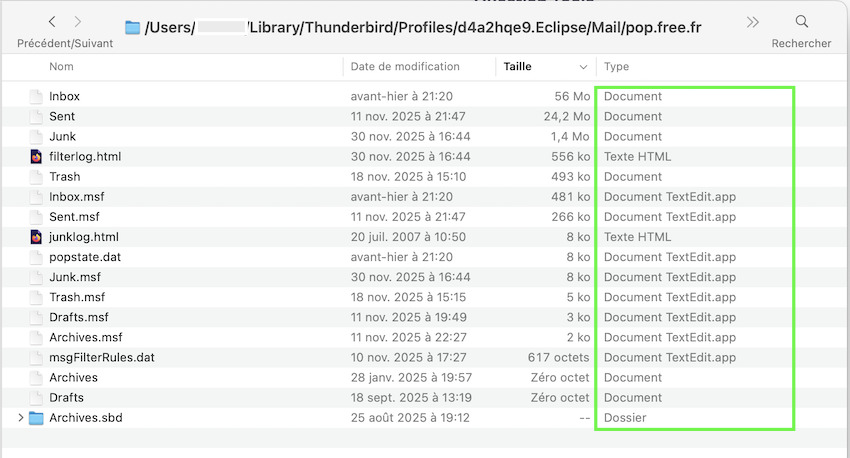
Modified by Mapenzi
minusetopii said
So it has not been solved, and it is not working for me.
"It is not working for me" is very general expression! Can you be more precise? What is not working in your Thunderbird installation on the new Mac? What happens when you start TB? What means On the new machine, files are not listed? Which files in which directory (screen shot) are missing? You did not answer my question whether you migrated the folder "Thunderbird" as a whole or just the folder Profiles or only the profile folder m8mojurw.default-esr Please post a screen shot with the contents of /Mail/Local Folders/ on the new Mac displaying those unix executable files.
Modified by Mapenzi
The profiles.ini file shows two profiles. One is from the annual esr release. The other may be from the monthly release. If you switched from one release to another, Thunderbird may have created a new profile.
The Finder window shows only one profile, the one on the annual esr release schedule. Apparently, you wanted the other one. Copying only one profile, and not the one that you wanted, could explain the symptoms. So I wonder if both profiles were copied.
First, do you actually have two profiles on the old Mac? Two ways to check:
- ~/Library/Thunderbird/Profiles
- Thunderbird's Help menu > Troubleshooting info > about:profiles
I would try again to copy ~/Library/Thunderbird (the whole folder) on the old Mac to ~/Library/ on the new Mac. The Finder should ask if you want to replace the existing folder. If it does not, something is amiss.
You may already know that "~" refers to the user account.
Well thanks again. Still dead in the water.
Any other ideas? I've looked all thru the Account Settings pages and see no differences. I've looked thru the Thunderbird Settings. I see all the files where the Account Settings are supposed to be looking for them.
Here is another weird one: If I select my account, I can see all of my addresses! So it knows addresses, but not where to look to find the files with my messages (over the last 20 years).
And another strange one: I can send a message! and it gets out and to the destination!! But it gives an error message in the image.
The Sent folder is where all my files are.
Is that a clue? Cuz I have none.
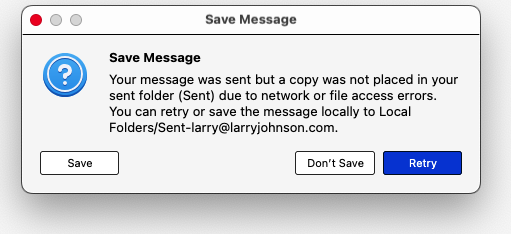
</blockquote> Please post a screen shot with the contents of /Mail/Local Folders/ on the new Mac displaying those unix executable files. </blockquote>
I'm eager to see them too. Different user accounts can have different application mappings and different macOS versions may have different application mappings too. I don't know. On my 15.7.2 installation, most files in "Local Folders" are of the type "document". I don't have Unix executables anywhere in my profile.
Does your Mac Studio have macOS 26? Maybe macOS 26 maps documents to apps differently (and incorrectly).
Rick said
The profiles.ini file shows two profiles. One is from the annual esr release. The other may be from the monthly release. If you switched from one release to another, Thunderbird may have created a new profile.
the esr profile seems to be the actual profile since the "Install" information lines at the bottom links it to the Thunderbird-esr application. The "default" profile is the "stub profile created with each Thunderbird installation and contains only the times.json file. If Thunderbird 145 would have been started in the esr profile a new default-release profile would have been created, but not a default profile
</blockquote>the esr profile seems to be the actual profile since the "Install" information lines at the bottom links it to the Thunderbird-esr application. The "default" profile is the "stub profile created with each Thunderbird installation and contains only the times.json file. If Thunderbird 145 would have been started in the esr profile a new default-release profile would have been created, but not a default profile </blockquote>
I see. Thanks.
Chosen Solution
Well, I'm not certain what happened, nor when, nor why, but it is working.
To answer previous questions:
--I did copy the entire TB file, which was suggested, to which I replied no, that didn't work.
--What was wrong was in TB, in the far left window, there is >USER and >Local files etc. If I select the >USER ( which is my email, which I am hiding) there were none of the files I expect to see, that is, everything from the last 20 years. The path is denoted under >User -> Account Settings -> Server settings ->Local Directory, which is a path to everything I want.
(I did state this in my original post)
That is what suddenly is working. That path is being seen, so the files are now being seen.
I think (??????) the one that did it was under the path given in Local Directory as shown above, I erased that line, and chose the Browse button to the right, and input it again in that way.
Could that have fixed it all? Is it possible that /Users/.... has a path to the old disk which we don't see? How could using "browse" impact that?
Altho it is true that I made a lot of changes to the Profile section, none made a difference, including keeping/nuking old builds of profiles.
Anyway, thanks to everyone who were helping. Sorry for belaboring this reply, but it may happen to someone else, so I wanted to add to the knowledge base.
Thanks again.
Is your user name the same on both machines?
I did not understand what you wrote about the path in your first post. Sorry.
Yay, it’s working!