


How to change default email address in TB

When I click on a mailto: link on websites, it defaults to an old email address that I am phasing out. So every time I click on a mailto: link, TB opens a new email using the old email address, and I need to remember to click on the list of my email accounts and select a different one.
How can I change the email address that is the default?
Thanks in advance! Clint
Chosen solution
- click 'account settings' - click the account name you want to be the default - in upper right is a button to set as default
Read this answer in context 👍 0All Replies (6)
Chosen Solution
- click 'account settings' - click the account name you want to be the default - in upper right is a button to set as default
Thanks for the reply, David.
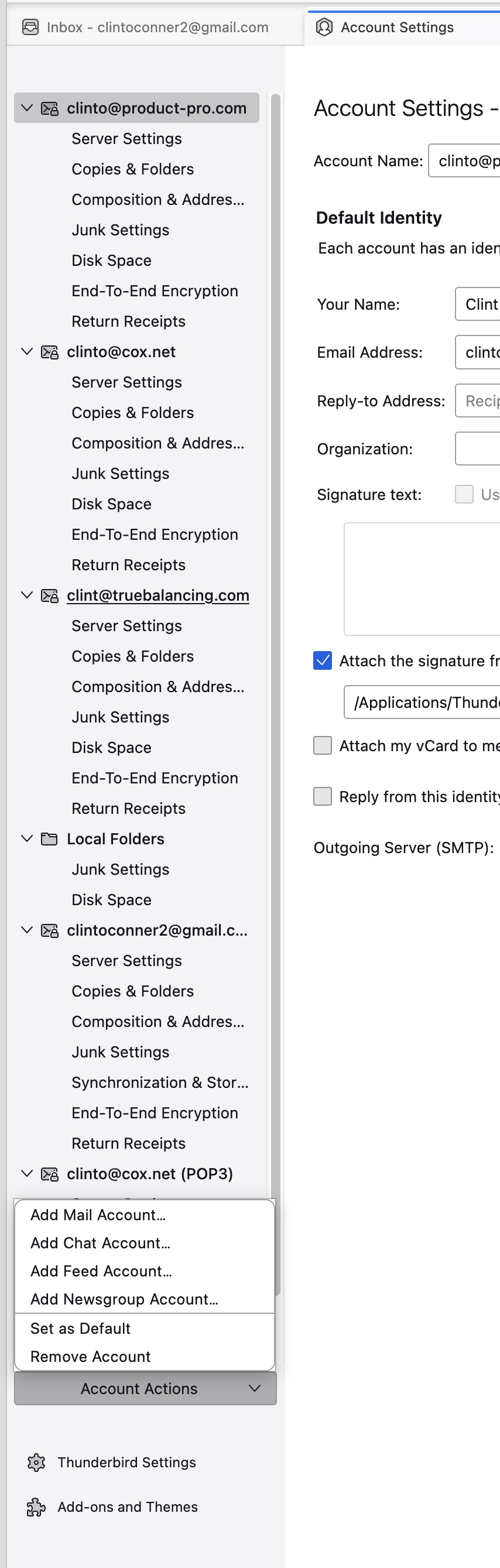
The UI on my version of TB is different from what you describe, but I figured out how to do it. After I opened Account Settings and selected the account I want to be my default, I had to click on a pop-up menu in the lower left corner. Here's a picture.
I am glad you resolved it. You are using an older version. I am not suggesting you upgrade, but wanted to remind you that a newer release may have more features that you would want. Again, if all is well, then stay.
Thanks for letting me know about my version of TB. I didn't realize I was so far behind. It seems that I don't get automatic notifications of new releases.
thunderbird stops advising when you are at last version of a release. What release are you at now?
Yesterday I updated to 140.5.0esr.
However it looks like I was pretty far behind on updates, and I hadn't received notices from TB telling me that an update was available.