


cannot attach files from shared OneDrive folder
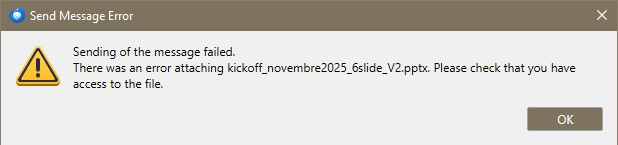
Hi, Microsoft recently changed the way Shared folders in OneDrive 365 business are managed. I'm referring in particular to folders shared by other users within my organization. Now you have to create a sort of link to the folder which appears in My files. Previously I used the odrive client to sync all my cloud accounts (OneDrive, Dropbox and Google Drive). Because of the changes, those shared folders cannot be synced by odrive anymore and I had to switch to the official Microsoft OneDrive client. With that, I can now sync the folders on my local drive but I cannot attach files from those folders to a Thunderbird message. While the folders appears as a link in the root OneDrive folder when I browse it with Explorer, when I click on the folder I see the files are local copies synced in my filesystem. Yet, Thunderbird cannot access them and gives the attached following Send Message Error: Sending of the message failed. There was an error attaching kickoff_novembre2025_6slide_V2.pptx. Please check that you have access to the file. Obviously I could make a local copy and attach that, but it is not convenient at all. Any fixes available?
All Replies (2)
Anything in those folders is stored on an external microsoft server and you have access to read files. This issue has been around for a long time.
Workaround - You would need to put a copy of the file onto your computer eg: desktop, then it can be attached as it is no longer stored on another server.
Maybe there is a way to create a shared link to the file on Onedrive, so not attaching the file itself but sending a link to the file which is also accessible by another person who normally has permission to also use the shared onedrive folder. I did find this - you can see if it works.
- In OneDrive.
- Browse to the OneDrive file or folder that you want to share.
- Right-click the file or folder you want to share.
- The right-click menu appears.
- In the menu that appears, click Share a OneDrive link.
- A notification appears showing that the link is ready to paste.
- Open the app where you want to use this link.
- Paste the link into that app and send the link to the intended person.
I also located this: https://support.microsoft.com/en-gb/office/share-onedrive-files-and-folders-9fcc2f7d-de0c-4cec-93b0-a82024800c07
The fun thing is that five minutes ago I was showing the issue to a colleague and now... it works. I managed to attach seamlessly the very same files that were giving me the error earlier today. Misteries of Microsoft. Maybe the recently installed client had not indexed the local shares immediately... Obviously it doesn't make sense to try any other solution. By the way, the workaround I adopted was exactly the one you suggest, i.e. copying the files in the Downloads folder and attaching them from there. In any case, thanks a lot for your prompt support, I hope it might be of help to somebody else.