This thread was archived.
Please ask a new question if you need help.

Archived
Number of E-Mails reported for each Local Folder

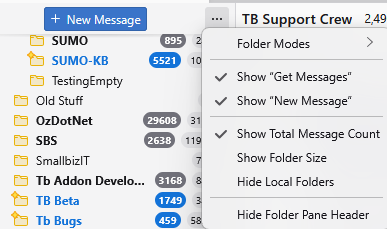
My previous Thunderbird program reported the number of E-Mails stored in each of my Local Folders. New installation on my latest Win 11 computer does not display that number following the Folder name. Is there a way of getting that feature back on display on the left side of the general info window? Usually showing on the left of monitor screen.
My previous Thunderbird program reported the number of E-Mails stored in each of my Local Folders. New installation on my latest Win 11 computer does not display that number following the Folder name. Is there a way of getting that feature back on display on the left side of the general info window? Usually showing on the left of monitor screen.
All Replies (1)
Thunderbird displayed the number of unread emails beside the folder name. That is the default.
Use the ... menu to add the other items if you require.