Removing "Original Profile" from windows?

I see in one of the past recent updates, I notice that "- Original Profile" is in the windows and not just the title of the website I'm on. Any way to remove it? It looks off and not necessary to me.
All Replies (5)
Actually I forgot to mention that I use Mac OS Sonoma 14.8.2 (23J126) and I tried creating a new profile through the profile manager, then deleting that new profile and not the original profile. It didn't work.
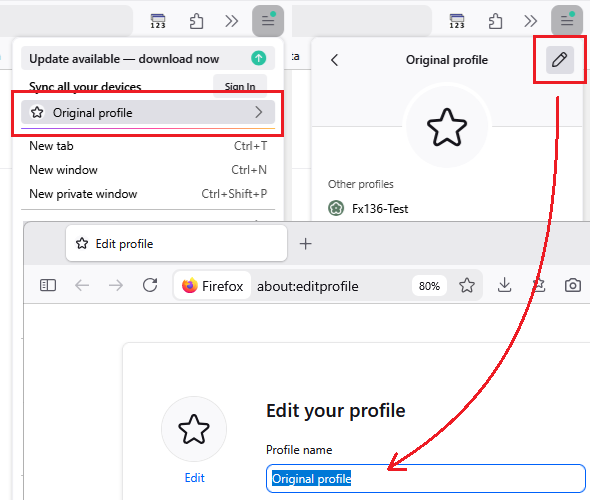
Yeah, that's actually how it works at the moment. Once you have tried the feature out, you'll have the profile name in your window titles. However, what you can do is renaming the profile, including using an emoji as a name :)
Sadly, it didn't work. This: "Check the window title by pressing Alt+Tab or hovering over the Firefox icon on the taskbar and than hovering over the title." did not work. I do not run on a Windows OS, it's Mac OS. What is the equivalent to this on a Mac OS?
Can you get to the "pencil" button?
I tested a change, and it didn't seem to take effect immediately. I probably need to quit/restart Firefox.