

This thread was archived.
Please ask a new question if you need help.

Solved
Archived
Thunderbird header pane color change

I am running Windows 11 with Thunderbird V144 and the Windows Classic theme. I find the background colors of the Message List Pane and the Message Pane almost the same as background of the Header pane. I would like to change the background color of the Header Pane so that it stands out more. I looked on the internet and found some solutions to most other Header Pane features but not the background color. Most of those solutions were additions to the userChrome.css file that appear not to work on V144.
I would appreciate some help with this.
I am running Windows 11 with Thunderbird V144 and the Windows Classic theme.
I find the background colors of the Message List Pane and the Message Pane almost the same as background of the Header pane.
I would like to change the background color of the Header Pane so that it stands out more.
I looked on the internet and found some solutions to most other Header Pane features but not the background color. Most of those solutions were additions to the userChrome.css file that appear not to work on V144.
I would appreciate some help with this.
All Replies (2)
Chosen Solution
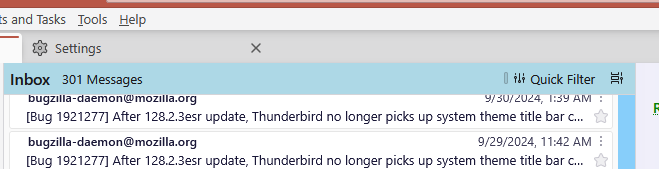
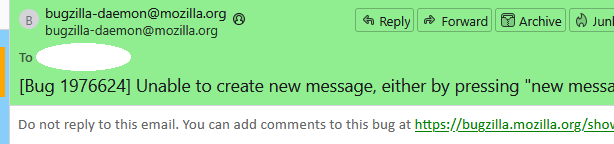
Add this to userChrome.css (see pictures):
#threadPaneHeaderBar{background-color: lightblue !important;}

#messageHeader{background-color: lightgreen !important;}
Thank you so much sfhowes. Just what I was looking for.