local folders on new PC - missing structure and files

Hi, I've set up TB successfully on a new PC and been using it a while. Then I noticed my local folders archive group of subfolders was missing. I followed some instructions about moving local folders file across from the old to the new version.
Now I see the individual archive folders without the folder group name 'archive'.
Also, there are a couple of other files not visible on the new platform although they were in the original installation local files and were copied across.
I was careful to ensure the same version running on both PCs. Also that TB was closed when copying files across.
Any pointers appreciated!
All Replies (20)
Please show a screen shot of your Local Folders in the folder pane. Then in Thunderbird go to Help > Troubleshooting Information > Profile Folder > Open Folder... and quit TB. In the profile folder open the Mail folder in it the folder "Local Folders". Take a screen shot of its contents.
Thanks for your support. I'll attach what you asked for plus the content of the sub-folder "archive". If it's helpful I can also send the view from the old PC.
regards
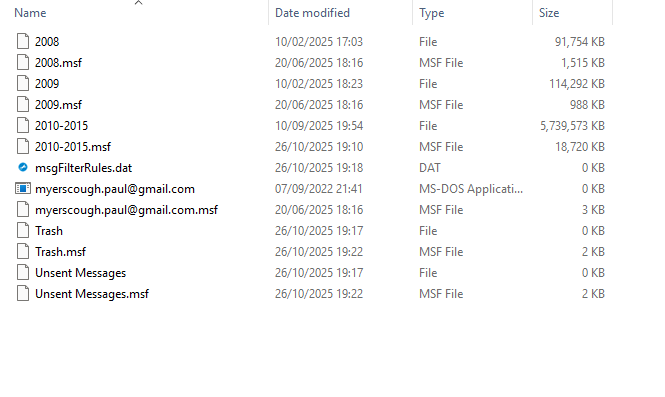
Thanks for your screen shots. The one in the middle is a bit confusing since at the top it doesn't indicate the path to and the name of the parent folder of archive, archive.sbd, ... etc . To illustrate what I mean a join a screen shot of the path to my Local Folders in the profile. It's on a Mac but you will understand the concept.
A screen shot of the contents of the Local Folders on your old PC would be welcome to compare with the situation on the new PC

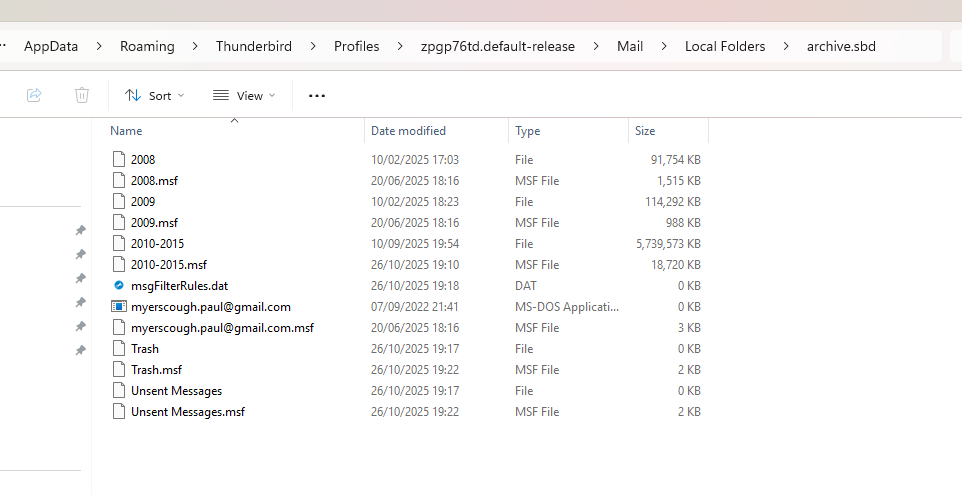
Here's the last picture with the path showing ... (new PC)
And with it the old PC's folders view showing local folder
I wonder if there is any problem with handling duplicate folder names. The folder name 'personal' also appears in one of the mail accounts.
myerscough.paul said
Here's the last picture with the path showing ... (new PC)
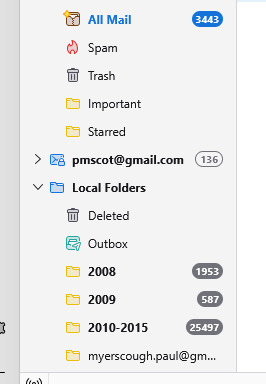
Even with this new picture I am unable to explain why your archive year subfolders (2008, 2009, ... etc) are not displayed as subfolders of "archive" - as they should - but directly as folders of the Local Folders. On the other hand the Unsent Messages and Trash files should not be stored in "archives.sbd" but directly in Local Folders. May be I am missing something in your pictures, that's why I prefer working with folder hierarchy views like in the macOS Finder.
myerscough.paul said
And with it the old PC's folders view showing local folder
I think that the best and most easy solution would be as follows: on your old PC copy the entire "Local Folders" folder from Mail (in the profile folder), transfer it on the new PC. On the new PC open the profile folder > Mail, quit Thunderbird and move Local Folders in another directory, e.g. Documents. Then put your Local Folders from the old PC in the Mail folder on the new PC and start Thunderbird.
myerscough.paul said
I wonder if there is any problem with handling duplicate folder names. The folder name 'personal' also appears in one of the mail accounts.
That's no problem. You can create folders with the same name in different accounts.
Modified by Mapenzi
Thanks for your reply. Before raising my question I copied the whole Local Folders directory across from the Old to the New as you described.
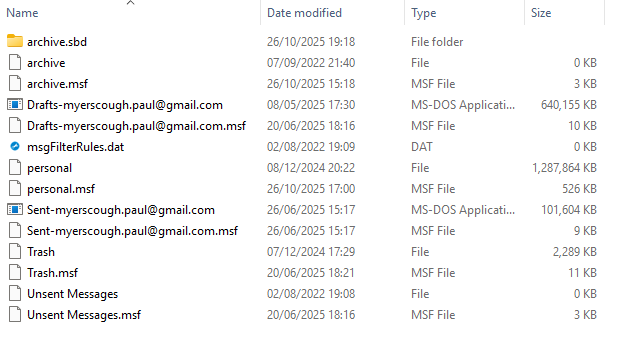
In the copied information the files for unsent and trash and also msgfilterrules only exist at the Local Folders root level, not in archive.sbd. TB on the new PC inserted these (5) files in the archive.sbd directory.
I tried deleting them from the archive.sbd folder while TB was closed on the new PC. Then opened the program again. The files were inserted in that folder again.
It is very difficult to imagine your real folder hierarchy in Local Folders following your images. Please show a new screen shot with the contents of \Mail\Local Folders\ with the folder path at the header. I cannot understand screen shots when I can't see which folder's content they display.
What do the "pin" symbols mean on the left of certain files in your last screen shot? Are these files "pinned" and cannot be moved?
Modified by Mapenzi
Hi, the top line shows the full path to the Local Folders directory.
The pins are not connected with the files you see to the right, but the folders on the left (they are pinned to the top of the file list in the navigation pane). You can ignore them.
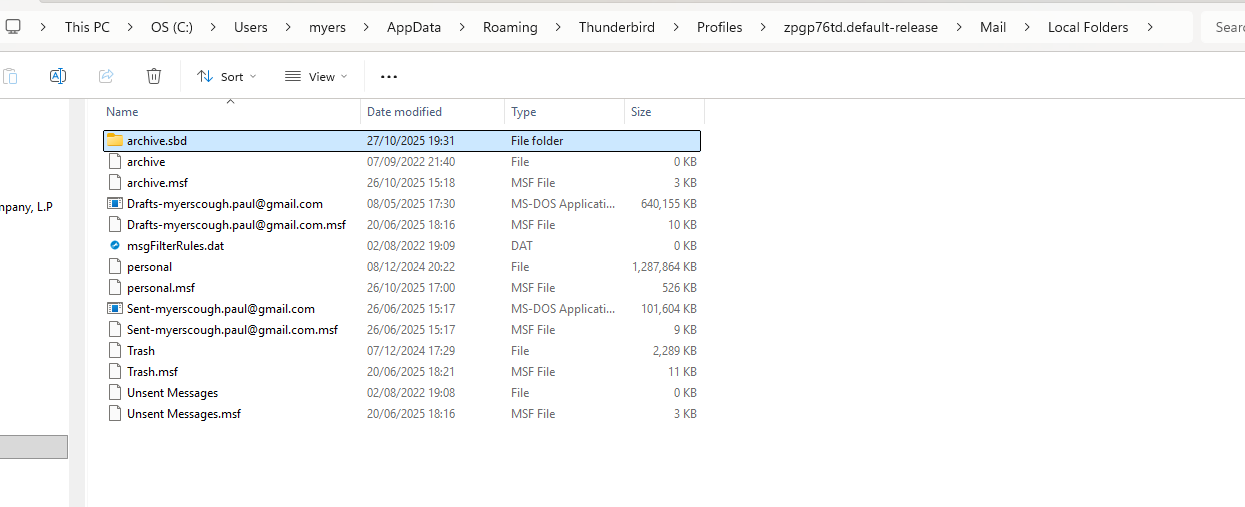
Your archive.sbd file folder contains archive files but below 2010-2015.msf there are files which do not belong in the archive.sbd folder. Those "illicite" files belong directly in Local Folders where they already exist. Thunderbird closed, open the archive.sbd folder and delete everything from msgFilterRules.dat to Unsent Messages.msf.
Restart Thunderbird.
Thanks M, you probably didn't notice what I said above
"I tried deleting them from the archive.sbd folder while TB was closed on the new PC. Then opened the program again. The files were inserted in that folder again."
There is some malfunctioning code which looks for these files and adds them.
myerscough.paul said
Thanks M, you probably didn't notice what I said above
OK, I misunderstood which exactly were those 5 files.
myerscough.paul said
There is some malfunctioning code which looks for these files and adds them.
I have never seen that before and I have no clue about the cause of this dysfunction. Now try this: open the Thunderbird profile folder, exit TB, look for two files named folderTree.json and folderCache.json and move them to your Desktop. They will be recreated after next TB startup.
OK, I moved the two json files you mentioned and deleted the 4 extra files in the archive.sbd.
When I restarted TB it looks the same.
The json files are recreated as you indicated with today's date.
Maybe I should copy the files from within the archive.sbd, and remove that extra folder.
What do you think?
You can give it a try. What I can't understand is that in your folder pane your archive folders 2008, 2009 and 2010-2015 are displayed subfolders of Local Folders and not subfolders of archive where they should be with regard of the profile. It is not logic.... or I misunderstand the Windows file manager!
That did not help! I copied the files from the archive.sbd up one level to local folders. Then deleted archive.sbd. Then deleted the two json files you mentioned.
When I opened TB there was 'deleted' and 'outbox' in local folders, nothing else.
If I scroll down the new cache json content there is still mention of archive.sbd even though it no longer exists in the file structure.
I'm reluctant to reinstall because I have been using it for a month or so on the new platform, but I think that's what I will have to do ....
Modified by myerscough.paul
This is more and more a nightmare! It's totally incomprehensible, there is no logic. Do you have one or two profiles in the "Profiles" folder? Please go to Account Settings > Local Folders > Message Storage > Local Directory and post a screen shot of the path to the local directory of the message storage. If the path is too long copy it and report it here. Did you read my private message?
There are two profiles: the first has nothing behind it (see attached screen shot).
The setting shows the place we have been working with ..
C:\Users\myers\AppData\Roaming\Thunderbird\Profiles\zpgp76td.default-release\Mail\Local

I previously said ..
"If I scroll down the new cache json content there is still mention of archive.sbd even though it no longer exists in the file structure."
Actually I didn't recheck file structure after re-opening TB. What I see now is that the deleted folder is recreated. Not with my archives in it of course, but with the 4 files for trash and unsent!
Unsent Messages and Trash are standard folders in Local folders and TB will always recreate them. As for your archive folders it stays a mystery for me. Did you read my private message?
Modified by Mapenzi
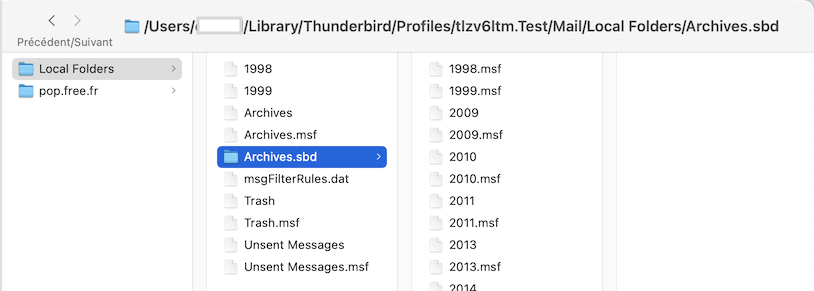
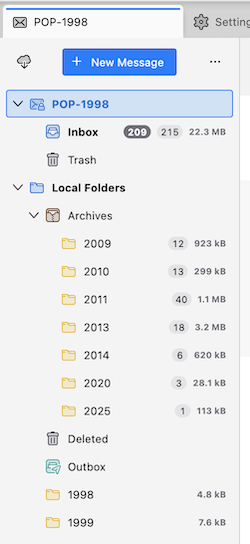
I just played a bit around in my Test profile: manually (copy & paste) imported an "Archives" file and the corresponding "Archives.sbd" folder from a POP account in another profile to ...Mail/ Local Folders/. .. in my Test profile. The I moved the 1998 and 1999 files from Archives.sbd directly in Local Folders (first image). When I start TB in my Test profile everything in Local Folders in the folder pane corresponds to the folder/file hierarchy I had created and modified in Local Folders in the Test profile.