

This thread was archived.
Please ask a new question if you need help.

Archived
TB 143.0.1 Online Status

I just installed TB v143.0.1 on a windows 11 PC.
The "online" status bar at the bottom-left of the message window has disappeared.
And when I do GET messages, the indicators for connecting to the POP server and the # of emails to be downloaded has also disappeared.
Any clues as to how to get this back or is this what is now supposed to happen?
I just installed TB v143.0.1 on a windows 11 PC.
The "online" status bar at the bottom-left of the message window has disappeared.
And when I do GET messages, the indicators for connecting to the POP server and the # of emails to be downloaded has also disappeared.
Any clues as to how to get this back or is this what is now supposed to happen?
All Replies (2)
could it be you have turned off the statuys bar somehow?
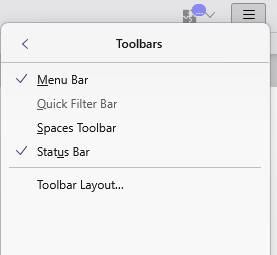

Me too, after update to 143.0.1 (64-bit), Windows 10, with Status Bar checked.
(I had hidden the Spaces toolbar, on the side.)
UNchecked: View/ Toolbars/ Status Bar. REchecked that. Still no status bar. But I think Exitted, restarted, and then OK.
OR: was ok after I then unhid Spaces, and then re-hid that.
Cheers.