


Sync google contacts - Does it work?

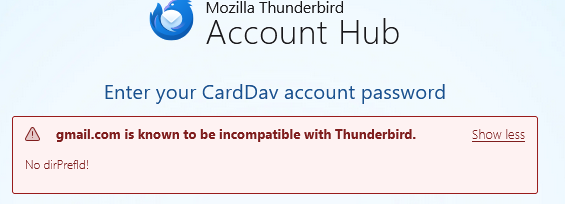
I thought up a sync for google contacts , but it seems to be broken. I tried to redo it and got an error(see image). Can it work? How?
Chosen solution
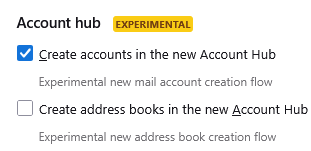
Disable the account hub in Settings/General, start again from ⩸ - New Account - New Address Book, CardDAV Address Book, enter the gmail address.... Contacts are autodetected. Cookies must be accepted in TB (not browser) Settings for OAuth authentication to complete.
Read this answer in context 👍 1All Replies (5)
I suggest starting over. enter gmail email address and see if that is accepted. This particular feature has been rock solid for years, so I'm puzzled
Chosen Solution
Disable the account hub in Settings/General, start again from ⩸ - New Account - New Address Book, CardDAV Address Book, enter the gmail address.... Contacts are autodetected. Cookies must be accepted in TB (not browser) Settings for OAuth authentication to complete.
Modified by sfhowes
david said
I suggest starting over. enter gmail email address and see if that is accepted. This particular feature has been rock solid for years, so I'm puzzled
Ok. Thank you. Do I delete that one account in Thunderbird then add it back in fresh? Should I turn off the "Account Hub settings in the image attached? (Since the normal way has been rock solid for years.)
sfhowes said
Disable the account hub in Settings/General, start again from ⩸ - New Account - New Address Book, CardDAV Address Book, enter the gmail address.... Contacts are autodetected. Cookies must be accepted in TB (browser) Settings for OAuth authentication to complete.
Thank you. I think the 'account hub' and 'cookies' could have been issues for me.
Solved. Thank you both. I had also manually remove the 'contact book' after removing the account, but before adding it back. That allowed the set up process to add the book as a new CardDAV book. Looks like it is all working now. Thanks!