


sending emails

When I write a meesage, the send button and all the other buttons (e.g. file, edit, insert.... cannot seen. What has happened. How do I restore them so I can send and write messages?
Chosen solution
I am very sorry if I appeared dumb and rude. I did not mean to be, just a learning kid at 89 years. The problem has been solved and I am grateful. I also understand the nature of Thunderbird and greatly approve of it.
Thank you David and Matt. Please forgive my frustration.
Read this answer in context 👍 0All Replies (7)
bars with options are set at view>toolbars if not shown, click alt key and then click view>toolbars and set. repeat this process also after clicking 'new message' as the options are different there.
Thank you Michael. That has worked well for the inbox page. But for New Message, I press Alt and the bars come up but insert and format are not available, nor is send. Then when I start to write it all disappears again. Where is set.?
the insert feature only appears if you are composing in HTML format. did you tick the view>toolbars>compostion toolbar when in 'new message' window?
I'm lost and need advice from Thunderbird direct. How do I get it?
This is the place.
BenjaminHopkinson said
I'm lost and need advice from Thunderbird direct. How do I get it?
You need to listen to the good advice you are given. No one is paid to help users of Thunderbird, so work with the folk that are freely giving of their time, because they are all you are going to get. Placing what amounts to a duplicate topic some 10 minutes after your last post here is not going to be effective in generating the result you apparently think it will. I will be closing your other topic as a duplicate of this one. https://support.mozilla.org/en-US/questions/1536696#question-reply
david said
bars with options are set at view>toolbars if not shown, click alt key and then click view>toolbars and set. repeat this process also after clicking 'new message' as the options are different there.
Which looks like this
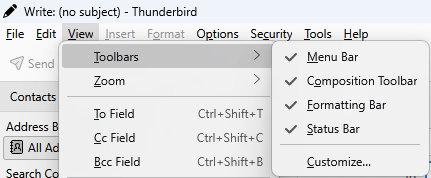
Did you do that in the compose window after you clicked new message like David asked you or not?
BenjaminHopkinson said
Thank you Michael. That has worked well for the inbox page. But for New Message, I press Alt and the bars come up but insert and format are not available, nor is send. Then when I start to write it all disappears again. Where is set.?
Do you mean like this

Place the insertion point in the text area of the email and if you are composing in HTML they will change like this.

Or do you mean this image I posted first.
Where the menu bar is turned on and off as is the toolbar w8ith the send button on it.
Chosen Solution
I am very sorry if I appeared dumb and rude. I did not mean to be, just a learning kid at 89 years. The problem has been solved and I am grateful. I also understand the nature of Thunderbird and greatly approve of it.
Thank you David and Matt. Please forgive my frustration.