


to many tabs

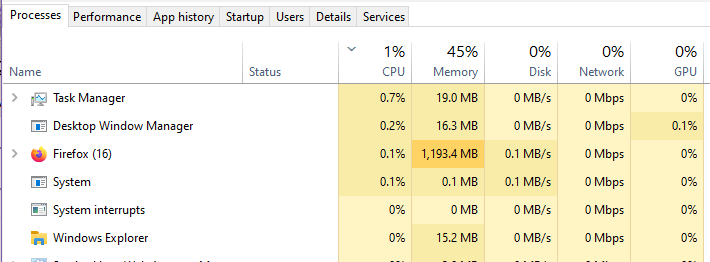
when i open firefox and have one tab open, doesnt matter what site it will freeze and i go to task manager and it says i have 15 open and ill end task and open again and it will say more or less
All Replies (2)

Hi,
If you are looking at this page - processes - in task manager then those are not tabs, just the number of processes Firefox is running. You have a Firefox freezing problem. I'd suggest making another help request for that problem.
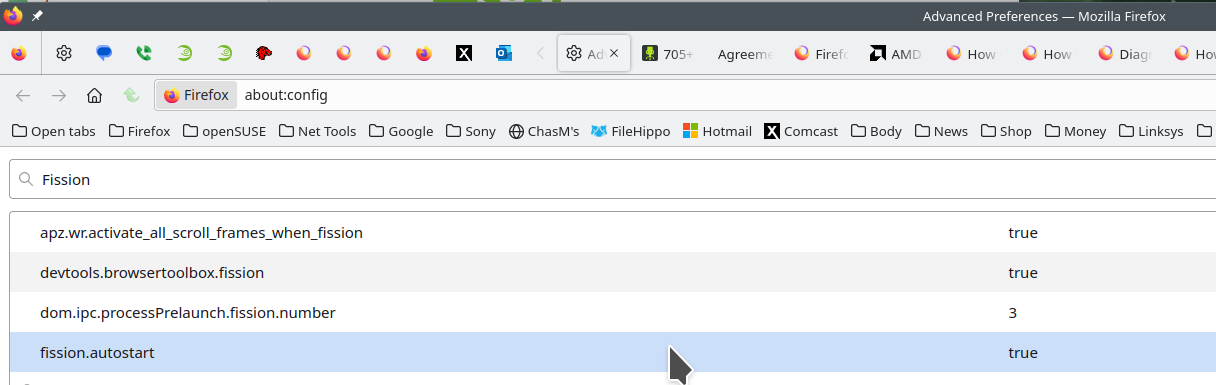
FISSION: The links are sites explaining the Firefox's Project Fission. This is the reason for the processes you see in task manager. You can turn fission off by setting it to false on the about:config page. see screenshot Here is more info. https://www.ghacks.net/2016/02/15/change-how-many-processes-multi-process-firefox-uses/
Introducing Firefox’s new Site Isolation Security Architecture https://hacks.mozilla.org/2021/05/introducing-firefox-new-site-isolation-security-architecture/
Firefox's Project Fission: better security and more processes https://www.ghacks.net/2019/02/07/firefoxs-project-fission-better-security-and-more-processes/
Modified by jonzn4SUSE