


Thunderbird shows old printer being not in Windows Printer List

Dear All,
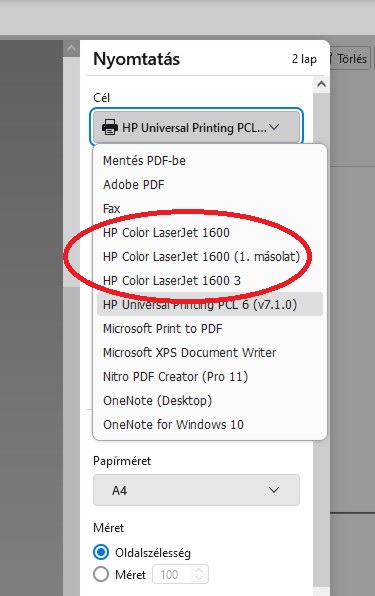
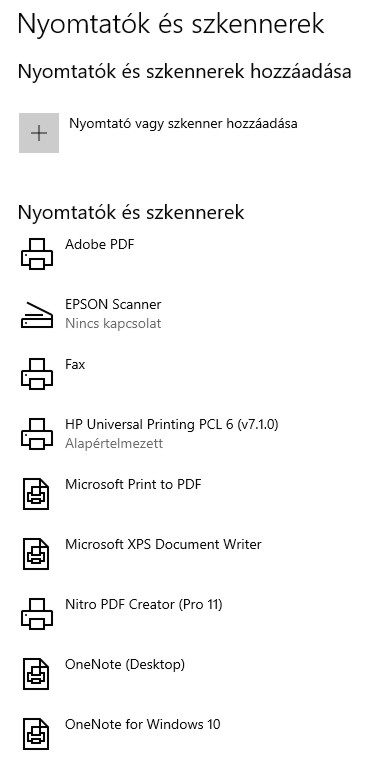
perhaps a lamer question, but I cannot fix it: TB (128.8.esr 64 bit) shows some older (local) printers which already don't exist now. These printers are not in my Win10 Printer List. How can I remove them from TB printer list?
Thanks Peter
Dear All,
perhaps a lamer question, but I cannot fix it:
TB (128.8.esr 64 bit) shows some older (local) printers which already don't exist now.
These printers are not in my Win10 Printer List.
How can I remove them from TB printer list?
Thanks
Peter
Chosen solution
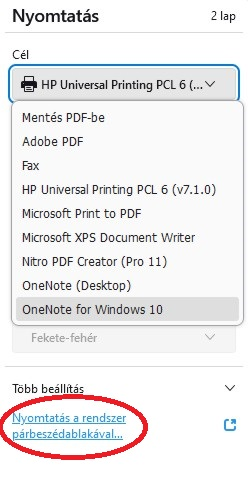
But now I solved it by choosing Print vie system dialog box > Then obsolete printers can be deleted.
- -))
All Replies (4)
Try this: Help/Troubleshooting Info, Printing (bottom of tab), Clear saved print settings, restart TB, see if obsolete printers are still present.
Hi! I tries this, but obsolete printers are still there..
Chosen Solution
But now I solved it by choosing Print vie system dialog box > Then obsolete printers can be deleted.
- -))

Thunderbird does not store internally a list of printers.
It lists printers from the O/S.