


How do I use the 'Add Exception' option on the Servers tab of the Certificate Manager

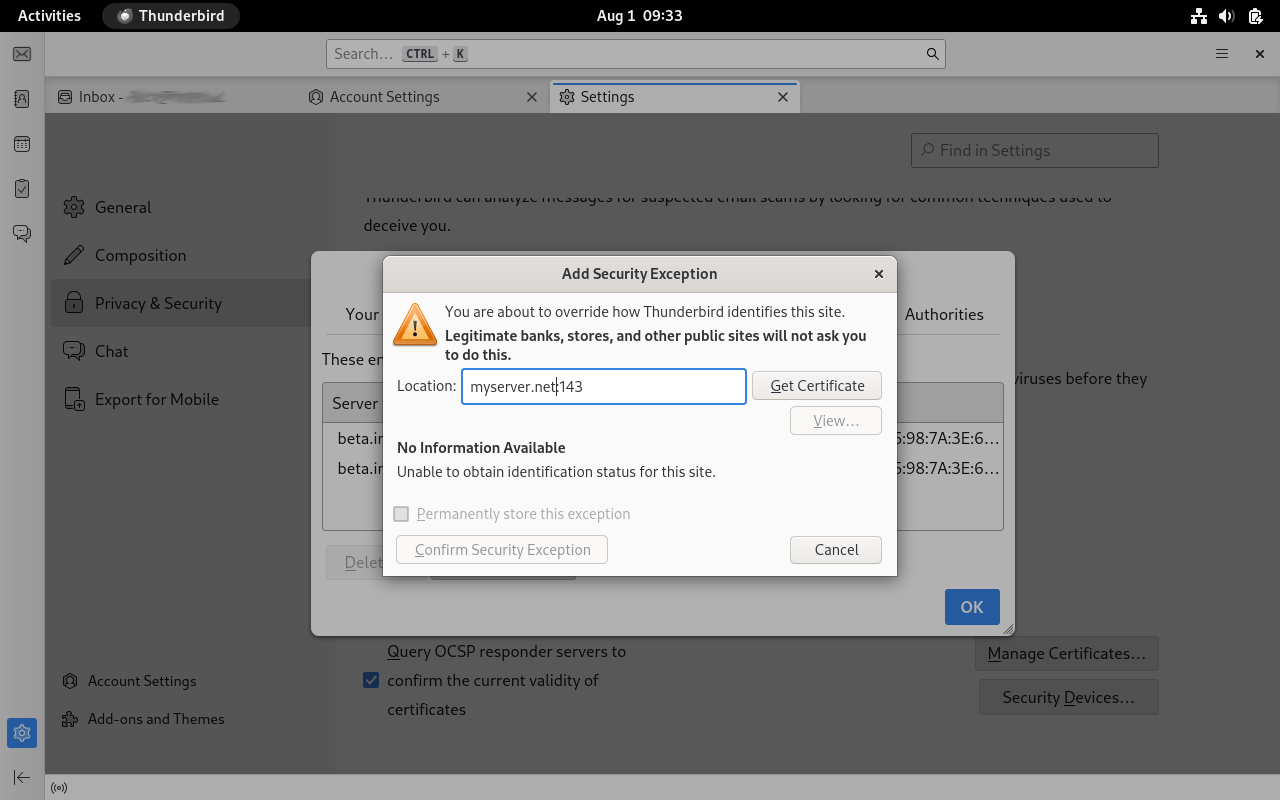
While debugging issues related to a self-signed certificate, I came across the Certificate Manager pop-up. This can be accessed in the Settings, under Privacy & Security, by clicking on the Manage Certificates button.
The Servers tab had a button for 'Add Exception'. I tried to add an exception, but it wasn't clear how this is supposed to work. I tried entering a location in form that is shown by existing exceptions and clicking on the Get Certificate button, but this resulted in a response of "No Information Available ... Unable to obtain identification status for this site." Is there any documentation or hints on how this is supposed to work?
All Replies (2)
I forgot to say that I'm using Thunderbird 128.13.0esr on Debian GNU/Linux 12

I had the same issue. You apparently cannot add an exception for an expired certificate from the Settings | Privacy and Security. Rather, you have to compose a test email and send it. Then you will see a warning. Then, click OK and you will get a dialog to allow an exception. After allowing the exception, it will be added, and you will also see it at Settings | Privacy and Security panel.
I am using Thurderbird 147.0 (64-bit) on Windows 10.
Modified by richardurbanfamily