


What happened to the 'forward as attachment' button

Thunderbird did an update 2 days ago. All of a sudden the buttons like 'forward as attachment' (and the others that were in that list) have disappeared. What happened to them? They used to be at the top left when you clicked on an email that you wanted to forward as attachment. Update shows this version--140.1.0esr
Thanks in advance for any help in getting those things back
Chosen solution
that is the version I am using.. Please select a message in message list pane, right click and select 'forward&redirect' and send screenshot of the displayed options. That will help in pursuing this. thank you
Read this answer in context 👍 0All Replies (15)
click 'forward and redirect' and it's there
that is, highlight message in message list and then rightclick...

Sorry, but that does not work in 140.1.0esr on Win10 pro.
Chosen Solution
that is the version I am using.. Please select a message in message list pane, right click and select 'forward&redirect' and send screenshot of the displayed options. That will help in pursuing this. thank you
What David suggested DOES work!
David,
Here is the screen shot you requested. When clicked...nothing happens at all.
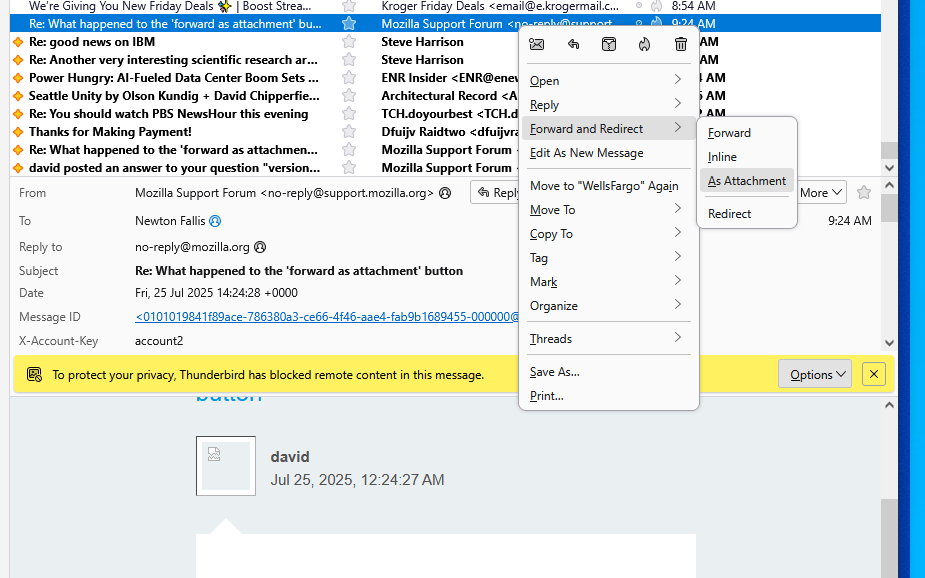
It works for me. When I right click on a message, the box you're showing pops up. I click forward, then as attachment, and it adds it to the email to send.
puzzling. try running in troubleshoot mode and see if that affects the outcome.
Well, apparently I have an even bigger problem. I just tried to use the "+ New Message" button...and it does not work either.
I think I need to force a reload of Thunderbird.
I used troubleshoot mode and cleared the startup cache, but same problem.
I went into Settings and changed the forward from "inline" to "attachment", with no change. I then changed it back because that was where I assume it has always been as a default.
I have been using the update function so long, I am not sure how to force a fresh copy of Thunderbird.
I just ran a virus scan and got zero problems.
Well, I just upgraded to 141.0, and the same thing is happening.
I cannot compose a new email??!!!? I can "reply to sender", but have not tried this as a workaround.
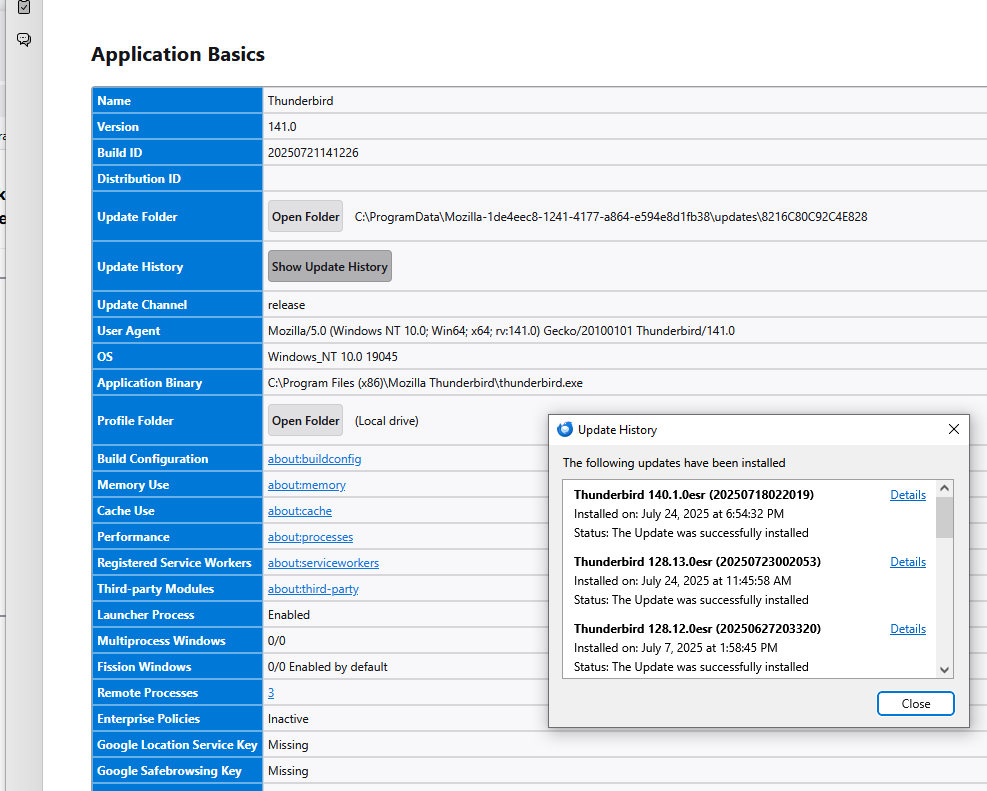
Well, I just thought I might revert to an earlier version which was working, so I looked at "troubleshooting information" and the history correctly shows "141.0" on one line titled "User agent", but the "Show Update History" popup still shows "140.1.0esr". See attached image.
A known bug - which might still be alive - that the 'new message' button does not work if there is not a default account defined. check 'account settings' - the default account will have a star to the right of the account name. Set a default and let us know if problems are resolved.
David,
I just got your reply, and I want to thank you!! That was the problem and it fixed BOTH problems.
The "forward as attachment" now initiates a new email, and the "+ New Message" button works as it should.
( I had worked out a temporary fix that might be useful to you down the road somehow. I could use the "Reply to Sender only" and get a message started. I cleaned out the "To", "Subject", and body of the email, and saved it as a "Draft", so that I could open it and use it. )
Thanks again for all your team does, it makes me glad I am an annual donor!
You're very welcome. And this helped me as well. I hadn't realized that the 'forward as attachment was tied to the other bug. Win/win for us both. :) And thank you for your annual support.