


How to show list column

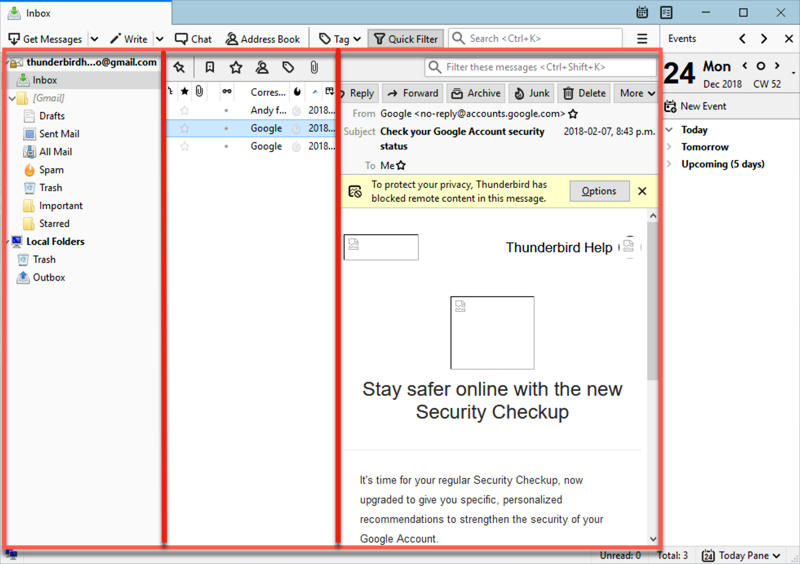
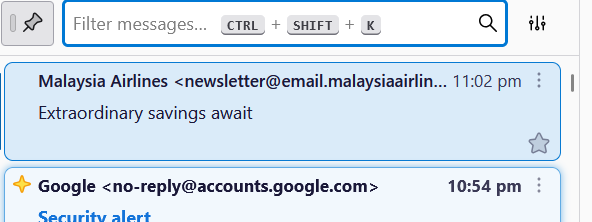
Last time thunderbird used to list the message by column. Refer to diagram 1 middle section. Now they list it in up down. Refer to diagram 2. Anyone know how to change back to list by column ? I am now using ver 137.0.2 (64 bit).
Last time thunderbird used to list the message by column. Refer to diagram 1 middle section. Now they list it in up down. Refer to diagram 2. Anyone know how to change back to list by column ? I am now using ver 137.0.2 (64 bit).
Chosen solution
Yeah..working now... Thanks.
Read this answer in context 👍 0All Replies (2)
- click view>layout>message list header - then, click the icon to the right of the quickfilter box and tick 'table view'
Chosen Solution
Yeah..working now... Thanks.