


Can not disable auto update on Firefox/Linux

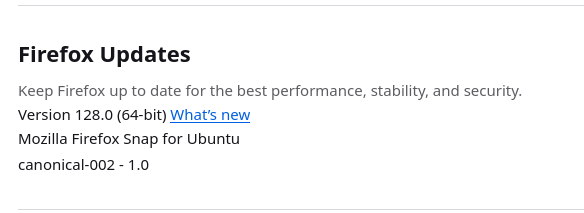
Please advise how to disable automatic updates on Firefox running on Linux Kubuntu. Solutions posted on mozilla.org do not work because stated disable options are not available(see screenshot). I have set app.auto.update to false in about:config but this does not disable updates. I have been repeatedly advised not to disable updates so I am aware of the so called risk. I am very tired of every update breaking a reliable browser and having to repair/fix/workaround each and every time. Please provide a viable solution.
All Replies (1)
Firefox 128.0 Released on July 9, 2024 is the current Firefox Release.
Mozilla only provides internal Firefox updates (with .mar files) to their official tarball builds from mozilla.org like say https://www.mozilla.org/firefox/all/#product-desktop-release and no internal updates to any package/snap builds.
You appear to have the snap version so you will need to deal with the snap updates.