


Updated Thunderbird and lost email inbox and connection

Pressed the 'update' request for Thunderbird this morning, After which I lost my entire inbox and the facility to send/receive emails. Local tech guys and BT unable to solve. Heeeeelp???!
All Replies (2)
First - check to see if your Firewall is blocking Thunderbirds access to internet. It's possible the firewall thinks the updated Thunderbird is different program.
Exit Thunderbird if running. Access Firewall - this might be the default one provided by OS or provided by a Anti-Virus. Is Thunderbird set up as an allowed program ? If no, then set Thunderbird as allowed program. If yes, block or remove Thunderbird and ok it. Then Access Firewall again and set the thunderbird.exe file as allowed program.
Then Start Thunderbird to see if it gets access to server.
I'm using Norton 360 Anti-Virus - I've provided example image showing how Thunderbird is allowed program and also the Thunderbird updater.
Pleases confirm you have reset Thunderbird as an allowed program in Firewall.
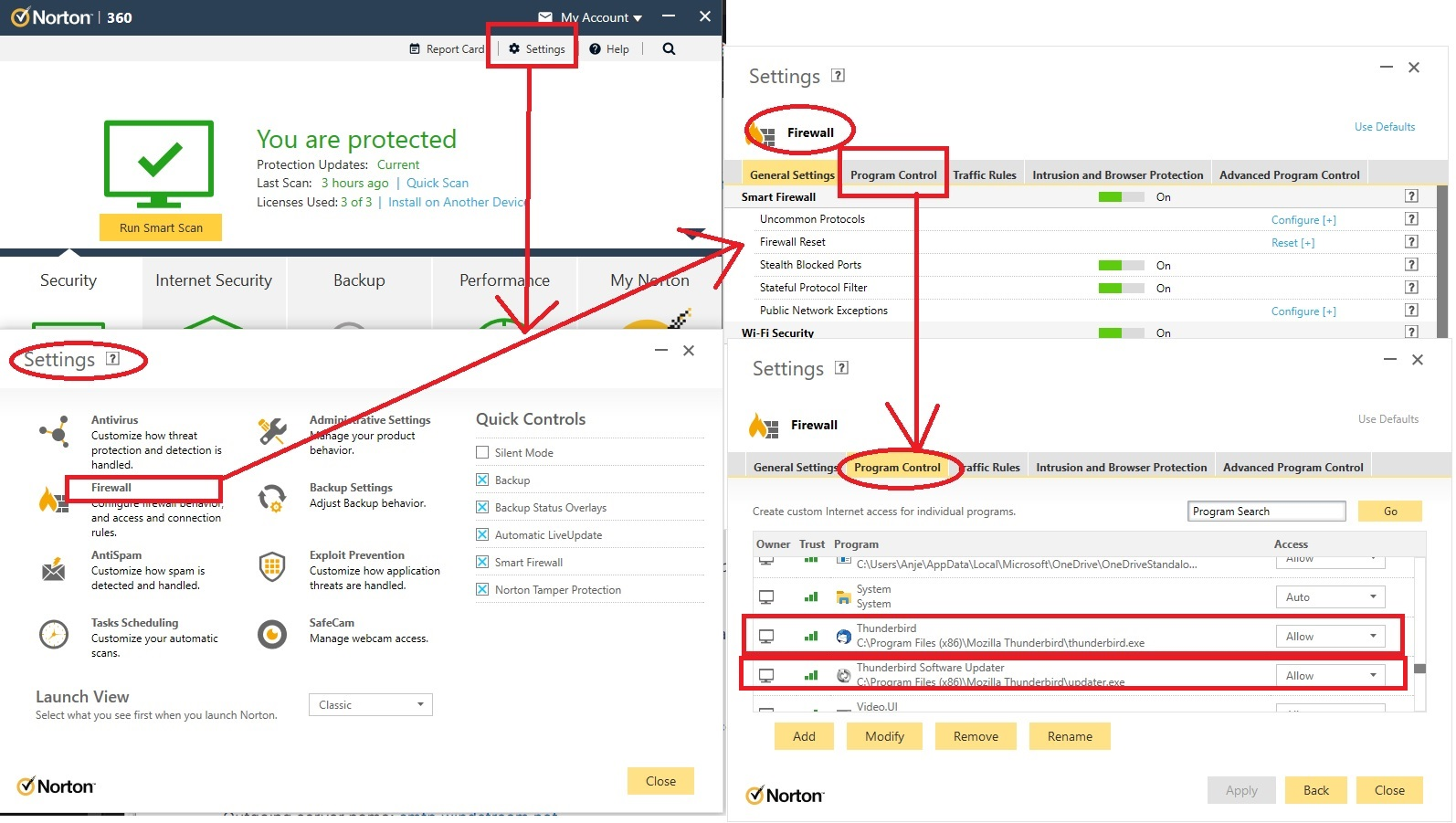
Modified by Toad-Hall
This question has been locked because the original author has deleted their account. While you can no longer post new replies, the existing content remains available for reference.