


Still~tiny fonts

Tbird only displays very small font size when: typing an email to send reading an email sent to me reading a previous email that I've manually enlarged font. I have checked out all of the suggestions, none satisfactorily. I obviously can manually enlarge (control +++++++ infinity). However is there any real solution to defaulting to the larger font size when using Tbird. I am NOT a programmer. I can follow specific instructions. I've tried and researched, read the entire community feedback. Nothing works here. I use windows 11. What the heck happened out there!? Tbird have covid??? Thank you to all of my Tbird family in advance.
All Replies (11)
You know, one of the standing problems is "I have checked out all the suggestions" I and no one else has any idea what that really is. Then folk get all excited when we start at the beginning, but that is the only choice we have.
Have you tried the font size option on the view menu?
Ahhhh, yes my good man. Let us quote our friend Mary Poppins..."we'll start at the very beginning, a very good place to start..." Alas, I have utilized that temporary solution Matt, thank you. But as we are aware, it is merely a moment in time, as when life restarts, in reality, there was no relief. Also, for the saga, all the way to the epilogue, "Config editor" will increase size, however, it increases the entire galaxy, where the pages can no longer display properly, becoming oversized even at a 1.2, no less a 1.5. What hath Satya Naryana Nadella wrought? I await and continue to admire your skills, my kind and wise moderator. I do believe that the next chapter's working title is "One day all is normal in the Thunderbird paradise...and the very next day...upon the start up of the Haydron Collidor...the shrinkage, oh my god...the shrinkage of the fonts descended upon the land"
There is also a way to increase font size throughout Thunderbird via the 'Settings'.
- Left Click on the 'Menu app icon' (icon with 3 horizontal lines) and left click on 'Settings'.
'Settings' (previously known as Preferences or Options) opens in a new tab
- In left menu - left click on 'General'
- Scroll down to the very bottom
- left click on 'Config Editor' button
- Accept the risk.
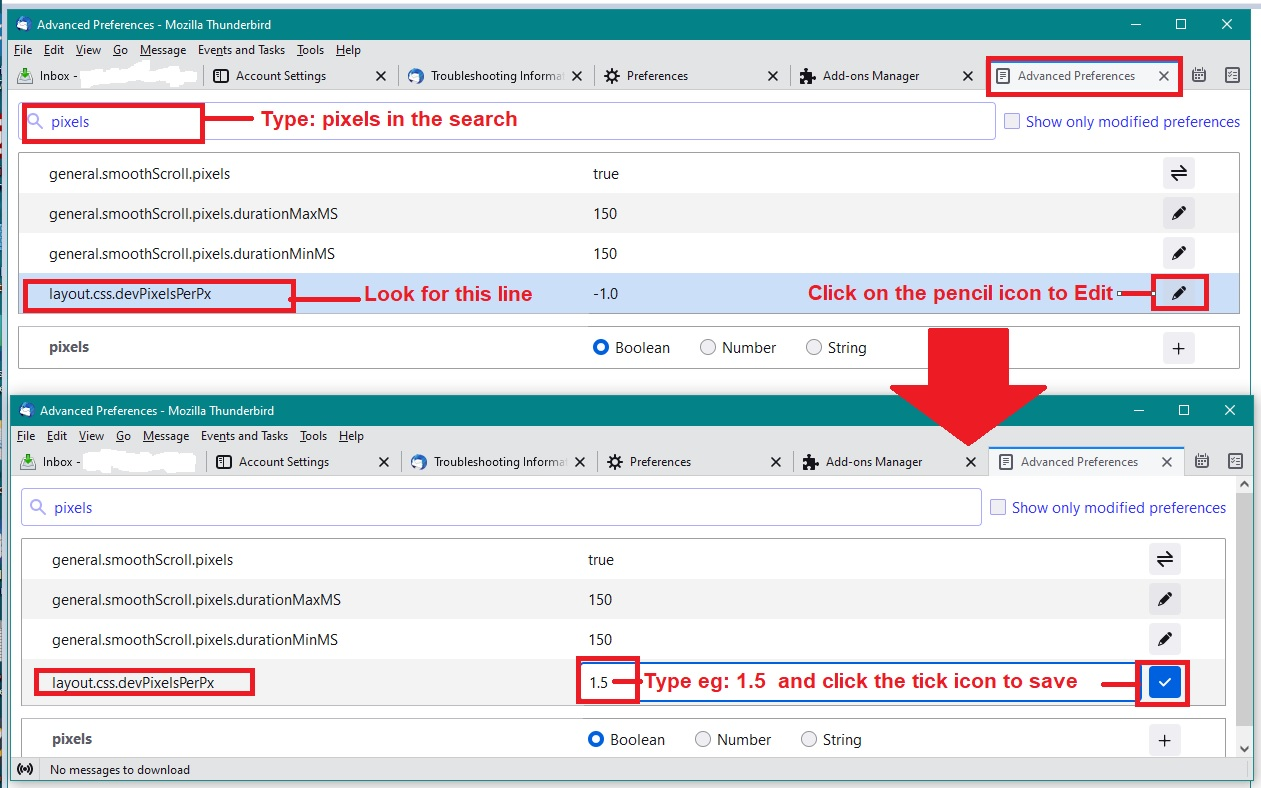
'Advanced Preferences' opens in a new tab - see image added below as a guide.
- In top search, type: pixels
- look for the line: layout.css.devPixelsPerPx
It has a default setting - a negative value of -1.0 and to the right you will see a 'pencil' icon
- left click on the 'pencil' icon for the line: layout.css.devPixelsPerPx
You will now be able to edit the value.
- Completely remove the negative -1.0 value
- type in a new value - I suggest you start with a positive number 1.5
- click on the icon that has a tick (previously it was the pencil icon) and this will save your entry.
Do not close anything at this point because you still have access to the 'Advanced Preferences'. Notice how the font size has increased.
If it has increased too much, then edit that same value again by clicking on the pencil icon and changing the value to : 1.25 and then click on the 'tick' icon.
If the font has not increased enough - then edit that same value again by clicking on the pencil icon and changing the value to : 1.75 and then click on the 'tick' icon.
Strongly advise you do not choose a setting which is too large, increase gradually otherwise you may inadvertantly set a size which renders it difficult to use Thunderbird and I'll have to assist you in a fix.
When happy, close the 'Advanced Preferences' tab.
PLEASE NOTE - MAC USERS The size of a pixel in a MAC OS is a lot smaller, so you would need to start with a larger size eg: 10.0 OR increase the font/pixel size via your computer settings.
Hi Toad. Thanks for your reply. Unfortunately, as I'd written, config only increases font when typing messages to be sent. When observing in SENT, the font is still tiny. Just so we're all clear on this issue: This all started upon a TB update. I am totally aware of the ways to temporarily increase font size, which is what I do each time. The config solution merely increases size for the email that is being typed. The config solution is not a solution to this issue. TB should somehow be able to default to any size font the user needs. Tiny fonts, yes tiny, are in need of being changed TB! Someone at TB needs to reprogram this ridiculous default. Ladies and gentlemen, I appreciate your valued knowledge. Does anyone have this issue that has been solved full time, as a default. Thank you all!
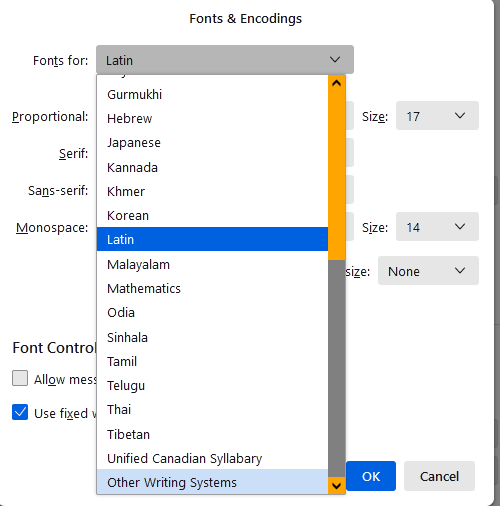
Open Settings/General, Language & Appearance, click Advanced..., set the fonts and sizes with Fonts for: Latin, then repeat with Fonts for: Other Writing Systems. Uncheck 'Allow messages to use other fonts'. Size is in pixels, e.g. 16px = 12pt.
In Settings/Composition/HTML Style, keep the Size as Medium.
Hi SFH! I think we're onto something here. after "Advanced, I have LATIN listed as the title of Fonts and Encodings. Below that the following: PROPORTIONAL: San Serif SIZE 18 SERIF: Cambria SANS SERIF: Calibri MONO SPACE: Consolas SIZE 18 Minimum Font Size 18 OK
Font Control : Unchecked "Allow messages to use other fonts" Checked "Use fixed width font for plain messages" __________________________________________________________________ Where do I find "other writing systems" Searched, but unable to find??? Thank you!
Click the Fonts for: drop-down menu, scroll to the bottom (see picture).
Thank you, completed all as stated. Now font size is even smaller!?? All set to 16. Don't understand.
The headings on the write email page are all large enough. It's in the text area, where I compose the emails, that the fonts are smaller and smaller. Then when I send myself an email to another one of my address', both the sent and the inbox on the received email are both tiny.
Did you change the Sizes so that the increase is noticeable? Different monitors and screen resolutions require different settings.
In Settings > General Under 'Language & Appearance' click on'Advanced'
I presume you have set up both 'Latin' and 'Other writing systems' to have the following: PROPORTIONAL: San Serif SIZE 18 SERIF: Cambria SANS SERIF: Calibri MONO SPACE: Consolas SIZE 18 Minimum Font Size 18 OK
What do you have in the following area?
Settings > Composition Under 'HTML Style' Choose these settings: Font - 'Variable width' Size - 'Medium' Uncheck 'Use Readers default colours' Text colour: 'Black' Background colour: 'White'