grouping messages

When I send a message it goes to the sent box and the message is being grouped This never happened before How do I make this not happen anymore?
Chosen solution
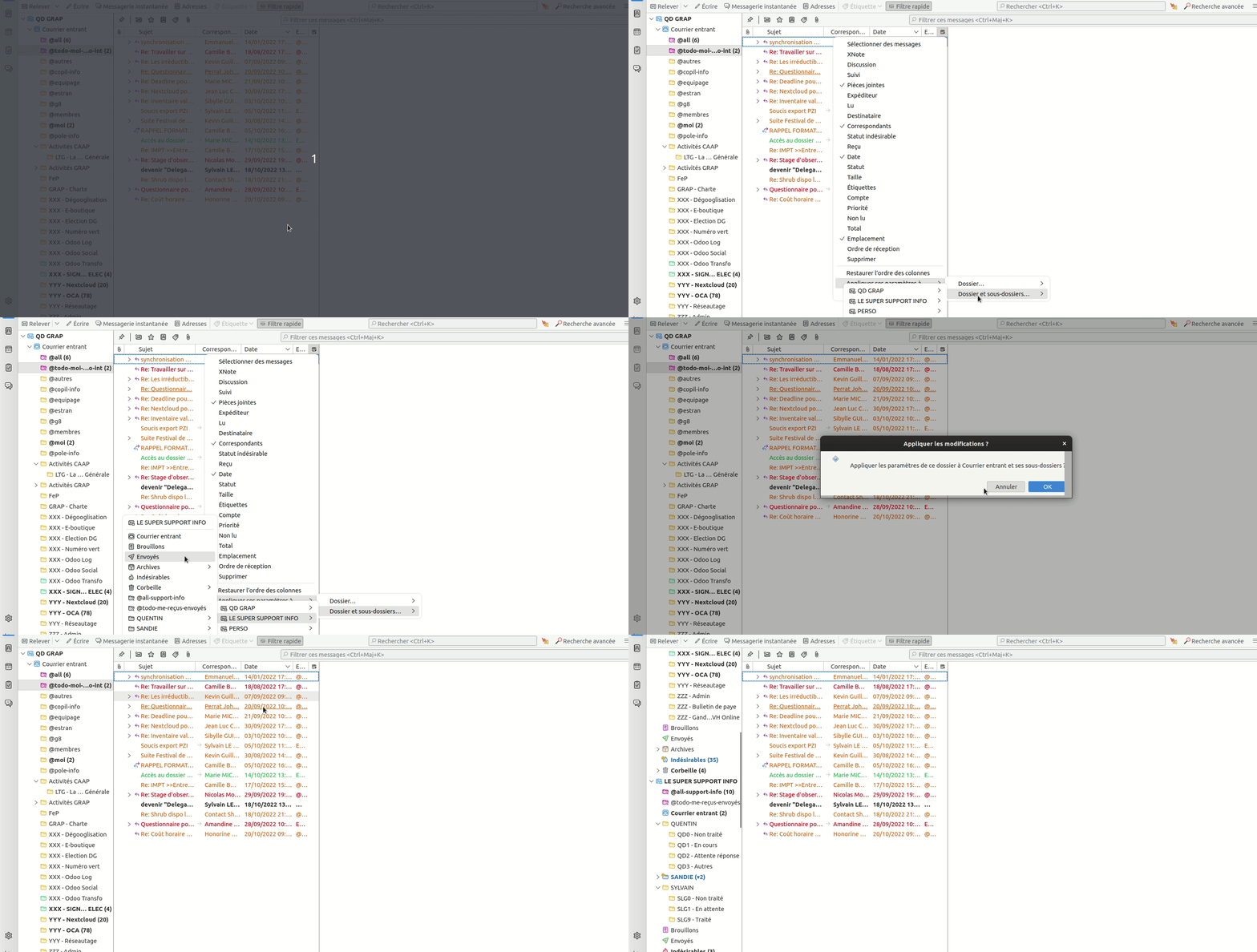
Indeed, this parameter is by folder, that's a bit annoying it seems for me. But you can apply all your parameters in all folders at once :
- do all the tricks you want in a folder (choose columns, threaded etc.) - then click on the upper right button and Apply parameters in all folders
Here is a gif for this last action
Read this answer in context 👍 0All Replies (3)
Hello,
What do you mean by "grouped" ? You mean all the mails of the same conversations are grouped together ?
For "grouped" mails, it's a parameter called "threaded" that you can change here : Menu > View > Sort by > Threaded / Unthreaded
For When I send a message it goes to the sent box it is normal, do you have a question about this ?
Thank you This solv my problemm For "grouped" mails, it's a parameter called "threaded" that you can change here : Menu > View > Sort by > do not group It's the penultimate option Is there any way to change all folders at once? Or do I have to change one by one?
Chosen Solution
Indeed, this parameter is by folder, that's a bit annoying it seems for me. But you can apply all your parameters in all folders at once :
- do all the tricks you want in a folder (choose columns, threaded etc.) - then click on the upper right button and Apply parameters in all folders
Here is a gif for this last action