


Unable to create a folder

I am trying to create a folder within my email account.
Everything seems to go okay, but then I don't see it.
Thank you, Ron
Chosen solution
It looked like I had fewer than 20 folders, but I deleted some folders I no longer needed. I tried again to create a folder and it still didn't work. I even restarted the computer and tried again. No change.
I then took a folder I didn't need and "Renamed" it. That worked.
Not sure why I couldn't create a folder, but I found a work-around.
Thank you for all of your assistance, Ron
Read this answer in context 👍 0All Replies (4)
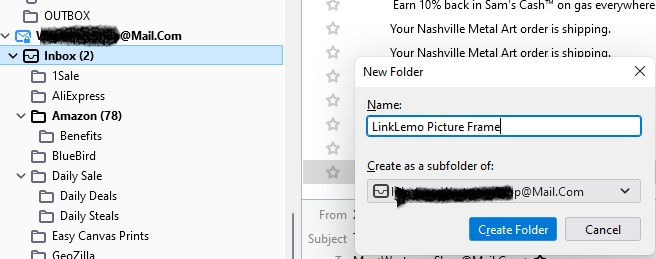
What are you calling the folder? Some hints are not to use punctuation like <>:\?{}[] Where are you trying to add the folder? Some IMAP providers require folders to be sub folders of inbox. Others prohibit that and it has to be added under the account name.
First, thank you Matt for replying.
I am attaching two screenshots.
1. Shows the Directory Tree. I am trying to create a new folder inside the email account shown. 2. Shows the Create Window and what I entered.
Ron
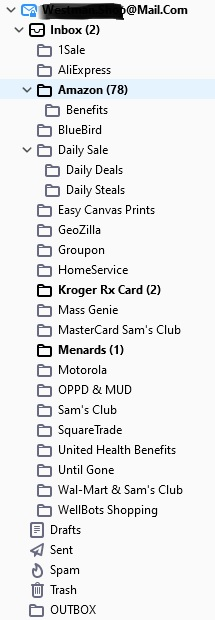
mail.com (good thing you left that bit visible) says you are limited to 20 folders. https://support.mail.com/email/folders/manage.html
Could it be you have arrived at that limit?
Chosen Solution
It looked like I had fewer than 20 folders, but I deleted some folders I no longer needed. I tried again to create a folder and it still didn't work. I even restarted the computer and tried again. No change.
I then took a folder I didn't need and "Renamed" it. That worked.
Not sure why I couldn't create a folder, but I found a work-around.
Thank you for all of your assistance, Ron