


New Tab "+" at right end of tabs has disappeared

I always relied on the "+" at the right end of tabs to get a New Tab, but it's disappeared, won't come back on reboot, doesn't seem available as a customization. It's not the greatest problem in the world but it is annoying when handy shortcuts disappear!
Chosen solution
Could you open the Customize panel and see whether you can find it there. This article will get you started:
Customize Firefox controls, buttons and toolbars
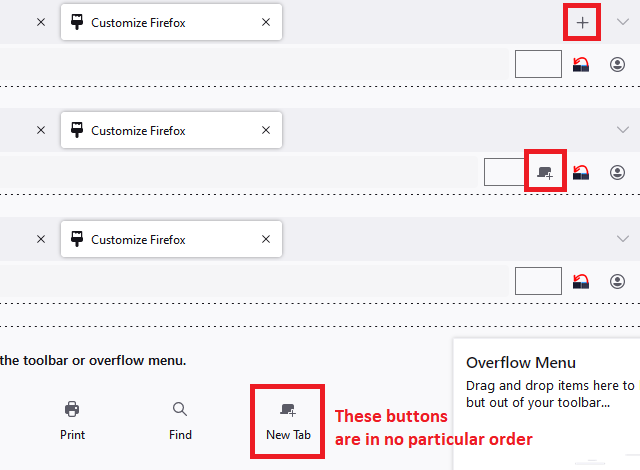
If the + button has been moved to a different bar, or back into the box of available buttons, it takes on a different appearance:

Can you track it down and move it back where it belongs? If all else fails, there is a "Restore Defaults" button at the lower right of the Customize panel to restore the initial layout.
Read this answer in context 👍 1All Replies (2)
Chosen Solution
Could you open the Customize panel and see whether you can find it there. This article will get you started:
Customize Firefox controls, buttons and toolbars
If the + button has been moved to a different bar, or back into the box of available buttons, it takes on a different appearance:
Can you track it down and move it back where it belongs? If all else fails, there is a "Restore Defaults" button at the lower right of the Customize panel to restore the initial layout.
Thanks, JScher2000. There's no "+" among the Customize icons but there is a New Tab icon for the Menu bar. I put that there, then left-button moved it to the end of the Tabs. Eureka! My "+" is back.