TB will not save in Sent-folder

Where can I look for the error? Anyone who knows? /hans peter
Chosen solution
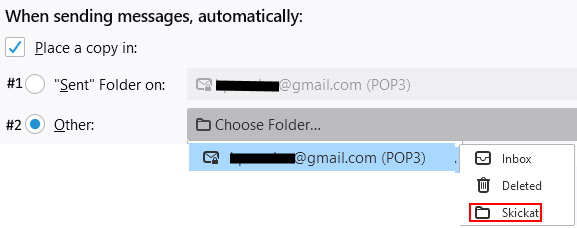
See Account Settings - Copies & Folders section.
Read this answer in context 👍 0All Replies (6)

Make sure that the SENT folder in your Thunderbird account can be accessed and is the correct folder. If you have IMAP - check that the Sent folder in Thunderbird is the same as where Sent messages go in your webmail. Test by sending a message in webmail, that it saves in Sent OK, then find that folder with the new email in Thunderbird. If you have Gmail it's a whole different way of doing that - use the special rules for Gmail and don't try to save to Sent in Thunderbird. There is more detail about where sent mail goes, specifically in Gmail here https://support.mozilla.org/en-US/questions/1266146 and how to connect Thunderbird to 'sent' if you are not subscribed here https://support.mozilla.org/en-US/questions/1285462
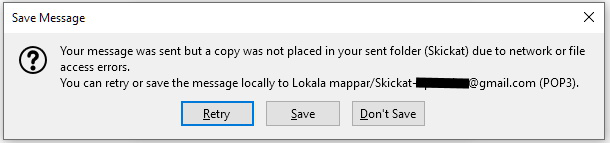
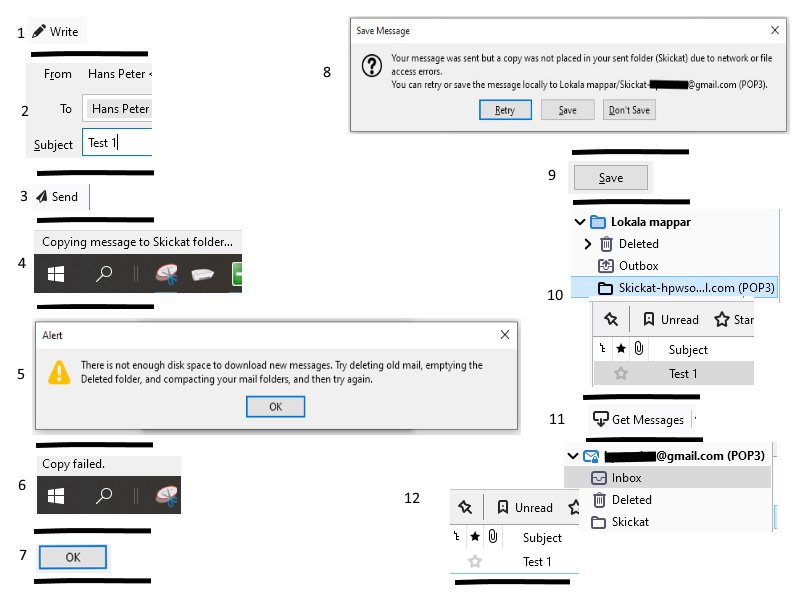
Thank you AgnesRM for a god try. However, I use POP. In the picture, I have tried to clarify the course of events. # 5 annoys me the most. I have not deleted any mail (have only 208 in the inbox), have emptied the Deleted folder and compacted the folders via File>Compact folders. Why are sent emails saved in a new local folder but not in the regular one? /hans peter
OK, then with POP all your mail is saved on your computer, and you could be out of space. Do you regularly 'compact' folders after deleting messages? You can do this for specific folders or all at once. Try one folder at a time at first. If you do not compact after deleting, then the space left by deleted messages is never made available.
Oh, sorry I forgot you said you do compact. Then perhaps the Where to put Sent messages setting is either pointing to the wrong place or the setting is corrupt. Try changing it save, change again to the correct location, save, restart Tunderbird and test.
Chosen Solution
See Account Settings - Copies & Folders section.
Hi AgnesRM!
#1 does not work, #2 works.
Thanks for kind help! /hans peter