


Problem with Mozilla Thunderbird
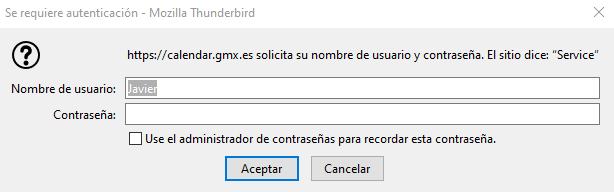
Sorry about my English. Each time I start Mozilla Thunderbird, the message I add appears. It says "https://calendar.gmx.es asks for your user name and password. The site says: "Service"". I'm a new user of Mozilla Thunderbird and I got some problems trying to configurate my email accounts, so then I think that's why that message appears. How should I do in order to stop watching that message each time I start Mozilla Thunderbird?
All Replies (3)
The picture suggests you are trying to add a CalDAV calendar (File/New/Calendar...), and the server is requesting your user name (GMX email address) and password. To add mail accounts, start from File/New/Existing Mail Account and enter your user name and password to start the setup.
Thanks for your help. Yes, but my problem is I have already added my accounts and the message keeps appearing each time I start Mozilla Thunderbird.
Did you accidentally add a calendar? If so, open the calendar tab and delete or unsubscribe the calendar. If the errant prompt still appears, create a new profile from Help/Troubleshooting, about:profiles, and add your mail accounts.