Windows 10 reached EOS (end of support) on October 14, 2025. For more information, see this article.

Search Support

Avoid support scams. We will never ask you to call or text a phone number or share personal information. Please report suspicious activity using the “Report Abuse” option.

Learn More

Thunderbird 78.5.0 user interface

  • 2 replies
  • 1 has this problem
  • 1 view
  • Last reply by Armadillo

more options

I need to change the user interface of new messages by changing the position of the "Delete" button. It is now over to the far right of the active window. It is a Royal pain in the butt to have it misplaced where it is. The majority of the incoming e-mail messages need to be deleted as soon as read, having the button to the right is clumsy. Please refer to attached capture image.

We used to be able to modify almost anything in the UID, but now we are stuck with whatever a distant programmer thinks is best.

Thanks for any great ideas,

Michael Gordon
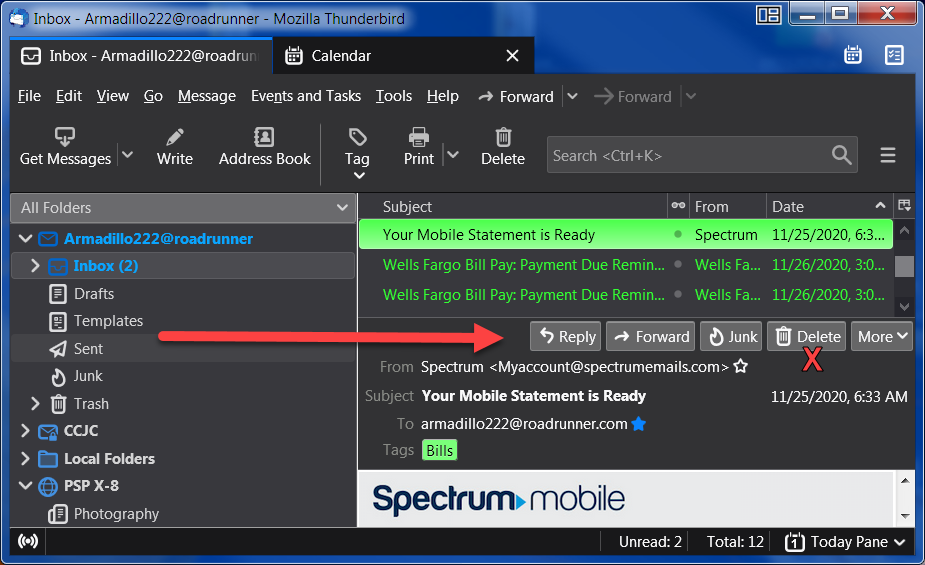
I need to change the user interface of new messages by changing the position of the "Delete" button. It is now over to the far right of the active window. It is a Royal pain in the butt to have it misplaced where it is. The majority of the incoming e-mail messages need to be deleted as soon as read, having the button to the right is clumsy. Please refer to attached capture image. We used to be able to modify almost anything in the UID, but now we are stuck with whatever a distant programmer thinks is best. Thanks for any great ideas, Michael Gordon
Attached screenshots

All Replies (2)

more options

Chosen Solution

more options

Thank you for your support. It is folks like you who make Firefox the greatest E-Mail program in the universe. It is folks like you who keep the Mozilla going forward, since 1996 and Netscape Communicator.