How do you import an address book

I am trying to import a .csv file as an address book. I have tried the import w/wo headers on the first line. I have rearranged the import columns and selected only the ones in the .csv file. And none have succeeded.
Using my test file I get a display which doesn't correspond to my input header, But the actual data for each name appears correct.
When I leave the First Name and Last Name field blank I get garbage. The display Name = Organization, all other fields are blank. The actual data corresponds to my input data.
What I would like to see is the display name, or, what name should I use?
I do not have the first or last name in my list. I have chosen to replicate the email address as the display name. I hope to use the address book (called PPHOA) for mass mailings.
So I guess I don't know what to expect and this may not be an error. But I would like to see something other than the Organization replicated, and I would like to use the address book for mass mailings.
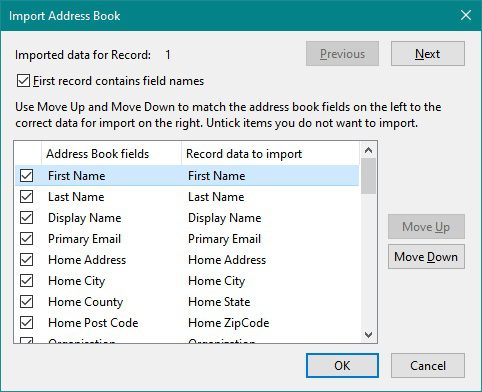
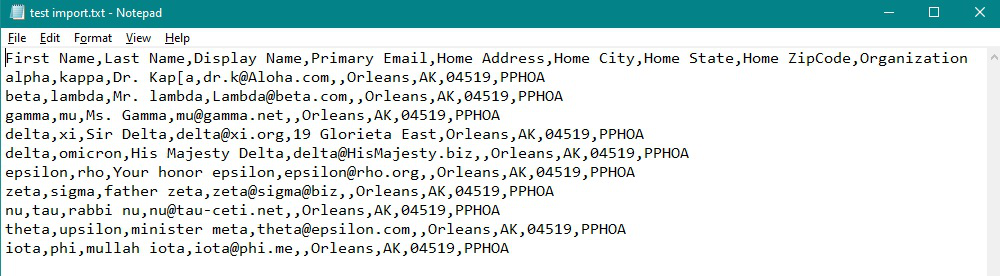
The header is: First Name Last Name Display Name Primary Email Home Address Home City Home State Home ZipCode Organization"
the test file is: alpha,kappa,Dr. Kap[a,dr.k@Aloha.com,,Orleans,AK,04519,PPHOA beta,lambda,Mr. lambda,Lambda@beta.com,,Orleans,AK,04519,PPHOA gamma,mu,Ms. Gamma,mu@gamma.net,,Orleans,AK,04519,PPHOA delta,xi,Sir Delta,delta@xi.org,19 Glorieta East,Orleans,AK,04519,PPHOA delta,omicron,His Majesty Delta,delta@HisMajesty.biz,,Orleans,AK,04519,PPHOA epsilon,rho,Your honor epsilon,epsilon@rho.org,,Orleans,AK,04519,PPHOA zeta,sigma,father zeta,zeta@sigma@biz,,Orleans,AK,04519,PPHOA nu,tau,rabbi nu,nu@tau-ceti.net,,Orleans,AK,04519,PPHOA theta,upsilon,minister meta,theta@epsilon.com,,Orleans,AK,04519,PPHOA iota,phi,mullah iota,iota@phi.me,,Orleans,AK,04519,PPHOA
Chosen solution
List of all the column headers in Thunderbird. http://kb.mozillazine.org/Import_address_list_from_text_file
When importing you need to match up all the fields used in Thunderbird in left column with all the fields you use in your csv file in the right column. Unchecking the ones you do not want to use.
Obviously you are not importing all of the same fields, you would uncheck those not to be imported.
I used your test list and saved it in Notepad so I had a text file.
I'm not certain what fields you would use, but the images shows the process and I unchecked all the ones I did not want. I moved some fields down out my way. Then selected the fields I wanted and moved them up into position. Working down the list. Note: Some data you want to import could be 'Home address' even if not for the particular set shown. I noticed there were two commas indicating an empty field in this conatct, but had address in another, so you still need to include it in the correct location. Finally I selected Organisation and clicked on move up to position with eg: PPHOA Checked all was ok and made sure all unwanted fields were not selected and clicked on OK. After importing, I did need to select another address book and then reselect test import to see contacts. See images below.
Read this answer in context 👍 0All Replies (2)
Chosen Solution
List of all the column headers in Thunderbird. http://kb.mozillazine.org/Import_address_list_from_text_file
When importing you need to match up all the fields used in Thunderbird in left column with all the fields you use in your csv file in the right column. Unchecking the ones you do not want to use.
Obviously you are not importing all of the same fields, you would uncheck those not to be imported.
I used your test list and saved it in Notepad so I had a text file.
I'm not certain what fields you would use, but the images shows the process and I unchecked all the ones I did not want. I moved some fields down out my way. Then selected the fields I wanted and moved them up into position. Working down the list. Note: Some data you want to import could be 'Home address' even if not for the particular set shown. I noticed there were two commas indicating an empty field in this conatct, but had address in another, so you still need to include it in the correct location. Finally I selected Organisation and clicked on move up to position with eg: PPHOA Checked all was ok and made sure all unwanted fields were not selected and clicked on OK. After importing, I did need to select another address book and then reselect test import to see contacts. See images below.
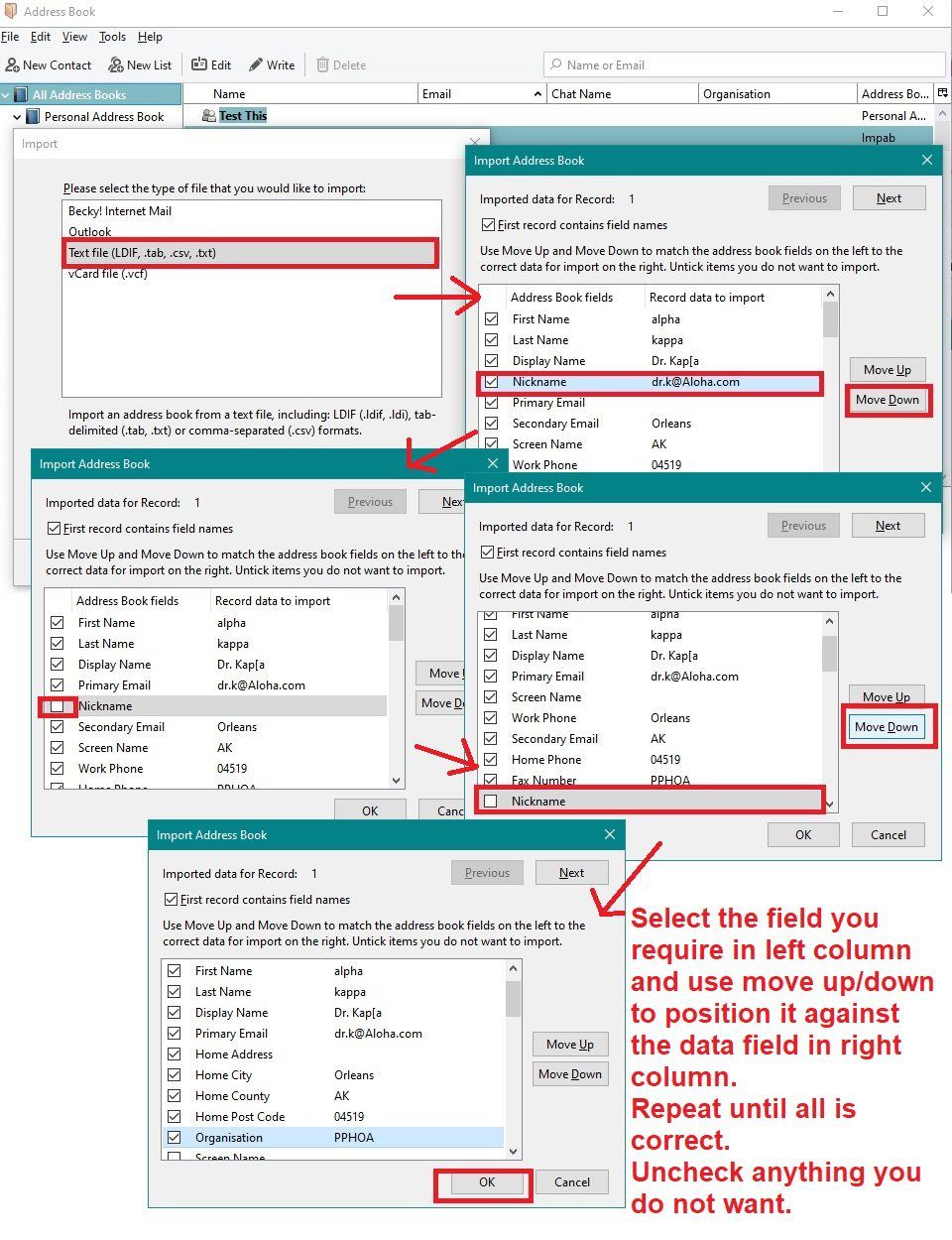
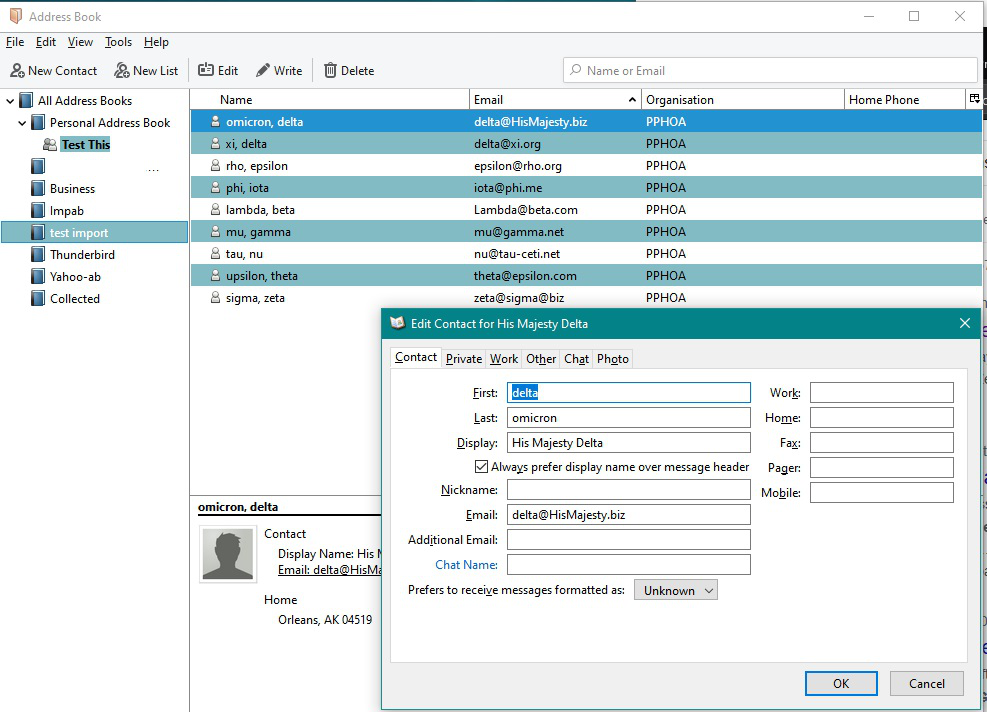
Please note: The example shown above did not have the column header fields in the Notepad, it only contained the actual data. As text file only had data, I did uncheck the option 'First record contains field names' for the first images above even though I did not show it nor mention it at the time.
If it had contained the field names, each separated by a comma and no spaces, as shown below, then you would select checkbox 'First record contains filed names'. it would have looked like the import image below. But after clicking OK and then Finish, the result is the same.
I just wanted to show you the two views just in case you decided to use a list file that did not necessarily have the column headers as fields.