The IMAP folder does not appear correctly.
Support contacted me to apologize and say that I deleted my question, so I will ask again.
The other day, I posted a question about IMAP folders not being partially displayed in Thunderbird. In response to this question.
- Once you unsubscribe from the IMAP folder in Thunderbird, exit Thunderbird
- Delete the *.msf file in ImapMail in your Thunderbird profile in Explorer and launch Thunderbird
- Restart Thunderbird after subscribing to an IMAP folder
I performed the operation after being taught the procedure to do so, but as a result, there was no change in the situation.
Is there anything else I can try? If anyone has any questions, I'd appreciate it.
Translated with www.DeepL.com/Translator (free version)
All Replies (2)

Create a new Thunderbird profile and set up the imap account on it. To prevent Thunderbird from re-downloading ALL the messages in the new profile, disable the only option under Account Settings > Synchronisation & Storage > Message Synchronising. This will force Tbird to download headers only, instead of full messages. Check if your IMAP folders appear as expected.
I've been away for a while due to personal matters. I'm sorry.
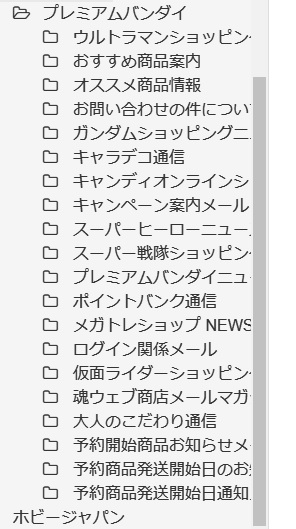
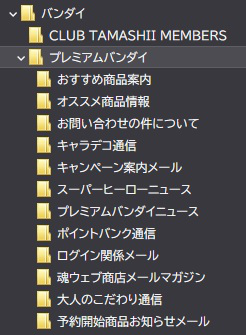
I tried the method you mentioned of creating and loading a separate IMAP account, but the IMAP folder configuration displayed by Thunderbird is still different from the original IMAP folder configuration. The first image I attached this time is the original IMAP folder (20 folders), and the second image is the folder configuration displayed by Thunderbird (12 folders). When I compared the result of this trial with the previous one, the folder configuration that I was able to get on the Thunderbird side was the same as the one when I was asked the question first.
In this case, I think that there is a folder that can't be obtained because of character code display processing on Thunderbird side in my amateur opinion.
Is there anything else I can try? I would appreciate it if someone could help me out. Thank you very much.
Translated with www.DeepL.com/Translator (free version)