


Storing emails on your HD
When I store emails on my hard drive, something I have done for years, looking at any of email files -- just reading them, changing nothing, even just looking at the "properties" of the file -- will change the date and time to now. That completely ruins the proper local storage of emails -- how can you look for an email from April 26, 2017, when the file date was changed to May 13, 2020, because that was when you briefly looked at it?
Is there something I can do to retain the file date (like every document, picture, txt, etc.), if you just look at it? Is there a reason for changing the file date and time even if it is completely unchanged?
I have asked this before, but did not get advice.
Chosen solution
You probably customised which date column is displayed in File Explorer. There are different date columns you can choose from, e.g date created, date modified and date accessed. If you right-click the column header, you'll see the different columns that you can enable/disable.
Read this answer in context 👍 0All Replies (16)
With the ImportExportTools NG add-on, messages can be exported to eml format with the date of the email in the file name. The file name format is set in the add-on's Options.
I can't say why an eml file's date in Explorer changes just by viewing (opening) it, except possibly if there is a link to a remote image that is downloaded when the message is viewed.
I just need a method of checking (reading) a few of the thousands of emails I have stored over the years on my hard drive (in .eml format) without the date, an important sort criterium, being immediatey change to today. Alternately I need to know why this happens. And once again: why making a word bold or italic in this input window displays it, while you are typing, in triple or double quotes (but makes it bold of kursiv in the preview or final posting). The purpose of this strange convention is...?
This is not a Thunderbird issue, it is how Windows Explorer is updating the accessed file data.
There are various 'Date' types of columns which can show different dates.
The email itself may have a date of 1st Jan 2020 when it was sent to you, this would be shown in a 'Date' column, but if saved as .eml file on the 10th Jan 2020, then the .eml file was created on 10th Jan 2020 so it will have a 'Created Date'.
If .eml file is opened and anything altered and saved then it will also display the 'Modified Date' and Windows Explorer may also update the 'Accessed date'.
So it depends upon which 'date' you are talking about.
In 'Indexing Options' > 'Advanced' > 'File types'
for .eml extension is it set to 'Index Properties only' or 'Index properties and File contents' ?
Mine is set to the latter.
Are you using Windows 7 or Windows 10 ?
There was a weird thing going on in Windows 7:
Thanks for attending to my problem, Toad-Hall. I am of course talking about the .eml file dates stamp on my hard drive, not the date in the email itself. For instance I have a folder with hundreds of .eml, .jpg, .doc and .txt files, all on "AI Development". Now I am looking for a picture or document I know I stored there around 2013. No problem -- I briefly scan the files until I hit the one I am looking for. But not for .eml files. If I just look briefly at one ("Nope, that's not it"), not change anything, it get moved to the top of the list and gets today's date and time. It no longer tells me when the file was stored, just when it was looked at last. Never again will I be able to search for an old email by date.
Naturally I can open each mail and check the merssage date, but that means all the .eml files in the folder, because I might have briefly looked at the June 2013 message and it now has the date January 12 2020, the day I looked at it. Naturally I can search for a picture from 2013 in all pictures file-dated 2013. The JPGs listed in the directory always show when I originally stored them in the directory, not the date when I last look at them. It's just the .eml files I dare not touch for fear of spoiling the sorting.
re :Naturally I can open each mail and check the merssage date, but that means all the .eml files in the folder, because I might have briefly looked at the June 2013 message and it now has the date January 12 2020,
In Explorer the 'Date' should display the date the email was sent, but that depends upon what setting you have in the Indexing Options. It would be useful if you could tell us what you have got set in this location on your computer.
In 'Indexing Options' > 'Advanced' > 'File types'
Q :for .eml extension you need 'Index properties and File contents', do you have this setting ?
Q :Are you using Windows 7 or Windows 10 ? Because it is a known fault on Windows 7 and the link tells you how to fix.
Okay, Toad-Hill, I have done some research. [this forum discussion] I discovered that Windows (I have W10) is doing this to .eml files (but not to JPG or PNG or TXT or other file types. Still it should be mozilla or Thunderbird that solves this issue and makes it possible to usefully store emails on your HD - and then be actually able to find them.
You are missing the point Frederic. Windows is changing the file when you mouseover it. It has nothing to do with Thunderbird or Mozilla or anyone else but Microsoft.
This ancient bug also describes this issue https://bugzilla.mozilla.org/show_bug.cgi?id=852624 which after reading https://answers.microsoft.com/en-us/windows/forum/windows_7-files/why-do-eml-files-modified-date-change-on-mouseover/d6b92680-9200-4731-932f-b45c0c8187dd?page=2 I think is invalid as the streams supported by the NTFS file system are being used by windows to store additional meta data about the file when the mouse hovers. So the file record is being modified so the file modified date is changed.
I suggest you change the sort order you use in Windows to date create not date modified and the list will stay stable. Otherwise address our concerns to Microsoft. This is not a Thunderbird issue.
You still have not stated what the indexing options are set for .eml files. They need to be 'Index properties and File contents'. Do you have that setting? If yes, then you can use the 'Date' column not 'Date modified' etc and it gives the date of the actual email.
I said in my 6/12/20 post: "I discovered that Windows is doing this to .eml files" to which you replied that I was missing the point, it was Windows doing it. I was confused by this answer.
Now I know that Windows is reindexing .eml files (but not .jpg, .doc, .txt, etc) if you touch them, making it impossible to search for a .eml file from a particular time (e.g. Dec. 2014) in the Explorer, because I may have looked for it in 2020 and it is now file-indexed to that date, i.e. the date I last looked at it. I do not (yet) know how to change the Windows indexing options or how to carry out your instructions and set "Date" instead of "Date modified." I will try to find the place I can do this and see if that solves the problem.
Toad-Hill, I apologise for taking up so much of your time and am (genuinely) thankful for your efforts. This is a big deal for me because I have stored emails on my HD for decades, thematically, in the directories dealing with specific subjects. An example is the directory "AI", which contains decades of material, Docs, pictures, URLs to articles, web pages, correspondence, etc., all nicely sorted by the date when I put them in the directory. But searching for an email (and only that file type) will immediately change its file index date to today, making a future search for "that email Demis wrote me in 2016" futile -- it is now indexed 2020. I am surprised that not more people share this problem.

I am surprised that not more people share this problem
Perhaps that is the case because storing emails in separate eml files and then directly opening them in Windows/File Explorer is not a common practice. Most people would likely import those eml files into their favourite email client then organise and access them from there. That's what I would have done, using Thunderbird as the client.
I do not want to protract this, but there are good reasons (at least for me) to store emails as separate files in folders on my HD. These folders are thematic, e.g. Artificial Intelligence, Astronomy, Ecology, etc. and contain Docs, Pictures, Audios, Videos, TXTs, URLs and .EML files, stored there over the years. I do not want to go to different clients to find something I need, e.g. the document I wrote, or the picture I took, or the site I visited, or the email I received in January 2016. I find material easily by approximate date -- just not emails. The files may now be dated June 2019, since I looked through them (without touching the contents) in that month. I simply wish that .eml files would, just like all of the others, retain the date stamp and be sorted according to when they were stored, not when I last looked at them.
Having said this I suddenly discover that this no longer happens. Did I change some setting, when trying to after discussion with Toad-Hall. Trouble is I have no idea what I could have changed. Just hope the redating of .eml files does not come back at some stage.
Chosen Solution
You probably customised which date column is displayed in File Explorer. There are different date columns you can choose from, e.g date created, date modified and date accessed. If you right-click the column header, you'll see the different columns that you can enable/disable.
I think you are right, Stans. I will explore and experiment further. I have "Date modified" and "Date created" clicked on and listed in separate columns. Maybe this wasn't the case before I started fooling around with with different settings. I will investigate further. But for the first time in years things are working fine now. So I must proceed with caution: we don't want to revert to the state where I could not browse through past emails without messing things up.
Anway, thanks for the help and support. One less problem to bother me every day.
I did a quick experiment and saved a few messages as eml files. By default, the date column that was visible in File Explorer was the Date modified column. I then added the Date created, Date received and a plain Date column as shown in the attachment. The Date created column displayed the date (and time) on which the eml files were saved to disk from Thunderbird. This date has remained unchanged throughout the numerous times I opened/accessed the eml files. I opened the eml files multiple times using different programs; Notepad++, Notepad and Thunderbird. The dates in the Date modified column, changed for the first two (oldest created) files, and I could have sworn they did even before I opened them. They seemed to change as soon as I opened the folder in which they are saved. I suspect this changed while they were being indexed slightly after their creation.
The Date received column is self explanatory and it matches the plain Date column. In your case, the solution would be to use the Date received column and hide the other date columns.
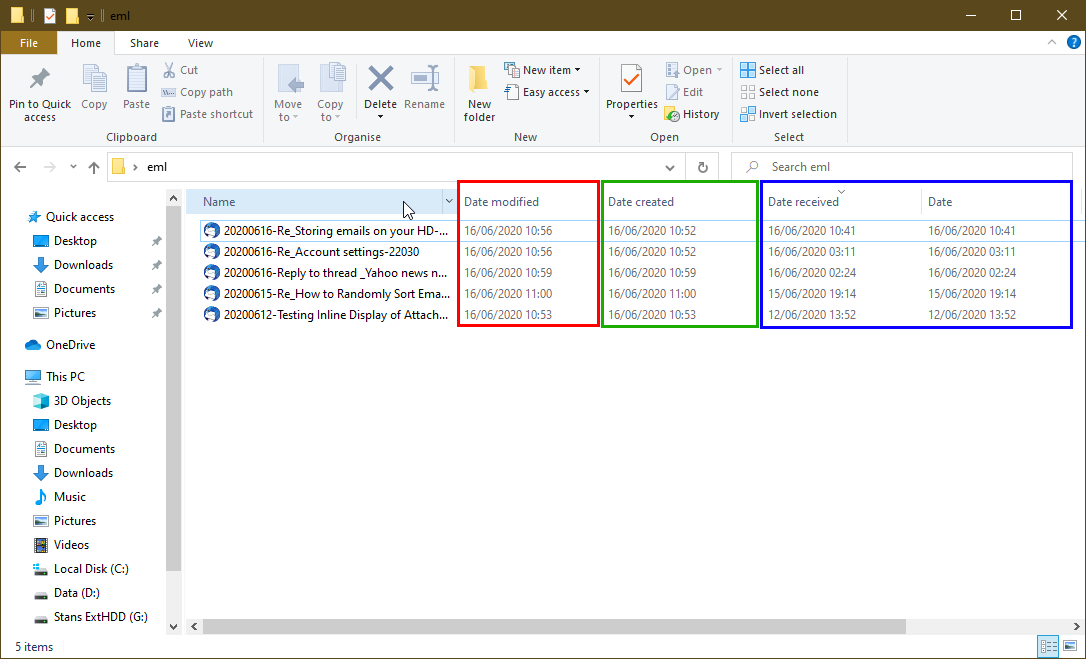
Marvellous, Stans, thanks. I will do similar experiments and come back to you if I mess up the sorting again and do not have my mails listed in the order in which they were stored. I am optimistic I will succeed, permanently. Heartfelt thanks for the important lesson.
So do I conclude you have eventually started to use the 'Date' volumn as opposed to the DateModified' or 'Date Created' as I instructed in my first comment.
re : I do not (yet) know how to change the Windows indexing options or how to carry out your instructions and set "Date" instead of "Date modified."
Just for you because why not :)
Here's a Heads up on how to access 'Indexing options' on your computer, should you need to access it in the future. When written in this format it means select each of the following in turn.
- 'Indexing Options' > 'Advanced' > 'File types'
I'll explain in a bit more detail. In Windows search located bottom left of your monitor screen where it says 'Start a search', type: Indexing Options and then select 'Indexing Options' from the list.
A new small window opens called 'Indexing Options', click on 'Advanced' button to open another small window called 'Advanced Options' which will have two tabs; 'Index Settings' and 'File Types', click on 'File Types' tab.
Stans showed a good image explaining how you can choose to display whatever column header you require.
The point we were making is your issue was not a Thunderbird issue. Even so, information and guidance on your problem was offered.
But, for future reference 'Windows 10' specific questions eg: how to select use Windows search and how to select column headers in Explorer windows are the kind of questions you normally ask in a Windows forum.
Good to hear you now all sorted.