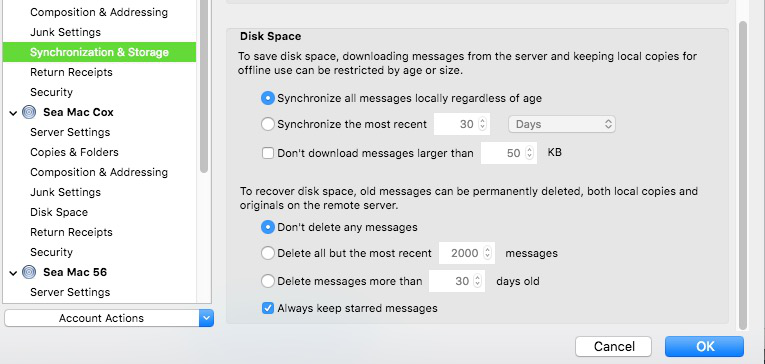
how to configure deletion settings
My trash folder only has deletions from the last week. I'm not intentionally deleting emails from trash folder. Is there a setting that I can configure for this? Thanks.
All Replies (2)
Right-click Trash, Properties, and check the Retention Policy tab. If it's different from what you see in practice, your mail provider may be overriding the TB policy. Also check the Message Storage section in Server Settings, under Tools/Account Settings, in case you have 'Empty Trash on Exit' checked.
Under the tools Menu select "Account Settings" Under the account in Question click the line "Synchronization and Storage" Check that the Radio Button "Don't Delete any Messages" is on ...
(If this is not it - then it is in a preference At your ISP, on you Email accounts Settings, THERE ... )