


Windows 10 reached EOS (end of support) on October 14, 2025. For more information, see this article.

Search Support

Avoid support scams. We will never ask you to call or text a phone number or share personal information. Please report suspicious activity using the “Report Abuse” option.

Learn More

Want horizontal lines between message headers

Once again following a Thunderbird update, the lines between my message headers have disappeared. Here is the previous question and solution I found: https://support.mozilla.org/en-US/questions/1256823

However, now, I still have the file userChrome.css set up the same way in my profile folder: C:\users\myname\appdata\roaming\thunderbird\profiles\jr8ewpri.default\chrome, but Thunderbird is not utilizing it. How do I get TB to recognize that file again?

Here is the content of the userChrome.css file:

@namespace url(http://www.mozilla.org/keymaster/gatekeeper/there.is.only.xul);

/* Add bottom border to thread pane (message list) */

  1. threadTree treechildren:-moz-tree-row {
 border-bottom: 1px solid grey !important;

}

Thank you, --Victoria

Once again following a Thunderbird update, the lines between my message headers have disappeared. Here is the previous question and solution I found: https://support.mozilla.org/en-US/questions/1256823 However, now, I still have the file userChrome.css set up the same way in my profile folder: C:\users\myname\appdata\roaming\thunderbird\profiles\jr8ewpri.default\chrome, but Thunderbird is not utilizing it. How do I get TB to recognize that file again? Here is the content of the userChrome.css file: @namespace url(http://www.mozilla.org/keymaster/gatekeeper/there.is.only.xul); /* Add bottom border to thread pane (message list) */ #threadTree treechildren:-moz-tree-row { border-bottom: 1px solid grey !important; } Thank you, --Victoria

Modified by Victoria-nola

Chosen solution

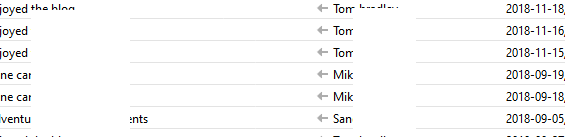
There's an extra : needed after treechildren for this to work in TB 68 (see picture).

@namespace url("http://www.mozilla.org/keymaster/gatekeeper/there.is.only.xul");

/* Add bottom border to thread pane (message list) */
#threadTree treechildren::-moz-tree-row {
  border-bottom: 1px solid threedlightshadow !important;
}
Read this answer in context 👍 1

All Replies (2)

Chosen Solution

There's an extra : needed after treechildren for this to work in TB 68 (see picture).

@namespace url("http://www.mozilla.org/keymaster/gatekeeper/there.is.only.xul");

/* Add bottom border to thread pane (message list) */
#threadTree treechildren::-moz-tree-row {
  border-bottom: 1px solid threedlightshadow !important;
}

It worked! Thank you very much.

--Victoria