


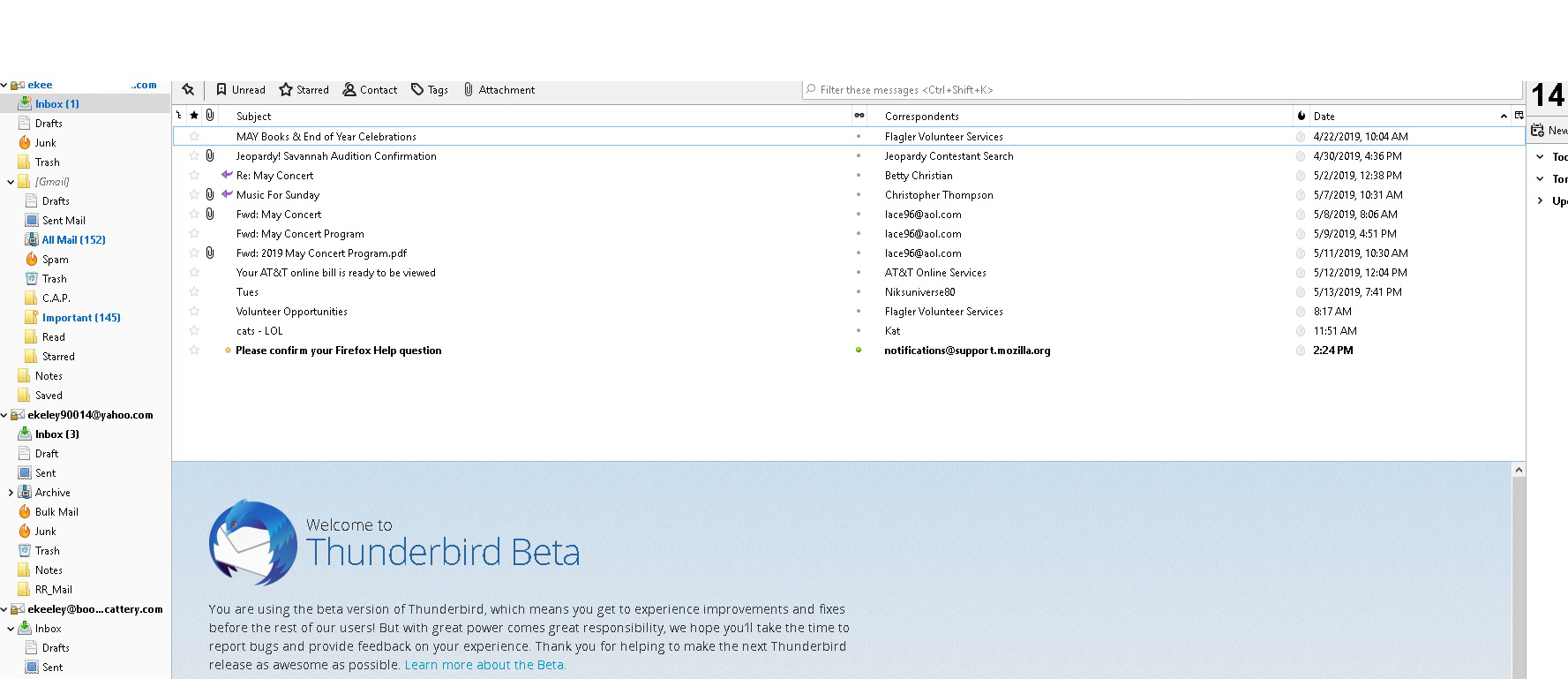
The top 2 inches of Thunderbird goes all white and I am unable to use any of the buttons in that area.

Sometimes, while using Thunderbird Beta, the top of the program whites out down to my 1st email address. At this point, NONE of the functions normally in this area (including restore, minimize and close) work. If i try to reply to an email, the reply page has the exact same problem.
DXdiag:
     Time of this report: 5/14/2019, 14:31:12
            Machine name: DESKTOP-VMHTR5A
              Machine Id: {D38EAACA-E93C-4640-8800-F372EA8BDA2F}
        Operating System: Windows 10 Home 64-bit (10.0, Build 17763) (17763.rs5_release.180914-1434)
                Language: English (Regional Setting: English)
     System Manufacturer: Gigabyte Technology Co., Ltd.
            System Model: To be filled by O.E.M.
                    BIOS: FC (type: UEFI)
               Processor: AMD FX(tm)-8320 Eight-Core Processor            (8 CPUs), ~3.5GHz
                  Memory: 16384MB RAM
     Available OS Memory: 16350MB RAM
               Page File: 8225MB used, 8524MB available
             Windows Dir: C:\WINDOWS
         DirectX Version: DirectX 12
     DX Setup Parameters: Not found
        User DPI Setting: 96 DPI (100 percent)
      System DPI Setting: 144 DPI (150 percent)
         DWM DPI Scaling: Disabled
                Miracast: Available, with HDCP
Microsoft Graphics Hybrid: Not Supported
DxDiag Version: 10.00.17763.0001 64bit Unicode
Display Devices
          Card name: Radeon RX 570 Series
       Manufacturer: Advanced Micro Devices, Inc.
          Chip type: AMD Radeon Graphics Processor (0x67DF)
           DAC type: Internal DAC(400MHz)
        Device Type: Full Device (POST)
         Device Key: Enum\PCI\VEN_1002&DEV_67DF&SUBSYS_34161462&REV_EF
      Device Status: 0180200A [DN_DRIVER_LOADED|DN_STARTED|DN_DISABLEABLE|DN_NT_ENUMERATOR|DN_NT_DRIVER]
Device Problem Code: No Problem
Driver Problem Code: Unknown
     Display Memory: 12251 MB
   Dedicated Memory: 4076 MB
      Shared Memory: 8175 MB
       Current Mode: 1920 x 1080 (32 bit) (59Hz)
        HDR Support: Not Supported
   Display Topology: Extend
Display Color Space: DXGI_COLOR_SPACE_RGB_FULL_G22_NONE_P709
    Color Primaries: Red(0.639648,0.334961), Green(0.285156,0.605469), Blue(0.150391,0.059570), White Point(0.280273,0.290039)
  Display Luminance: Min Luminance = 0.500000, Max Luminance = 270.000000, MaxFullFrameLuminance = 270.000000
       Monitor Name: Generic PnP Monitor
      Monitor Model: TOSHIBA-TV
         Monitor Id: TSB0206
        Native Mode: 1920 x 1080(p) (60.000Hz)
        Output Type: HDMI
Monitor Capabilities: HDR Not Supported Display Pixel Format: DISPLAYCONFIG_PIXELFORMAT_32BPP
     Advanced Color: Not Supported
        Driver Name: C:\WINDOWS\System32\DriverStore\FileRepository\c0340461.inf_amd64_2d68f98a8fb13eb0\B340443\aticfx64.dll,C:\WINDOWS\System32\DriverStore\FileRepository\c0340461.inf_amd64_2d68f98a8fb13eb0\B340443\aticfx64.dll,C:\WINDOWS\System32\DriverStore\FileRepository\c0340461.inf_amd64_2d68f98a8fb13eb0\B340443\aticfx64.dll,C:\WINDOWS\System32\DriverStore\FileRepository\c0340461.inf_amd64_2d68f98a8fb13eb0\B340443\amdxc64.dll
Driver File Version: 25.20.15027.9004 (English)
     Driver Version: 25.20.15027.9004
        DDI Version: 12
     Feature Levels: 12_0,11_1,11_0,10_1,10_0,9_3,9_2,9_1
       Driver Model: WDDM 2.5
Graphics Preemption: Primitive
 Compute Preemption: DMA
           Miracast: Not Supported by Graphics driver
Hybrid Graphics GPU: Not Supported
     Power P-states: Not Supported
     Virtualization: Paravirtualization
Sometimes, while using Thunderbird Beta, the top of the program whites out down to my 1st email address. At this point, NONE of the functions normally in this area (including restore, minimize and close) work. If i try to reply to an email, the reply page has the exact same problem.
DXdiag:
Time of this report: 5/14/2019, 14:31:12
Machine name: DESKTOP-VMHTR5A
Machine Id: {D38EAACA-E93C-4640-8800-F372EA8BDA2F}
Operating System: Windows 10 Home 64-bit (10.0, Build 17763) (17763.rs5_release.180914-1434)
Language: English (Regional Setting: English)
System Manufacturer: Gigabyte Technology Co., Ltd.
System Model: To be filled by O.E.M.
BIOS: FC (type: UEFI)
Processor: AMD FX(tm)-8320 Eight-Core Processor (8 CPUs), ~3.5GHz
Memory: 16384MB RAM
Available OS Memory: 16350MB RAM
Page File: 8225MB used, 8524MB available
Windows Dir: C:\WINDOWS
DirectX Version: DirectX 12
DX Setup Parameters: Not found
User DPI Setting: 96 DPI (100 percent)
System DPI Setting: 144 DPI (150 percent)
DWM DPI Scaling: Disabled
Miracast: Available, with HDCP
Microsoft Graphics Hybrid: Not Supported
DxDiag Version: 10.00.17763.0001 64bit Unicode
Display Devices
---------------
Card name: Radeon RX 570 Series
Manufacturer: Advanced Micro Devices, Inc.
Chip type: AMD Radeon Graphics Processor (0x67DF)
DAC type: Internal DAC(400MHz)
Device Type: Full Device (POST)
Device Key: Enum\PCI\VEN_1002&DEV_67DF&SUBSYS_34161462&REV_EF
Device Status: 0180200A [DN_DRIVER_LOADED|DN_STARTED|DN_DISABLEABLE|DN_NT_ENUMERATOR|DN_NT_DRIVER]
Device Problem Code: No Problem
Driver Problem Code: Unknown
Display Memory: 12251 MB
Dedicated Memory: 4076 MB
Shared Memory: 8175 MB
Current Mode: 1920 x 1080 (32 bit) (59Hz)
HDR Support: Not Supported
Display Topology: Extend
Display Color Space: DXGI_COLOR_SPACE_RGB_FULL_G22_NONE_P709
Color Primaries: Red(0.639648,0.334961), Green(0.285156,0.605469), Blue(0.150391,0.059570), White Point(0.280273,0.290039)
Display Luminance: Min Luminance = 0.500000, Max Luminance = 270.000000, MaxFullFrameLuminance = 270.000000
Monitor Name: Generic PnP Monitor
Monitor Model: TOSHIBA-TV
Monitor Id: TSB0206
Native Mode: 1920 x 1080(p) (60.000Hz)
Output Type: HDMI
Monitor Capabilities: HDR Not Supported
Display Pixel Format: DISPLAYCONFIG_PIXELFORMAT_32BPP
Advanced Color: Not Supported
Driver Name: C:\WINDOWS\System32\DriverStore\FileRepository\c0340461.inf_amd64_2d68f98a8fb13eb0\B340443\aticfx64.dll,C:\WINDOWS\System32\DriverStore\FileRepository\c0340461.inf_amd64_2d68f98a8fb13eb0\B340443\aticfx64.dll,C:\WINDOWS\System32\DriverStore\FileRepository\c0340461.inf_amd64_2d68f98a8fb13eb0\B340443\aticfx64.dll,C:\WINDOWS\System32\DriverStore\FileRepository\c0340461.inf_amd64_2d68f98a8fb13eb0\B340443\amdxc64.dll
Driver File Version: 25.20.15027.9004 (English)
Driver Version: 25.20.15027.9004
DDI Version: 12
Feature Levels: 12_0,11_1,11_0,10_1,10_0,9_3,9_2,9_1
Driver Model: WDDM 2.5
Graphics Preemption: Primitive
Compute Preemption: DMA
Miracast: Not Supported by Graphics driver
Hybrid Graphics GPU: Not Supported
Power P-states: Not Supported
Virtualization: Paravirtualization
All Replies (1)
Now my Firefox is doing the same thing! WTF?? Is this on???