


Installed Thunderbird on new PC - e-mail password is correct but can't connect

I am in the middle of installing everything into the new PC. Have installed Thunderbird and am trying connect (in Thunderbird's small window) to my e-mail server. Failure. After several tries I went online and opened my account direct on the server (same password), went to setting for E-Mail password and made a "new" password, but duplicating the one I've been using. Logged out online. Tried again. Failure. Tried again still logged in on the server. Failure.
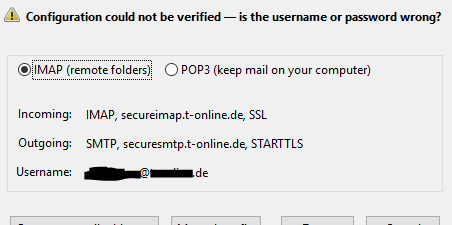
I'm completely baffled. The small TB window did the configuration itself and I assume it's right. I'm trying to upload an image but it's not working, so I'll describe it.
!! Configuration could not be verified -- is the username or password wrong? x IMAP (remote folders) Incoming: IMAP, secureimap.t-online.de, SSL Outgoing: SMTP, securesmtp.t-online.de,STARTTLS Username: s******@t-online.de
I'm on Win10 64b with newly downloaded TB.
HELP!
All Replies (2)
Here's the pic, upload is working now.
Chosen Solution
I hardly believe this, but I just took the time to bring in my old FF profile and then change profile and VOILA! the %&$#% works! I have NO idea how that is possible but I'm very happy about it.
Moderators, please remove this post if it's just wasted space.