


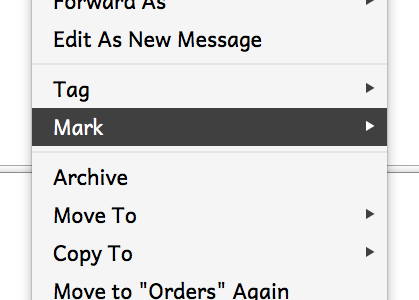
Thunderbird contextual menus do not show submenus

See here: https://bugzilla.mozilla.org/show_bug.cgi?id=1486872
I tried to right-click on the message list to mark a message as junk.
I use user css to increase font sizes and spacing. Can't use Thunderbird without fixing font sizes and spacing, but apparently using Thunderbird is enough to invalidate a bug report.
The contextual menu opened, but mousing to "Mark," no submenu would open. None of the submenus will open.
Using command-shift-4 to take a screenshot means the submenus open when I mouse to the lower right. However, it means a lot of extra screenshots.
Using command-shift-3 just takes the screenshot.
All Replies (1)

Does this problem go away if you temporarily disable your userChrome.css file?
If not then it is more likely to be an issue in Thunderbird, so report back to bugzilla with this finding.
I take it from your description of keystrokes that you're using a mac. It really helps to state such things explicitly, along with version numbers.