


Using version 52.7.0. Trash does not show list of deleted messages, although the no. of deleted messages is displayed, and the first message shows at the bottom

A few days ago I noticed I could no longer see the list of my deleted emails in the trash folder. I have tried all the solutions I could find related to this problem and nothing helps. Neither old nor newly deleted messages are listed, although the number of deleted messages is displayed. I noticed today that I can scroll down to read the first message even though the subject and sender information are not displayed. Hope you can help.
Chosen solution
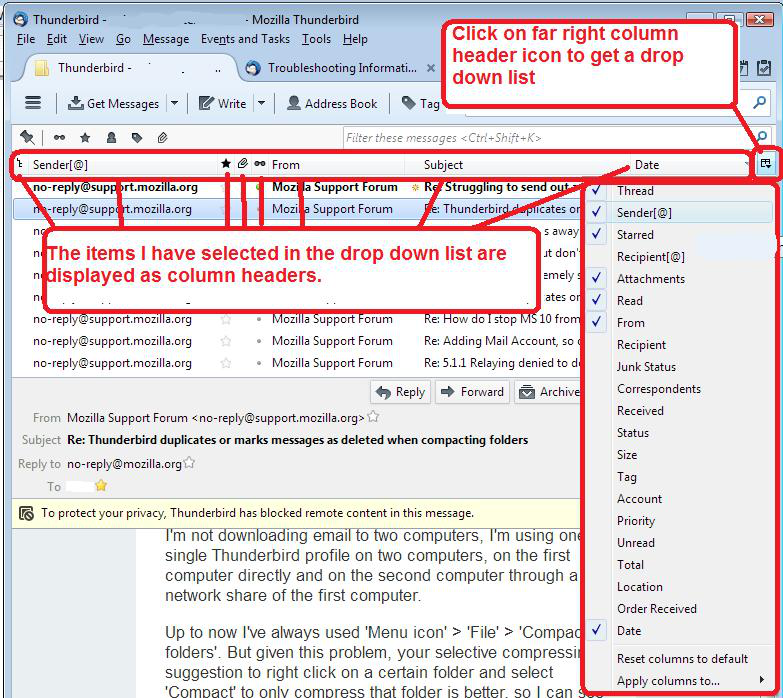
Perhaps you have a hidden list. select 'Trash' folder click on the far right icon used to select column headers. select 'Reset columns to default'
see image as guide.
Read this answer in context 👍 1All Replies (4)
Chosen Solution
Perhaps you have a hidden list. select 'Trash' folder click on the far right icon used to select column headers. select 'Reset columns to default'
see image as guide.
Thank you very much. Problem solved.
Didn't work. Any other suggestions?
barbsheets: This question is already marked as solved. The solution for displaying an 'invisible' list always works.
You need to confirm that you have an invisible list. That means you can click in the area where the list should be and it will open an email for you to read. Therefore emails exist, but the list is invisible.
If the list is not visible and you cannot get anything to display, then you do not have an 'invisible' list. So, this question and solution is not suitable for you.
Please Note: When you post into another persons question, you are only sending an email to that person who asked a question and expecting them to repond. They may not want to repond or may not know how to assist you. I got a copy, because by chance, I had forgotten to stop following an already solved question. Therefore, it is always better to ask your own question, so that the entire community may see it.