


Suddenly my wellknown friends receive my mails as SPAM don't know why Please advise

Much of my mails send or resend to known contacts arrive there as SPAM
Chosen solution
SMTP port 587 - this should be fine.
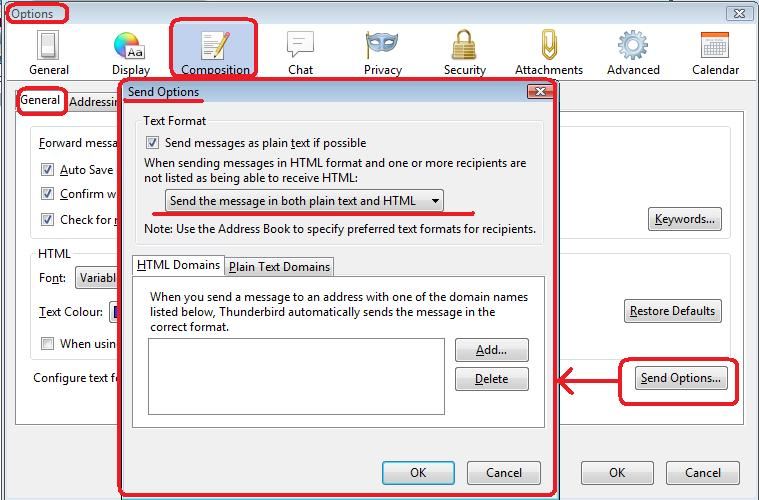
Make sure you select 'Send message in both plain text and HTML' In dutch using google translate: Stuur een bericht in zowel platte tekst als HTML
Read this answer in context 👍 1All Replies (7)

Probably because your ISP or email provider has recently been added to a spam blacklist.
Do your correspondents not get any advisory message saying why a message has been classified as spam? If they do, ask for a copy of the message and pass it on to your email provider. Your provider needs to know if they have been blacklisted and need to work with the owner of the blacklist to have themselves removed.
No not any reason mentioned.... messages in Thunderbird AND gmail the same thing. Providor is KPN Netherlands one of the biggest telephone/Intrnet/wifi providors....
Do you send emails in both Plain Text and HTML ?
Do you send using an smtp port 25 ?
Do emails contain several links or remote content ?
re:messages in Thunderbird AND gmail the same thing. Have you checked that your computer IP address has not been blacklisted? Suggest you try refreshing/ using a different IP address. https://whatismyipaddress.com/change-ip http://www.tp-link.com/us/faq-840.html
Is it possible that someone abused your email address and sent a load of spam which got reported?
SMTP port 587 I cannot choose html or plain text (see picture) no links or remote content Maybe its all because some difficulties I had with installing Windows 10. Lost a lot of mail but luky to have Mailstore to get some back.
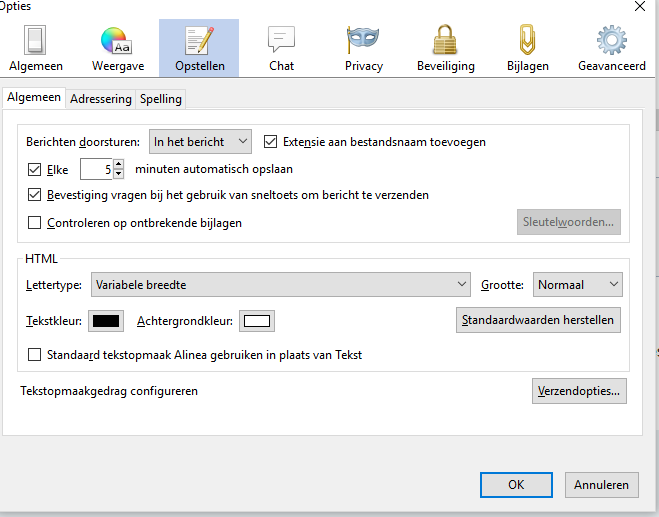
re :I cannot choose html or plain text (see picture)
What happens when you click on 'Verzendopties' button? Does that button open the Sendoptions window? It should show you the options.
Ok I found it, (was stupid of me because did not serch for it in a "creating email" situation. I can choose the folowing automaticly recognizing plain text HTML plain text and HTML I tries automatic recognizing and checked with the receiver of mu mail weather it arrived correctly in the INBOX It did What do you suggest as best choice of the above options? Thanks so far for your friendly help!
Chosen Solution
SMTP port 587 - this should be fine.
Make sure you select 'Send message in both plain text and HTML' In dutch using google translate: Stuur een bericht in zowel platte tekst als HTML