


My husband an I share the same email address. When he deletes emails from his Inbox they disappear from mine too. How can I stop this?

My husband and I share the same email address but work on different computers at home. Whenever he deletes emails from his Inbox they disappear from mine. This never used to happen. It's driving me nuts. It doesn't happen when I delete Inbox emails and they still stay in his Inbox. I can't think we have reconfigured any of the settings to make this happen and we have compared accounts settings in Mozilla, they are just the same. Any ideas on how to fix this? Thanks!
Chosen solution
So if you use IMAP, Thunderbird is showing you a copy of what is on the server. If your husband is using POP and he downloads a message, one of two things can happen.
- If he is using POP in the conventional way, he will download the message and delete it, so it will vanish from your Thunderbird.
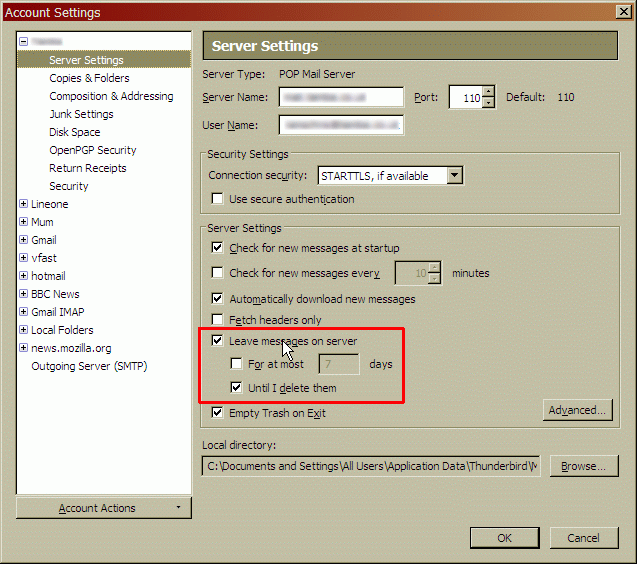
- If he is using POP but with "leave a copy on the server" enabled then the message will stay where you can still see it. But if he subsequently decides to delete it, Thunderbird can ask the server to delete it too.Then it vanishes from your client.
If you can find the settings page I showed, on your husband's computer, check if the "when I delete them" is checked or not.
Read this answer in context 👍 0All Replies (4)
Why do you choose to share an email address when you clearly wish to be able to work independently of one another? I have never shared an email address with anyone; it's just so much hassle. And then there is the matter of privacy. And how can you arrange something as a surprise?
If you arrange to have isolated personal copies of all your messages, how would you know if other person has answered a message, and if they had, how could you see what they had written? How would you know if YOU need to deal with it yourself?
If you really want to continue sharing an account, I would advocate using IMAP and sharing all your messages and folders so you have a total view of all messages. But if either of you deletes or moves a message, that will be seen in both of your computers. That seems right and proper to me, but appears not to suit you.
If you use POP then you both need set your clients to leave messages on the server, ensuring that a copy remains there for the other user. Then you have to negotiate between you to agree which messages have been dealt with, and periodically remove them from the server, otherwise they will accumulate and eventually fill up your Inbox. See the attached image for this setting.
I suspect your husband is using POP and you are using IMAP, or you are both using POP but yours is set to leave copies on the server and his isn't.
If you need further help I'd suggest you post your Troubleshooting Information. We'd probably need to see both yours and your husband's to understand what is going on.
Please add the troubleshooting information to your post.
To find the Troubleshooting information:
- Open Help (or click on three-line-icon and select Help).
- Choose Troubleshooting Information.
- Clear the check box Include account names.
- Use the button Copy to clipboard to select all.
- Paste this in your post.
Ha-ha! Yes I can see it would seem a bit strange to share an email address with my husband but we work for the see organisation and it helps to see all the emails. But you will also be pleased to hear we do have separate interests too and separate emails are the way to go. It will however take quite a while to get our new addresses out there. You were indeed right,.. I am IMAP and he is POP though I don't really understand the difference. My Troubleshooting info as requested is below. Thanks so much for your prompt response, it's great to get support from someone in the know, I'm a bit of a technophobe!
Application Basics
   Name: Thunderbird
   Version: 52.3.0
   User Agent: Mozilla/5.0 (Windows NT 10.0; WOW64; rv:52.0) Gecko/20100101 Thunderbird/52.3.0
   Profile Folder: Open Folder
             (Local drive)
   Application Build ID: 20170815040357
   Enabled Plugins: about:plugins
   Build Configuration: about:buildconfig
   Memory Use: about:memory
   Profiles: about:profiles
 Mail and News Accounts
   account1:
     INCOMING: account1, , (imap) imap.chipembele.org:143, plain, passwordCleartext
     OUTGOING: , smtp.chipembele.org:587, plain, passwordCleartext, true
   account2:
     INCOMING: account2, , (none) Local Folders, plain, passwordCleartext
 Crash Reports
   https://crash-stats.mozilla.com/report/index/bp-b8e66f0e-631a-4947-bfa2-bc3720170928 (28/09/2017)
 Extensions
   Lightning, 5.4.3, false, {e2fda1a4-762b-4020-b5ad-a41df1933103}
Important Modified Preferences
Name: Value
     accessibility.lastLoadDate: 1504932872
     accessibility.typeaheadfind.flashBar: 0
     browser.cache.disk.capacity: 358400
     browser.cache.disk.filesystem_reported: 1
     extensions.lastAppVersion: 52.3.0
     font.name.monospace.el: Consolas
     font.name.monospace.x-cyrillic: Consolas
     font.name.monospace.x-unicode: Consolas
     font.name.monospace.x-western: Consolas
     font.name.sans-serif.el: Calibri
     font.name.sans-serif.x-cyrillic: Calibri
     font.name.sans-serif.x-unicode: Calibri
     font.name.sans-serif.x-western: Calibri
     font.name.serif.el: Cambria
     font.name.serif.x-cyrillic: Cambria
     font.name.serif.x-unicode: Cambria
     font.name.serif.x-western: Cambria
     font.size.fixed.el: 14
     font.size.fixed.x-cyrillic: 14
     font.size.fixed.x-unicode: 14
     font.size.fixed.x-western: 14
     font.size.variable.el: 17
     font.size.variable.x-cyrillic: 17
     font.size.variable.x-unicode: 17
     font.size.variable.x-western: 17
     mail.openMessageBehavior.version: 1
     mail.winsearch.firstRunDone: true
     mailnews.database.global.datastore.id: 594f2d0e-02a9-4a72-bc14-59eddfa6547
     media.gmp.storage.version.observed: 1
     network.cookie.prefsMigrated: true
     network.predictor.cleaned-up: true
     places.database.lastMaintenance: 1505994551
     places.history.expiration.transient_current_max_pages: 122334
     print.printer_Canon_PRO-100_series.print_bgcolor: false
     print.printer_Canon_PRO-100_series.print_bgimages: false
     print.printer_Canon_PRO-100_series.print_duplex: -437918235
     print.printer_Canon_PRO-100_series.print_edge_bottom: 0
     print.printer_Canon_PRO-100_series.print_edge_left: 0
     print.printer_Canon_PRO-100_series.print_edge_right: 0
     print.printer_Canon_PRO-100_series.print_edge_top: 0
     print.printer_Canon_PRO-100_series.print_evenpages: true
     print.printer_Canon_PRO-100_series.print_footercenter:
     print.printer_Canon_PRO-100_series.print_footerleft: &PT
     print.printer_Canon_PRO-100_series.print_footerright: &D
     print.printer_Canon_PRO-100_series.print_headercenter:
     print.printer_Canon_PRO-100_series.print_headerleft: &T
     print.printer_Canon_PRO-100_series.print_headerright: &U
     print.printer_Canon_PRO-100_series.print_in_color: true
     print.printer_Canon_PRO-100_series.print_margin_bottom: 0.5
     print.printer_Canon_PRO-100_series.print_margin_left: 0.5
     print.printer_Canon_PRO-100_series.print_margin_right: 0.5
     print.printer_Canon_PRO-100_series.print_margin_top: 0.5
     print.printer_Canon_PRO-100_series.print_oddpages: true
     print.printer_Canon_PRO-100_series.print_orientation: 0
     print.printer_Canon_PRO-100_series.print_page_delay: 50
     print.printer_Canon_PRO-100_series.print_paper_data: 1
     print.printer_Canon_PRO-100_series.print_paper_height: -1.00
     print.printer_Canon_PRO-100_series.print_paper_name:
     print.printer_Canon_PRO-100_series.print_paper_size_unit: 0
     print.printer_Canon_PRO-100_series.print_paper_width: -1.00
     print.printer_Canon_PRO-100_series.print_resolution: 600
     print.printer_Canon_PRO-100_series.print_reversed: false
     print.printer_Canon_PRO-100_series.print_scaling: 1.00
     print.printer_Canon_PRO-100_series.print_shrink_to_fit: true
     print.printer_Canon_PRO-100_series.print_to_file: false
     print.printer_Canon_PRO-100_series.print_unwriteable_margin_bottom: 0
     print.printer_Canon_PRO-100_series.print_unwriteable_margin_left: 0
     print.printer_Canon_PRO-100_series.print_unwriteable_margin_right: 0
     print.printer_Canon_PRO-100_series.print_unwriteable_margin_top: 0
     security.sandbox.content.tempDirSuffix: {290bbc9f-95ed-46c5-955c-212e1d1237e1}
Graphics
     GPU #1
     Description: Intel(R) HD Graphics 530
     Vendor ID: 0x8086
     Device ID: 0x1912
     RAM: Unknown
     Drivers: igdumdim64 igd10iumd64 igd10iumd64 igd12umd64 igdumdim32 igd10iumd32 igd10iumd32 igd12umd32
     Driver Version: 22.20.16.4749
     Driver Date: 7-24-2017
     Features
     Direct2D: false
     DirectWrite: true (10.0.15063.413)
     WebGL Renderer: Google Inc. -- ANGLE (Intel(R) HD Graphics 530 Direct3D9Ex vs_3_0 ps_3_0) -- OpenGL ES 2.0 (ANGLE 2.1.0.2a250c8a0e15)
     AzureCanvasBackend: skia
     AzureCanvasAccelerated: 0
     AzureFallbackCanvasBackend: cairo
     AzureContentBackend: skia
JavaScript
Incremental GC: 1
Accessibility
   Activated: 0
   Prevent Accessibility: 0
Library Versions
     Expected minimum version
     Version in use
     NSPR
     4.13.1
     4.13.1
     NSS
     3.28.5
     3.28.5
     NSS Util
     3.28.5
     3.28.5
     NSS SSL
     3.28.5
     3.28.5
     NSS S/MIME
     3.28.5
     3.28.5
Chosen Solution
So if you use IMAP, Thunderbird is showing you a copy of what is on the server. If your husband is using POP and he downloads a message, one of two things can happen.
- If he is using POP in the conventional way, he will download the message and delete it, so it will vanish from your Thunderbird.
- If he is using POP but with "leave a copy on the server" enabled then the message will stay where you can still see it. But if he subsequently decides to delete it, Thunderbird can ask the server to delete it too.Then it vanishes from your client.
If you can find the settings page I showed, on your husband's computer, check if the "when I delete them" is checked or not.
Modified by Zenos
Cracked it! Thanks so much. We can get back to marital harmony again now :-)