


Despite using F/F's steps several times to change the default browser, my current F/F default browser doesn't change...what's the problem?

Had more details here, but screenshot never completed loading, so thinking maybe it was too large I reduced its size only to still not loading I lost all the detail I had! Giving up for now...back tomorrow.
All Replies (5)

Please explain the problem in detail. What happens? Error messages?
Open Windows Internet Explorer. Have it declared as the default browser, But turn off the option to check this when the browser opens (If you want).
Now do the same thing using Firefox.
Sorry, headed for bed now but will try your IE suggestion and return with more data for you tomorrow.
In the meantime, having trouble loading my screenshot, I can't find the forum instruction that I skipped to read later. Someone please point me to it. Oops, just tried loading same jpeg again and it showed right up...must be it didn't load before when I hadn't completed the registration yet. Oh well, not my day...tomorrow hopefully will be better. :-)
p.s. Screenshots show FF page first with FF browser still despite having changed default browser to Google in XP. Next two screens show change properly recorded in FF's options screens, but ignored by FF (top screen).
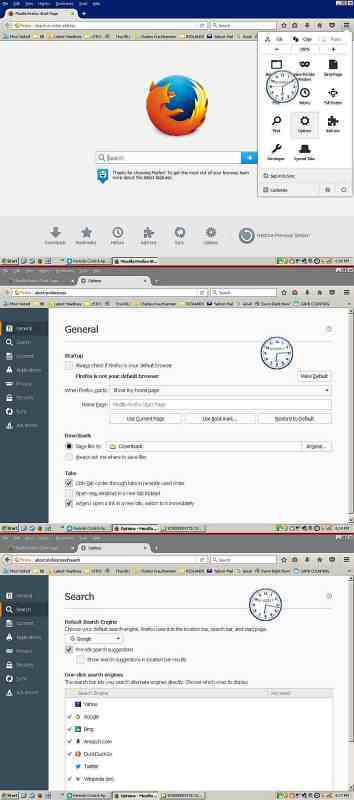
Modified by nevet
Nice clock.
https://support.mozilla.org/en-US/kb/how-to-fix-preferences-wont-save
Note: Some software, like Advanced SystemCare with Surfing Protection, can protect files in the Firefox profile folder against changes. If you have such software then check the settings or uninstall this software.
FredMcD said
Nice clock. https://support.mozilla.org/en-US/kb/how-to-fix-preferences-wont-save Note: Some software, like Advanced SystemCare with Surfing Protection, can protect files in the Firefox profile folder against changes. If you have such software then check the settings or uninstall this software.
Good thought, Fred, but unless it's a transparent function in malewarebytes, I'm not aware of having any 'surfing protection' with that feature at all. OTOH, your link does offer me several possibilities that I may be trying later today if your IE one doesn't do it...but starting with that next.
Re 'nice clock'...thanks...it's one of the better free utilities I've used daily for years, particularly for it's multi-'alarm clock' feature. If you haven't already, check it out on CNET at http://tinyurl.com/ydunryn .
Modified by nevet
Also, one of your screen shots was the Search settings. Is there a problem with searching?