


Thunderbird not connecting to internet

Hello mates,
my Thunderbird does not connect to the internet anymore. I am using Windows 10 64 bit, Thunderbird version was ... 36? Don't remember, I'm sorry. It happened some five days or so ago. Any other programs are still connecting to the internet, although I started to have trouble with the Ecosia search engine at the same time as well. Don't know if these two are connected somehow, although I cannot see how.
What happened: Really nothing. Didn't install anything, didn't modify any config, neither Windows nor Mozilla nor my email provider settings.
What's not working: Internet connection. My accounts stopped up- or downloading, and the "About Thunderbird" search for updates does not acquire any connection either. I tried to find some solution here on the forums and read about the Add-on test. Surprisingly enough, there IS internet connection via the Find new Add-on button (or however it is called in English, using a German version). This is puzzling me, although I don't know how this is going to help.
What I did: I updated Thunderbird to 52.3, which didn't help. I looked through the Proxy settings, though I don't use one. Changed from "detect automatically" to "no proxy" without any effect.
Please ask me what I forgot in the description of the problem.
Thank you very much for your help!
Cheers, Bokarati
Chosen solution
Hey mates,
in case anybody else is suffering a problem like mine:
I found the solution. It was as simple as switching the router off and on and not a Thunderbird problem at all. Since doing that my Ecosia is running again, and internet in general is much quicker.
Thanks for your help and cheers!
Read this answer in context 👍 0All Replies (9)
A common reason for this is that Thunderbird has updated, but the user's security software doesn't recognize the new version and so doesn't allow it to connect. You can either specifically permit the current version of Thunderbird, or check by temporarily disabling your security software by restarting Windows in Safe Mode.
Some security software identifies a permitted application by creating a checksum or hash of its executable component, and allowing the application only if its checksum or hash remains unchanged. This can be a useful guard against programs which might become compromised and modified by malware, but of course this means that any legitimate change to a program will also lead to it being disallowed.
Hey Zenos, hey everybody,
thank you very much for your answer.
However, nothing changed when I tried using safe mode. Still no connection.
Other things happened in the meantime, though:
1st, Thunderbird managed precisely ONCE to connect. I don't know how or why, because I didn't change anything. It wasn't able to connect in one second (or rather, the minutes it takes to give the error message), afterwards it suddenly connected and down- and uploaded my mail in the next second, then was not able to connect anymore in the third second. No connection since then.
2nd, I also couldn't connect to this forum. Tried it yesterday and the day before, without any luck. Any other pages were accessible without any problem, only Mozilla.org didn't work. I wonder if this might be connected to a) my inability to connect with Ecosia (although my cell phone cannot connect to Ecosia either since a few weeks) or the inability of my Thunderbird to connect.
I know. This is really weird. Any more ideas?
Thank you very much!
Cheers, Bokarati
Edit: By the way, I am not using any security software besides the onboard Windows 10 Defender.
Modified by CaptainBo
Close thunderbird. Access the Firewall. Thunderbird should be an allowed program.
If Thunderbird is already set as allowed then the Firewall is probably not recognising the updated version. In this case, make sure Thunderbird is closed and access the Firewall, block Thunderbird, ok it and then access Firewall again and set to allowed. The Firewall should then pick up the updated version.
This should make sure the Firewall is correct.
Hey Toad-Hall, thank you for your reply!
Did deactivate the Firewall completely. Then started Thunderbird. Thunderbird didn't connect, though. Guess my problem is something else ... :-(

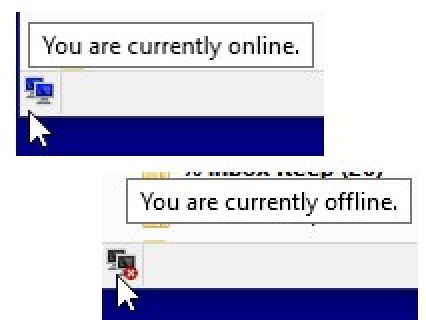
There is a icon on the Status Bar that shows when Thunderbird is connected - or I guess in your case that shows when Thunderbird THINKS it's connected.
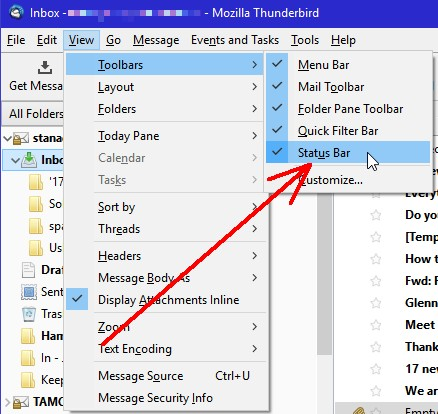
If you don't see a small two-computer icon on the bottom left of your Thunderbird window, your Status Bar is not turned on. To turn it on, hit F10 to open the menu (File, Edit, View and so on) at the top and select View > Toolbars > Status Bar.
Clicking the icon will toggle Thunderbird on and off line. When you're off line, there is a small x on the icon.
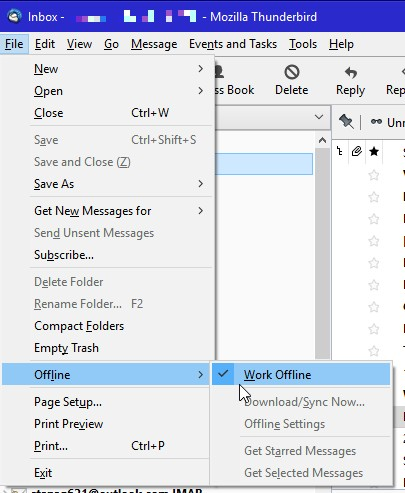
This function is also in the menu bar. Again, if it's not there, hit F10, and then select File > Work Offline. If there is an check mark next to Work Offline, you're off line. Click the check mark to put TB back on line.
Modified by stanstr
Hey stanstr, thank you very much for your post!
The icon says I am online. Doesn't download emails, though. Tried to go offline and online again using the icon, with no apparent effect. Tried the Add-on page again, which is still working. Thunderbird is apparently connected, but still doesn't download any emails, instead giving me the timeout warning ... :-(
Chosen Solution
Hey mates,
in case anybody else is suffering a problem like mine:
I found the solution. It was as simple as switching the router off and on and not a Thunderbird problem at all. Since doing that my Ecosia is running again, and internet in general is much quicker.
Thanks for your help and cheers!
I have this problem to. Can it be because I installed Thunderbird also on my other laptop and restored a backup the of my first laptop? Probably has nothing to do with it but I didn´t change anything else.
I can browse the internet perfectly fine, although I have another software program that is not able to connect to the internet.
Reconnecting my router, restarting computer and/or Thunderbird did not help.
Modified by wvn1980
Wvn1980 this thread is 2 months old and solved. If resetting the router did not help then your issue is not related to this thread. You need to start a new thread for your problem.