


how delete a folder in Thundebird

I created the folder called "h". I called earthlink and they couldn't fix it. Told me to call Mozilla. The number was no help (no actual person).
I have the folder called "Local Folders" which has subfolders of Inbox, Sent, etc etc. I think it's the default,
On a direct line directly below Local Folders is the folder I created, simply called "h"."h" is NOT a subfolder - it has same status as Local Folders above it. I can't delete it. When I go to account settings and highlight "h" I go to bottom where it says "account actions" , the "remove account" is grayed out.
The earthlink chat people took over my computer and still couldn't fix it. They spent an hour and finally gave up. (They made some changes when in control of my computer and I had to remind them to undo those changes which was annoying)
Chosen solution
You have renamed things. "h" is Local Folders. What you have as "Local Folders" is your working POP-connected earthlink account.
You can't delete either of these without breaking Thunderbird. I'd urge you to rename "Local Folders" to show your earthlink account's email address, and rename "h" to "Local Folders".
Granted, Local Folders doesn't make a lot of sense if you have and use only one real email account. For a user with many email accounts, particularly if they use IMAP, then Local Folders is useful "neutral territory" where you can store messages independently of any actual email accounts, and, if you're bothered about security, it is a local and private store, as opposed to being out there somewhere on the 'net. It also provides a home for newsgroups, RSS feeds and the Outbox for unsent messages. In addition to RSS feeds and newsgroups, my Local Folders are used for Saved Search folders.
http://kb.mozillazine.org/Local_Folders
Read this answer in context 👍 1All Replies (5)
Let me get this straight.
On Day One, "Local Folders" was part of Thunderbird. At some undefined later time, I renamed "Local Folders" to "h". My reason for doing this was so that I could rename my "actual email account" local folders.
Are you saying that I renamed "Local Folders" to 'h" so that I could rename "h" to local folders?
I hope that's not what you're saying.
As a test, I just tried to do some renaming at Thunderbird. I couldn't do it. In fact, I couldn't find an option for renaming anywhere in any menu.
It's possible I missed a renaming option. Even so, my question above remains.
Open Account Settings. There right at the top of each account's settings is "Account Name:". Ordinarily this is what appears as the label for each account in the folder pane. If the two accounts we are discussing here are not named "Local Folders" and "h" then something is seriously amiss in your profile.
Note: "h" is an account, not a folder. So the tools for removing a folder don't apply. And since "h" represents the built-in "Local Folders" special account, you are not allowed to delete it. So the tools provided to remove accounts don't apply to it either.
I would urge you to rename this "Local Folders" to something relevant to the earthlink account (perhaps the earthlink email address), and then rename "h" to "Local Folders". You can have as many real email accounts as you want, but only one "Local Folders" special account, so it makes sense to respect the distinctive name Thunderbird wants to use for this single special account.
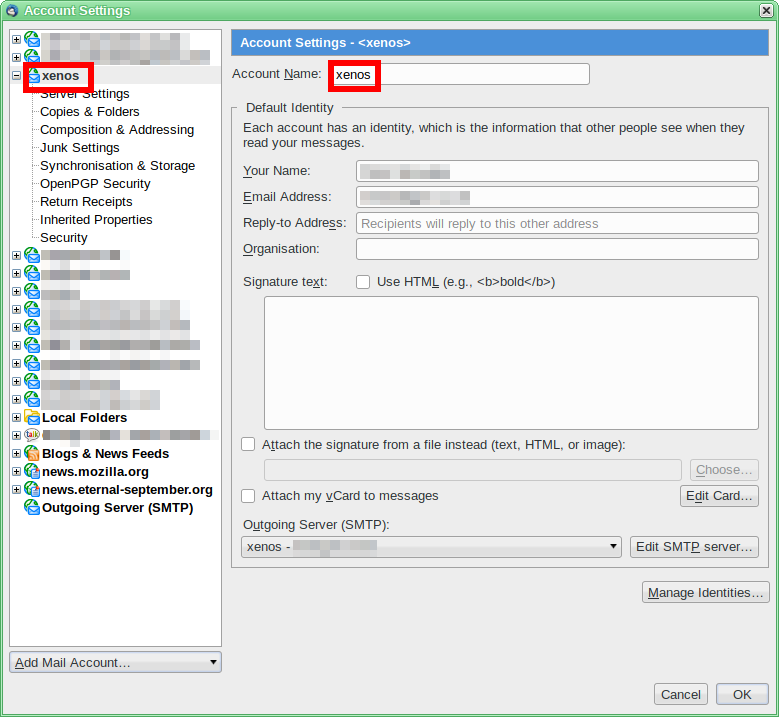
Modified by Zenos
I opened "Account Settings".
Both accounts are there on the left with their subfolders below each. In fact, that's the screen shot I finally succeeed in sending you (with your help).
Ergo - nothing is "seriously amiss"?
The subfolders shown below your "Local Folders" are the folders we'd see in a real working account, connected to a server. And the smaller number of folders beneath "h" (along with the explicit statement that "The following is a special account.") betrays the fact that is it a renamed "Local Folders".
If you add further real accounts, and set one of these as default, then you WILL be permitted to delete the account currently and misleadingly named "Local Folders", because in fact it is just an ordinary account. You will not be allowed to delete the account currently named "h" because it is in fact the built-in Local Folders special account.
At least the names are consistent. In that respect, there is nothing I can see that is broken, as such. But I am puzzled at what one would be trying to achieve by moving the "Local Folders" name from a special account to a regular account. I suspect that you couldn't see any purpose for "Local Folders" and tried to make it look tidier.
Open the settings for the account named "Local Folders" and you'll see POP server settings.
There is a legitimate way to make all your POP messages appear under Local Folders, and in doing so, hide the individual POP accounts. People who have moved from Outlook Express seem to like this arrangement as it feels familiar to them.
For myself, I prefer to keep my multiple email accounts separate and distinctive.
Thunderbird allows both types of user to have what they want. But renaming a POP account to "Local Folders" is not the way to do it.
I don't want to trouble you gentlemen any further so let's make this the final post in this thread.
It was years ago I made that "h" account. What I was thinking at the time, I have no idea. Just the fact that I called it "h" makes me wonder. As if I were testing something.
I have to bow to your superior knowledge because it's getting harder and harder to keep up with your replies. I am not computer savvy enough to belabor the point and you two are.
Whatever I originally intended was done inadvertently. Certainly, the intent was not as some suggested above. I wasn't clever enough to do that then, nor now.
I admit defeat. You guys are correct. Now I'll go have my evening glass of Irish whisky.