


Get "Unresponsive Script Error" message while restore bookmarks

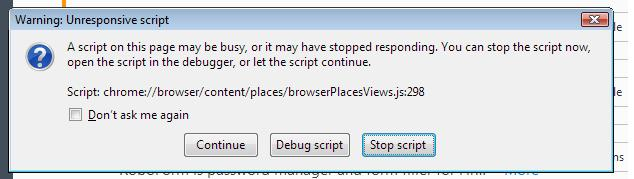
attached image is error message i get when i try to restore bookmarks. i've tried making a copy of .jsonlz4 file to a external USB disk, then i copied file to Desktop, then i tried sent it to Bookmarks "Import and backup", that is when FF would hang and i would get error. *i've also tried the other ways of restoring files. also i already tried deleting places.sqlite file a coupla times. i pretty much tried everything. even uncheck 'Hardware accelerator" box in FF and Chrome.
below is data copied from "Troubleshooting Information" page.
Application Basics
Name: Firefox Version: 52.1.2 Build ID: 20170517122419 Update Channel: esr User Agent: Mozilla/5.0 (Windows NT 6.0; rv:52.0) Gecko/20100101 Firefox/52.0 OS: Windows_NT 6.0 Multiprocess Windows: 0/1 (Disabled by add-ons) Safe Mode: false
Crash Reports for the Last 3 Days
All Crash Reports
Extensions
Name: Application Update Service Helper Version: 2.0 Enabled: true ID: aushelper@mozilla.org
Name: Multi-process staged rollout Version: 1.9 Enabled: true ID: e10srollout@mozilla.org
Name: Pocket Version: 1.0.5 Enabled: true ID: firefox@getpocket.com
Name: RAMBack Version: 1.0.1-signed.1-signed Enabled: true ID: ramback@pavlov.net
Name: RoboForm Toolbar Version: 8.2.8.8 Enabled: true ID: {22119944-ED35-4ab1-910B-E619EA06A115}
Name: Speed DNS Version: 0.2.1-signed.1-signed Enabled: true ID: speeddns@gmail.com
Name: Tab Mix Plus Version: 0.5.0.3 Enabled: true ID: {dc572301-7619-498c-a57d-39143191b318}
Name: Tweak Network Version: 1.8.1-signed.1-signed Enabled: true ID: {DAD0F81A-CF67-4eed-98D6-26F6E47274CA}
Name: Video DownloadHelper Version: 6.3.1 Enabled: true ID: {b9db16a4-6edc-47ec-a1f4-b86292ed211d}
Name: Web Compat Version: 1.0 Enabled: true ID: webcompat@mozilla.org
Name: Google Gears Version: 0.5.36.0 Enabled: false ID: {000a9d1c-beef-4f90-9363-039d445309b8}
Name: Microsoft .NET Framework Assistant Version: 0.0.0 Enabled: false ID: {20a82645-c095-46ed-80e3-08825760534b}
Name: Norton Security Toolbar Version: 2016.8.0.95 Enabled: false ID: {C1A2A613-35F1-4FCF-B27F-2840527B6556}
Name: One-Click Translate Page Version: 1.0.1 Enabled: false ID: @one-click-translate-page-button
Name: Places Maintenance Version: 2.0.3 Enabled: false ID: places-maintenance@bonardo.net
Name: Zoom Page Version: 15.7 Enabled: false ID: zoompage@DW-dev
Graphics
Features Compositing: Basic Asynchronous Pan/Zoom: none WebGL Renderer: Google Inc. -- ANGLE (Software Adapter Direct3D11 vs_4_1 ps_4_1) WebGL2 Renderer: Google Inc. -- ANGLE (Software Adapter Direct3D11 vs_4_1 ps_4_1) Hardware H264 Decoding: No; Hardware video decoding disabled or blacklisted Audio Backend: wasapi Direct2D: Blocked for your graphics driver version. DirectWrite: false (7.0.6002.23845) GPU #1 Active: Yes Description: Mobile Intel(R) 945GM Express Chipset Family Vendor ID: 0x8086 Device ID: 0x27a2 Driver Version: 7.14.10.1147 Driver Date: 12-12-2006 Drivers: igdumd32 Subsys ID: 0366107b RAM: Unknown
Diagnostics AzureCanvasAccelerated: 0 AzureCanvasBackend: skia AzureContentBackend: skia AzureFallbackCanvasBackend: cairo Decision Log HW_COMPOSITING: disabled by user: Disabled by pref D3D11_COMPOSITING: unavailable by default: Hardware compositing is disabled D3D9_COMPOSITING: unavailable by default: Hardware compositing is disabled DIRECT2D: unavailable by default: Direct2D requires Direct3D 11 compositing D3D11_HW_ANGLE: unavailable by default: D3D11 compositing is disabled disabled by env: D3D11 compositing is disabled
Important Modified Preferences
accessibility.lastLoadDate: 1496684927 accessibility.loadedInLastSession: true accessibility.typeaheadfind.flashBar: 0 browser.cache.disk.capacity: 358400 browser.cache.disk.filesystem_reported: 1 browser.cache.disk.hashstats_reported: 1 browser.cache.disk.smart_size.first_run: false browser.cache.disk.smart_size.use_old_max: false browser.cache.frecency_experiment: 1 browser.cache.memory.enable: false browser.download.importedFromSqlite: true browser.download.useDownloadDir: false browser.places.smartBookmarksVersion: 8 browser.sessionstore.resume_from_crash: false browser.sessionstore.upgradeBackup.latestBuildID: 20170517122419 browser.startup.homepage: http://google.com browser.startup.homepage_override.buildID: 20170517122419 browser.startup.homepage_override.mstone: 52.1.2 browser.tabs.closeWindowWithLastTab: false browser.tabs.loadInBackground: false browser.tabs.remote.autostart.2: true browser.urlbar.daysBeforeHidingSuggestionsPrompt: 1 browser.urlbar.lastSuggestionsPromptDate: 20170603 browser.urlbar.userMadeSearchSuggestionsChoice: true extensions.lastAppVersion: 52.1.2 font.internaluseonly.changed: false font.name.serif.x-western: Verdana gfx.blacklist.direct2d: 3 gfx.blacklist.direct2d.failureid: FEATURE_FAILURE_DL_BLACKLIST_g984 gfx.crash-guard.d3d11layers.appVersion: 52.1.2 gfx.crash-guard.d3d11layers.deviceID: 0x27a2 gfx.crash-guard.d3d11layers.driverVersion: 7.14.10.1147 gfx.crash-guard.d3d11layers.feature-d2d: false gfx.crash-guard.d3d11layers.feature-d3d11: false gfx.crash-guard.status.d3d11layers: 2 gfx.direct2d.disabled: true layers.acceleration.disabled: true media.gmp-gmpopenh264.abi: x86-msvc-x86 media.gmp-gmpopenh264.lastUpdate: 1496354923 media.gmp-gmpopenh264.version: 1.6 media.gmp-manager.buildID: 20170517122419 media.gmp-manager.lastCheck: 1496594355 media.gmp-widevinecdm.abi: x86-msvc-x86 media.gmp-widevinecdm.lastUpdate: 1496479234 media.gmp-widevinecdm.version: 1.4.8.903 media.gmp.storage.version.observed: 1 media.hardware-video-decoding.failed: false media.webrtc.debug.log_file: C:\Users\tag\AppData\Local\Temp\WebRTC.log network.cookie.prefsMigrated: true network.dns.disableIPv6: true network.http.pipelining: true network.http.pipelining.maxrequests: 8 network.http.proxy.pipelining: true network.predictor.cleaned-up: true places.database.lastMaintenance: 1496408155 places.history.expiration.transient_current_max_pages: 122334 plugin.disable_full_page_plugin_for_types: application/pdf plugin.state.flash: 1 plugin.state.np-rf-plugin: 2 plugin.state.np32dsw: 0 privacy.cpd.extensions-tabmix: false privacy.sanitize.timeSpan: 0 security.dialog_enable_delay: 0 security.sandbox.content.tempDirSuffix: {70a0405f-79e3-4f4f-b685-f7ff26c81799} services.sync.declinedEngines: storage.vacuum.last.index: 0 storage.vacuum.last.places.sqlite: 1496637442
Important Locked Preferences
Places Database
JavaScript
Incremental GC: true
Accessibility
Activated: false Prevent Accessibility: 0
Library Versions
NSPR Expected minimum version: 4.13.1 Version in use: 4.13.1
NSS Expected minimum version: 3.28.4 Version in use: 3.28.4
NSSSMIME Expected minimum version: 3.28.4 Version in use: 3.28.4
NSSSSL Expected minimum version: 3.28.4 Version in use: 3.28.4
NSSUTIL Expected minimum version: 3.28.4 Version in use: 3.28.4
Experimental Features
Sandbox
Content Process Sandbox Level: 1
Modified by thealexangroup
Chosen Solution
Your file doesn't seem unusually large. cor-el has posted steps to have Firefox decompress the file to a plain .json file, but I haven't tried it myself:
https://support.mozilla.org/questions/1116176#answer-861503
If the .json version cannot be successfully restored, it may have a structural or data issue. While it's probably not too difficult to mine the URLs out of the JSON, maintaining the folder structure might not be possible in that case.
All Replies (9)
How many times did you click Continue before giving up? Some users have reported they might need to continue two or three times for a huge backup.
What is the file size of this backup?
Is there an item count in the file name?
The name of a JSON bookmarks backup file includes a total item count (folders and separators included) and an hash value to prevent saving the same backup more than once.
- bookmarks-YYYY-MM-DD_<item count>_<hash>.jsonlz4.
that particular .jsonlz4 file (the latest) is 621 kb - 3797 items (is that a lot?) there are about 20 files in the bookmarksbackup folder and each averages around 614kb
i've tried all of them and they basically 'hang up' my pc with a 'Not Responding' error message. how long should i wait while it's hanging/no response mode? i mean, after a 15-20 min wait...?
any advice?
Modified by thealexangroup
i was just reading this forum post (see link below) by person with similar problem with the exception being his/her file size was 30mb and 100,000+ items. incredible. i don't nearly have that amount and in end that person gave up, problem unresolved. that sucks big time.
Is there a way to convert the compressed jsonlz4 files to json?
/questions/1071533
Modified by John99
That thread was apparently /questions/1071533
Should you get a solution here by the way make sure you copy it. Questions and answers made recently on this forum software will not be easily available in future they are not being migrated to the new forum software.
Chosen Solution
Your file doesn't seem unusually large. cor-el has posted steps to have Firefox decompress the file to a plain .json file, but I haven't tried it myself:
https://support.mozilla.org/questions/1116176#answer-861503
If the .json version cannot be successfully restored, it may have a structural or data issue. While it's probably not too difficult to mine the URLs out of the JSON, maintaining the folder structure might not be possible in that case.
My bookmarks files are about the same size and item count.
A way to avoid some problems is to delete or move all places.sqlite files and place the compressed .jsonlz4 as only file in the bookmarkbackups folder. That way Firefox will automatically try to rebuild places.sqlite on the next start using the compressed .jsonlz4 in the bookmarkbackups folder.
jscher2000 said
Your file doesn't seem unusually large. cor-el has posted steps to have Firefox decompress the file to a plain .json file, but I haven't tried it myself: https://support.mozilla.org/questions/1116176#answer-861503 If the .json version cannot be successfully restored, it may have a structural or data issue. While it's probably not too difficult to mine the URLs out of the JSON, maintaining the folder structure might not be possible in that case. AND... How many times did you click Continue before giving up? Some users have reported they might need to continue two or three times for a huge backup.
jscher2000
thanx for this, that did the trick! :) i will say that it did take about roughly an hour because i had to keep clicking the "Unresponsive..." error message to continue with the script. (i think error prompt showed up, at first every 10-15 minutes, then every 5-6 minutes. in total about 6-8 times.) here's what i did...
firstly, i made a copy of the 'bookmarksbackup' folder, then i deleted everything inside except for the most recent json file. i then went and decompressed file using instructions from link you provided. after file created i added it into 'bookmarksbackup' folder. i then went to:
Bookmarks/Show All Bookmarks/Import and Backup/Restore/Choose File
and looked for created decompressed json file (i had to use 'Choose File' because decompressed file did not show up on list of items in folder, i guess i had needed to restart Firefox, or maybe because it only shows zipped files, i don't know.)
anywayz, you know the rest. kudos jscher2000
-alx
Wow, that's a lot to go through. There must be something "special" in your bookmarks that is causing problems processing the backup, but I don't know what it might be. You might create an export file as an extra form of backup in case the new automatic backups have the same problem.
Export Firefox bookmarks to an HTML file to back up or transfer bookmarks